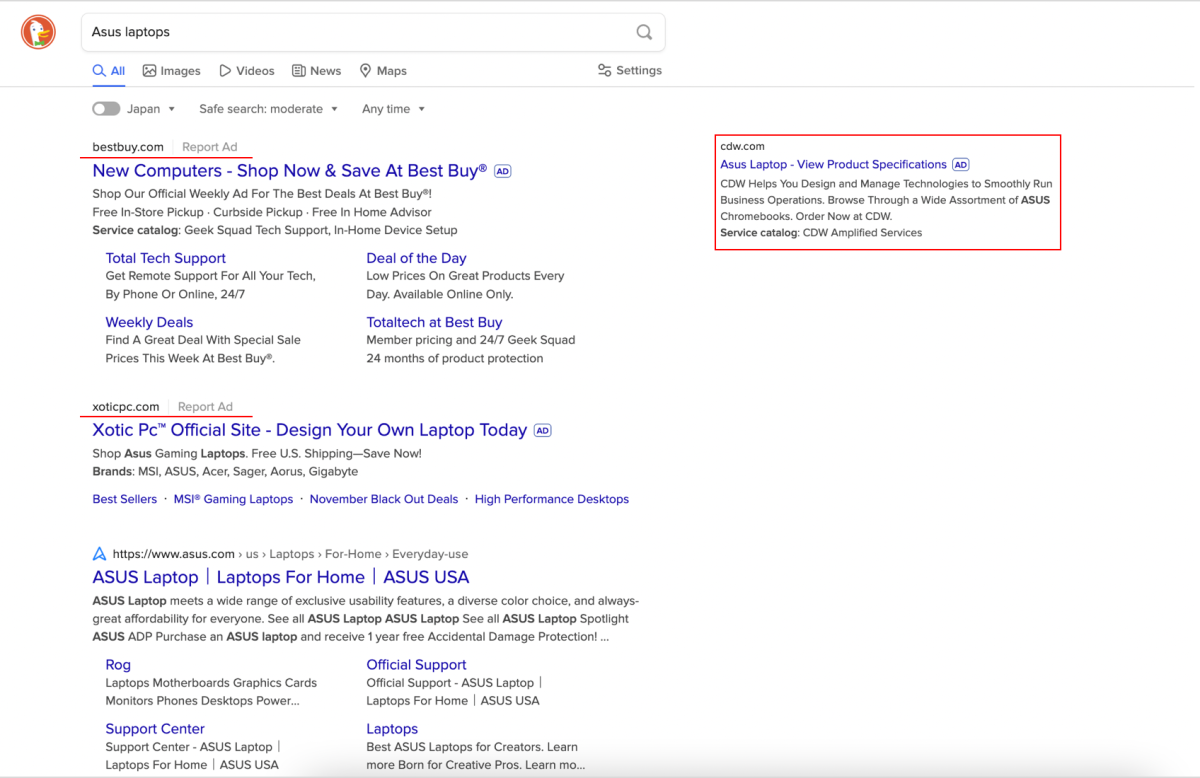
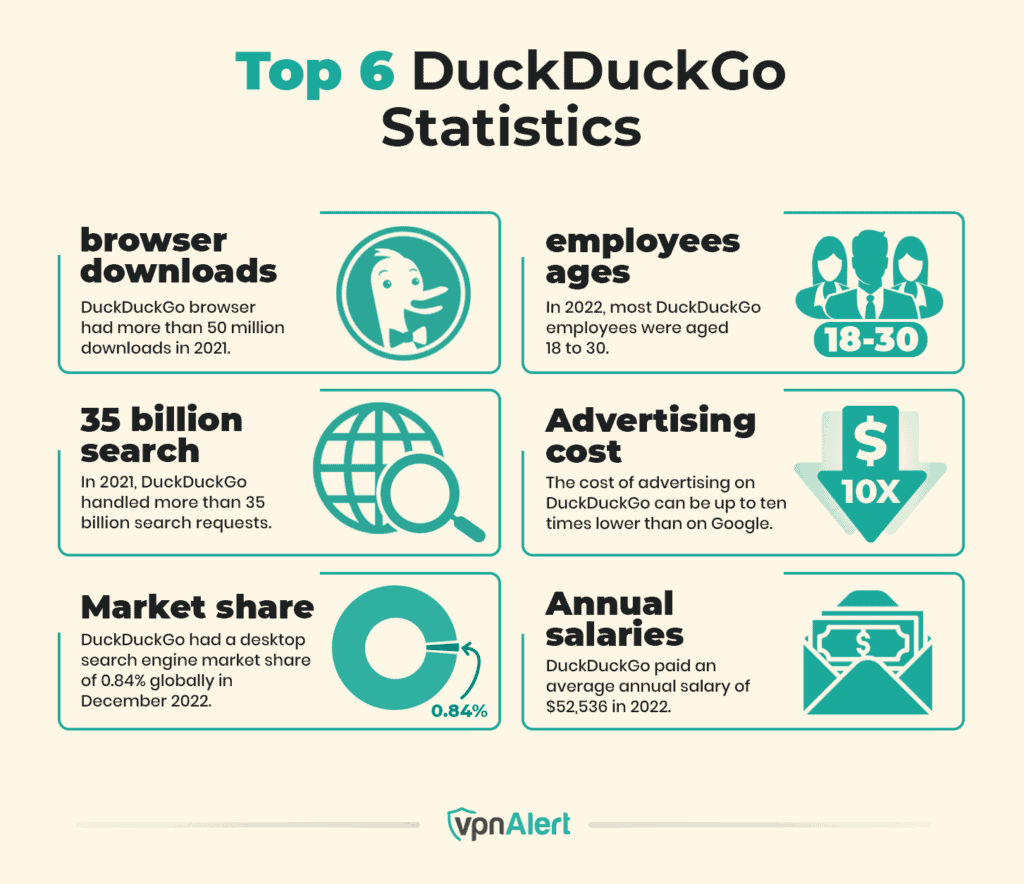
Advertising on DuckDuckGo relies on keyword-targeted search engine marketing through the Microsoft Advertising network rather than an independent ad platform. Because DuckDuckGo partners with Microsoft to serve ads, running campaigns on the platform requires managing settings within the Microsoft Advertising dashboard and opting into the syndicated partner network where DuckDuckGo is a key publisher.
Understanding the DuckDuckGo Advertising Model
Navigating the landscape of search engine marketing often leads businesses to look beyond dominant platforms like Google. DuckDuckGo has carved out a distinct space in the search market by prioritizing user privacy, explicitly declining to track search histories, build user profiles, or store personal identifiers. For advertisers, this privacy-first model presents a unique paradigm. You cannot target users based on granular behavioral tracking, demographic profiling, or extensive personal search histories. Instead, advertising on DuckDuckGo is strictly contextual, relying on the immediate keyword query entered by the user.
To run advertisements on DuckDuckGo, marketers do not interact with a proprietary DuckDuckGo ad management portal. DuckDuckGo outsources its paid search inventory to the Microsoft Advertising network (formerly Bing Ads). When you configure a campaign in Microsoft Advertising and ensure your settings allow ads to appear on search partner networks, your text ads become eligible to display on DuckDuckGo search results pages. This integration means that mastering Microsoft Advertising is the primary technical requirement for capturing traffic from DuckDuckGo users.
This partnership shapes how campaigns perform and how budgets are spent. While you gain access to an audience that frequently avoids other major search engines, your optimization levers are tied to Microsoft’s ecosystem. Understanding this relationship ensures you invest time and resources in the correct dashboard, configure targeting parameters accurately, and interpret performance metrics within the right structural context.
Prerequisites and Platform Setup
Before your ads can appear on DuckDuckGo, you must establish an active, properly configured Microsoft Advertising account. Because DuckDuckGo relies entirely on Microsoft’s syndication network for paid search, creating a direct account with Microsoft is the mandatory first step.
Creating and Verifying a Microsoft Advertising Account
Setting up your account involves standard business verification, including billing details, tax information, and website ownership validation. Ensuring your website complies with standard security practices, such as maintaining an active SSL certificate and offering a clear privacy policy, is critical for policy approval. Microsoft enforces strict editorial guidelines regarding landing page quality, malware prevention, and prohibited content.
Configuring Network Distribution Settings
By default, Microsoft Advertising campaigns are often set to distribute ads across the Bing, AOL, and Yahoo owned-and-operated properties, as well as syndicated search partner sites. However, verifying these settings is essential to guarantee your ads reach DuckDuckGo.
- Navigate to your campaign settings within the Microsoft Advertising dashboard.
- Locate the section labeled Ad distribution or Network options.
- Select the option that includes All search networks (Bing, AOL, Yahoo, and syndicated search partners). Choosing syndication-exclusive options or restricting delivery strictly to owned-and-operated properties will prevent your ads from appearing on DuckDuckGo.
| Network Setting Option | Description | DuckDuckGo Eligibility |
|---|---|---|
| Bing, AOL, and Yahoo syndicated search partners | Displays ads across Microsoft properties and all partner sites, including DuckDuckGo. | Yes (Full Eligibility) |
| Bing, AOL, and Yahoo owned and operated only | Restricts ads exclusively to core Microsoft properties, excluding partner networks. | No (Ineligible) |
| Syndicated search partners only | Limits delivery strictly to external partner networks. | Yes (Conditional, depends on partner tier) |
Targeting Strategies for Privacy-Focused Search
Because DuckDuckGo does not track user identities, traditional audience-based targeting options available in other ad networks are severely limited or entirely absent on this platform. Advertisers must shift their strategic focus away from who the user is and pivot heavily toward what the user is actively searching for at that exact moment.
Keyword Targeting as the Foundation
Keyword selection dictates your visibility on DuckDuckGo. Because intent is signaled solely through the typed query, your keyword list must be comprehensive, highly relevant, and structured with appropriate match types.
- Exact Match: Ensures your ad appears only when a user searches for your exact keyword or close variants. This provides tight control over spending but limits overall volume on a smaller search engine.
- Phrase Match: Allows your ad to show when searches include the exact phrase, with words before or after it. This offers a balanced approach to capturing relevant traffic on niche search engines.
- Broad Match: Casts the widest net, matching user queries that relate broadly to your keyword theme. On DuckDuckGo, relying heavily on broad match can quickly exhaust budgets on irrelevant traffic due to the lack of deep behavioral filtering.
Negative Keywords and Budget Preservation
Because contextual relevance is the primary mechanism for ad delivery, negative keywords are indispensable. Implementing a robust negative keyword list prevents your ads from displaying on ambiguous, low-converting, or irrelevant queries. Monitoring your search terms report regularly within Microsoft Advertising allows you to identify wasted spend and refine your keyword match types proactively.
Costs, Bidding, and Budget Management
Managing finances for DuckDuckGo campaigns requires an understanding of how Microsoft Advertising allocates budgets across its network. You cannot isolate your budget exclusively to DuckDuckGo; instead, you set a daily or monthly budget for your Microsoft Advertising campaigns, which is then distributed across the selected search networks.
Cost-Per-Click (CPC) Dynamics
Cost-per-click rates on DuckDuckGo and the broader Microsoft Advertising syndication network are frequently lower than those on Google Ads. This pricing variance stems from lower overall search volume and reduced advertiser competition for certain keywords. However, lower CPCs do not automatically equate to higher return on investment. Conversion rates can vary significantly depending on your industry and how well your landing page matches the transactional intent of privacy-conscious users.
Budget Allocation and Bid Strategies
- Manual CPC Bidding: Gives you direct control over the maximum amount you are willing to pay for a click on specific keywords. This is often recommended for initial testing phases on syndication networks to prevent automated bidding algorithms from overspending on unverified traffic pools.
- Automated Bidding Strategies: Options like Maximize Conversions or Target CPA can be effective once your account has accumulated sufficient conversion data. However, ensure that conversion tracking pixels are correctly installed on your website to feed accurate data back to the Microsoft Advertising engine.
Tracking, Analytics, and Performance Measurement
Measuring the success of campaigns that appear on DuckDuckGo requires proper configuration of conversion tracking and web analytics tools. Because traffic originates from Microsoft Advertising, performance data flows directly into your Microsoft Advertising reporting interface and can be cross-referenced within tools like Google Analytics or independent privacy-friendly analytics platforms.
Isolating DuckDuckGo Traffic in Reports
By default, Microsoft Advertising aggregates performance data across all search partners unless you segment your reports. To analyze how DuckDuckGo specifically contributes to your campaign performance:
- Go to the Reports tab in Microsoft Advertising.
- Create a custom report or select a standard performance report.
- Add the Network or Publisher segment to your data view.
- Review the metrics attributed specifically to DuckDuckGo to evaluate click-through rates, conversion volumes, and cost-per-acquisition.
Privacy Considerations in Analytics
Marketers must account for how user privacy preferences impact data collection. Many DuckDuckGo users utilize anti-tracking extensions, strict browser settings, or VPNs. Consequently, standard client-side tracking cookies may occasionally be blocked or cleared more frequently than on mainstream browsers. Implementing robust server-side tracking or utilizing first-party data collection methods where permissible can help mitigate data discrepancies between ad platform reports and your internal CRM systems.
Common Pitfalls and Troubleshooting
Advertisers transitioning to the Microsoft Advertising syndication network often encounter specific operational hurdles. Recognizing these issues early prevents wasted ad spend and ensures continuous campaign delivery.
- Accidental Network Exclusion: The most frequent error is configuring campaigns to display only on Bing, AOL, and Yahoo owned-and-operated properties, which entirely blocks appearance on DuckDuckGo. Always verify that partner networks are explicitly enabled.
- Over-Reliance on Automated Audience Targeting: Attempting to apply complex demographic or interest-based filters that rely on third-party tracking will severely restrict impression volume on DuckDuckGo, as the data simply does not exist within their ecosystem.
- Ignoring Search Term Reports: Failing to monitor search term reports leads to budget leakage on syndicated partner sites where query context can occasionally be loose. Regular pruning of negative keywords safeguards ad quality.
- Landing Page Mismatch: Privacy-focused users often exhibit high skepticism toward intrusive pop-ups, aggressive lead capture forms, or opaque business practices. Ensuring transparent, fast-loading, and secure landing pages is vital for maintaining healthy conversion rates.
Frequently Asked Questions
Can I advertise directly on DuckDuckGo without using Microsoft Advertising?
No. DuckDuckGo does not operate an independent, self-serve advertising platform for text or display ads. All paid search inventory on DuckDuckGo is managed exclusively through the Microsoft Advertising network. To run ads that appear on DuckDuckGo, you must set up an account with Microsoft Advertising and opt into their syndicated search partner network.
Why are my ads not showing specifically on DuckDuckGo?
If your ads are running on Microsoft Advertising but not appearing on DuckDuckGo, check your campaign ad distribution settings. If your network setting is restricted strictly to Bing, AOL, and Yahoo owned-and-operated sites, your ads will not syndicate to partner networks like DuckDuckGo. Additionally, low keyword search volume or overly restrictive geographic and language targeting can limit partner network delivery.
How do privacy features on DuckDuckGo affect conversion tracking?
DuckDuckGo’s privacy protections focus on blocking user tracking and profiling on their search engine. However, once a user clicks an ad and arrives at your website, standard web analytics and conversion tracking pixels function normally unless the user has installed external ad-blockers or privacy extensions in their browser. It is advisable to monitor overall campaign trends and utilize server-side tracking where possible to account for browser-level restrictions.
Are advertising costs on DuckDuckGo lower than on Google Ads?
Generally, cost-per-click rates on the Microsoft Advertising network, which includes DuckDuckGo, tend to be lower than those on Google Ads. This price difference is driven by lower overall auction competition for specific keywords. However, traffic volume is also smaller, meaning advertisers must balance lower CPCs against total reachable audience size and conversion efficiency.
What types of ads are supported on DuckDuckGo?
Through the Microsoft Advertising integration, text-based search ads (Responsive Search Ads) are the primary format displayed on DuckDuckGo search results pages. These ads appear above or below organic search results and are triggered dynamically based on the contextual keywords entered by the user.
Conclusion and Next Actions
Advertising on DuckDuckGo provides a strategic pathway to engage an distinct audience that actively avoids mainstream tracking ecosystems. By leveraging the Microsoft Advertising network, verifying your network distribution settings to include syndicated partners, and focusing heavily on contextual keyword relevance rather than behavioral tracking, you can successfully capture high-intent search traffic. Review your current Microsoft Advertising campaigns today, audit your search partner network settings, and refine your negative keyword lists to optimize performance across privacy-focused search properties.