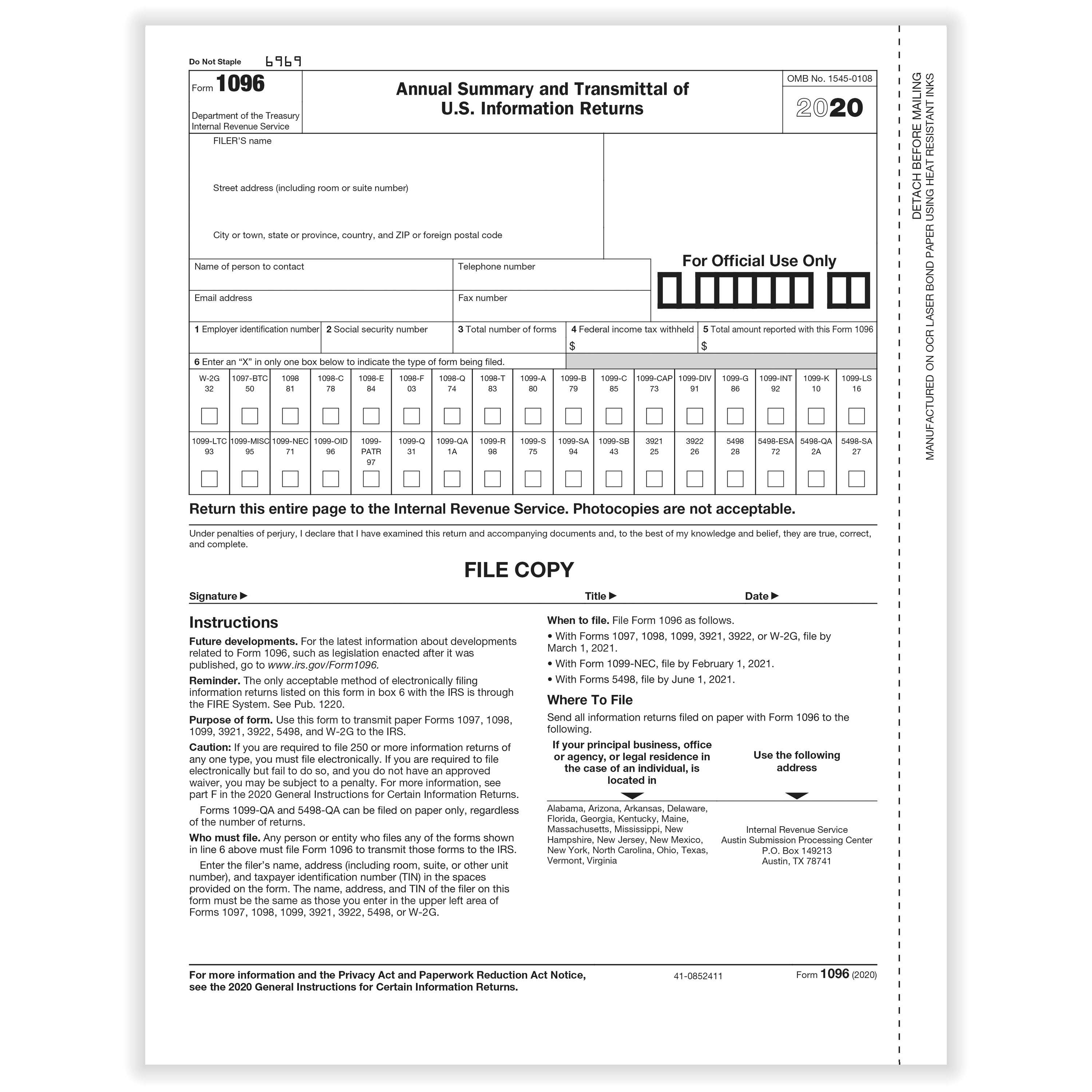
Internal Revenue Service (IRS) Form 1096, officially titled the Annual Summary and Transmittal of U.S. Information Returns, serves as the physical cover sheet when filing paper information returns with the federal government. For tax year 2025 (filed in calendar year 2026), businesses must navigate specific submission deadlines, mandatory electronic filing thresholds, and strict physical formatting rules to remain fully compliant and avoid non-filing penalties.
What Is IRS Form 1096 and Who Must File It?
IRS Form 1096 is a transmittal document used exclusively for paper tax submissions. It summarizes the total amounts and number of physical information returns being transmitted to the IRS. A separate Form 1096 must accompany each distinct type of information return submitted on paper. For example, if a business files paper copies of both Form 1099-NEC and Form 1099-MISC, it must prepare two separate 1096 transmittal forms.
The Mandatory Electronic Filing Threshold
Under Treasury Decision 9972, the IRS significantly lowered the electronic filing threshold. Businesses and entities that file 10 or more information returns in aggregate across almost all form types during a calendar year must file electronically.
Aggregate counting means combining different form types. For instance, if an employer files seven Forms W-2 and three Forms 1099-NEC, the total aggregate count is 10 forms. Consequently, all of those forms must be submitted electronically through IRS digital portals such as the IRS Information Returns Intake System (IRIS) or the IRS Filing Information Returns Electronically (FIRE) system.
As a result of this low threshold:
- Form 1096 is strictly used by paper filers. If you file electronically, you do not submit Form 1096. Transmitting Form 1096 alongside electronic filings creates duplicate records and processing delays.
- Small volume filers only: Form 1096 is primarily utilized by small businesses, sole proprietors, or entities that submit fewer than 10 total information returns combined across the entire tax year.
2025 Form 1096 Filing Deadlines (Filing in 2026)
Filing deadlines for Form 1096 directly depend on the specific information return type attached to it. Because Form 1096 acts as the transmittal sheet, its due date matches the IRS physical submission deadline for the underlying underlying forms.
When an official statutory deadline falls on a Saturday, Sunday, or legal holiday, the due date automatically shifts to the next business day. Below are the key tax year 2025 deadlines for paper submissions sent in 2026:
1. Form 1099-NEC (Nonemployee Compensation)
- Recipient Copy Due Date: January 31, 2026 (Shifted to February 2, 2026, because January 31 is a Saturday).
- IRS Paper Filing Due Date (with Form 1096): February 2, 2026.
- Note: Unlike other information returns, Form 1099-NEC has an accelerated statutory deadline under the PATH Act. Both paper and electronic filings share the exact same early deadline to combat tax fraud.
2. General Forms 1099, 1098, and Form W-2G
Includes Forms 1099-MISC, 1099-INT, 1099-DIV, 1099-B, 1099-R, 1098, 1098-T, and W-2G.
- Recipient Copy Due Date: January 31, 2026 (Shifted to February 2, 2026).
- IRS Paper Filing Due Date (with Form 1096): February 28, 2026 (Shifted to March 2, 2026, because February 28 is a Saturday).
- IRS Electronic Filing Due Date (for comparison): March 31, 2026.
3. Form 5498 Series (IRA and Coverdell ESA Contributions)
Includes Forms 5498, 5498-ESA, and 5498-SA.
- Participant Statement Due Date: May 31, 2026 (Shifted to June 1, 2026).
- IRS Paper Filing Due Date (with Form 1096): June 1, 2026.
Complete Summary Matrix: Deadlines and Form Specifications
The table below summarizes filing deadlines and specifications for tax year 2025 information returns filed on paper with Form 1096 in 2026:
| Form Type | Description | Recipient Copy Deadline | Paper Filing Deadline with Form 1096 | E-File Deadline (No Form 1096) | Form 1096 Box 6 Code |
|---|---|---|---|---|---|
| 1099-NEC | Nonemployee Compensation | Feb 2, 2026 | Feb 2, 2026 | Feb 2, 2026 | Box 7 (1099-NEC) |
| 1099-MISC | Miscellaneous Information | Feb 2, 2026 | Mar 2, 2026 | Mar 31, 2026 | Box 7 (1099-MISC) |
| 1099-INT | Interest Income | Feb 2, 2026 | Mar 2, 2026 | Mar 31, 2026 | Box 7 (1099-INT) |
| 1099-DIV | Dividends and Distributions | Feb 2, 2026 | Mar 2, 2026 | Mar 31, 2026 | Box 7 (1099-DIV) |
| 1099-R | Pensions, Annuities, IRAs | Feb 2, 2026 | Mar 2, 2026 | Mar 31, 2026 | Box 7 (1099-R) |
| 1098 | Mortgage Interest Statement | Feb 2, 2026 | Mar 2, 2026 | Mar 31, 2026 | Box 6 (1098) |
| 1098-T | Tuition Statement | Feb 2, 2026 | Mar 2, 2026 | Mar 31, 2026 | Box 6 (1098-T) |
| W-2G | Certain Gambling Winnings | Feb 2, 2026 | Mar 2, 2026 | Mar 31, 2026 | Box 7 (W-2G) |
| 5498 | IRA Contribution Information | June 1, 2026 | June 1, 2026 | June 1, 2026 | Box 7 (5498) |
Technical Formatting Rules and Optical Character Recognition (OCR)
The IRS processes paper submissions using high-speed Optical Character Recognition (OCR) equipment. Failing to prepare physical forms to precise IRS specifications can lead to processing failures, rejection of filings, or penalty assessments.
- PREPARE IRS FORM 1096
- Use Official Red-Ink Scannable Forms Only
- One Form 1096 per Return Type (e.g., 1099-MISC)
- VERIFY DATA ENTRIES
- Box 1/2: EIN or SSN matching IRS records
- Box 3: Total number of attached physical forms
- Box 4: Total federal income tax withheld
- Box 5: Total aggregate amount reported
- Box 6: Check EXACTLY ONE form type box
- PACKAGE & SUBMIT
- Place Form 1096 ON TOP of Copy A sheets
- Do NOT staple, fold, or paperclip forms
- Mail flat to designated IRS Submission Center
1. Official Red-Ink Forms Required
You cannot download Form 1096 or Copy A of Forms 1099/1098 from standard PDF web browsers, print them on a standard office printer, and mail them to the IRS.
- Official Copy A forms and Form 1096 are printed using special red, heat-sensitive drop-out ink.
- Standard black-and-white printouts downloaded from the public IRS site are non-scannable and subject to a penalty per form for submitting non-conforming documents.
- Official physical forms must be ordered from the IRS Online Ordering for Information Returns portal or purchased from authorized office supply vendors.
2. Typing and Data Formatting Standards
- Font and Ink: Use black ink with 10-point Courier or similar block font. Do not use script, italic, or handwritten fonts.
- No Symbols: Omit dollar signs ($), commas (,), or ampersands (&) inside data boxes. Use plain decimal points (e.g.,
12500.00instead of$12,500.00). - Blank Fields: Leave zero-balance or non-applicable fields completely blank rather than typing "N/A", "None", or "0" (unless specifically directed by IRS instructions).
3. Document Packaging and Physical Assembly
- Place Form 1096 on top of the stack of associated Copy A information returns.
- Do not staple or paperclip Form 1096 to the underlying returns. Keep pages flat and loose within the mailing envelope.
- Do not fold sheets. Package forms flat in large, sturdy envelopes or boxes.
Box-by-Box Instructions for Form 1096
Completing Form 1096 correctly ensures the IRS attributes the attached forms to your entity without administrative flags.
- Filer's Name and Address Block: Enter the legal entity name, address, and primary contact person's name, email address, telephone number, and fax number. The legal name must match official IRS records (e.g., the name associated with your Employer Identification Number).
- Box 1 or Box 2 (Taxpayer Identification Number): Enter your 9-digit identification number. Enter an Employer Identification Number (EIN) in Box 1 or a Social Security Number (SSN) in Box 2. Fill out only one of these boxes.
- Box 3 (Number of Forms): Enter the exact count of physical information return sheets attached to this Form 1096. Do not include Form 1096 itself in this total.
- Box 4 (Total Federal Income Tax Withheld): Enter the total sum of federal income tax withheld from all attached forms. If no tax was withheld, enter
0.00. - Box 5 (Total Amount Reported): Enter the sum of all monetary amounts reported on all attached individual forms. For instance, on Form 1099-NEC, this reflects the combined total of Box 1 nonemployee compensation across every attached sheet.
- Box 6 (Form Type Indicator): Place an "X" in exactly one box corresponding to the form type being transmitted. Selecting multiple boxes invalidates the Form 1096.
- Signature and Date Block: An authorized individual (such as an officer, partner, or sole proprietor) must sign, date, and provide their title. An unsigned Form 1096 is treated as invalid by IRS submission processing.
Paper Filing Addresses for Form 1096
Where you mail Form 1096 depends on the state or territory of your principal business address. IRS processing locations are divided geographically:
| If your principal business or legal address is in: | Mail Form 1096 and attached returns to: |
|---|---|
| Alabama, Arizona, Arkansas, Delaware, Florida, Georgia, Kentucky, Maine, Massachusetts, Mississippi, New Hampshire, New Jersey, New Mexico, New York, North Carolina, Ohio, Oklahoma, Pennsylvania, Rhode Island, South Carolina, Tennessee, Texas, Vermont, Virginia, West Virginia | Department of the TreasuryInternal Revenue Service CenterAustin, TX 73301 |
| Alaska, Colorado, Hawaii, Idaho, Illinois, Indiana, Iowa, Kansas, Michigan, Minnesota, Missouri, Montana, Nebraska, Nevada, North Dakota, Oregon, South Dakota, Utah, Washington, Wisconsin, Wyoming | Department of the TreasuryInternal Revenue Service CenterKansas City, MO 64999 |
| California, Connecticut, District of Columbia, Maryland, Rhode Island, or if you have no legal business location in any state | Department of the TreasuryInternal Revenue Service CenterOgden, UT 84201 |
Note: Always consult the latest official IRS Instructions for Form 1096 before mailing, as IRS center regional assignments are subject to change.
E-Filing Mandates vs. Hardship Waivers
Because the e-filing threshold remains fixed at 10 or more aggregate returns, filing on paper when required carries significant consequences.
Penalties for Incorrect Paper Filings
If a business files 10 or more information returns on paper without an approved waiver, the IRS can reject the submission and assess penalties for failure to file electronically. The penalty applies to each return submitted on paper above the legal allowance.
For tax year 2025, standard failure-to-file penalties range from $60 to $330+ per return, depending on how late the failure is corrected, with maximum cap structures for small businesses:
- Filing within 30 days of due date: $60 per return.
- Filing after 30 days but by August 1: $130 per return.
- Filing after August 1 or not filing: $330 per return.
- Intentional Disregard: Minimum $660 per return, with no maximum penalty limit.
Electronic Filing Alternatives
Rather than ordering paper forms, buying special red ink stock, and mailing physical packages with Form 1096, small businesses can utilize free IRS online systems:
- IRS IRIS System: The Information Returns Intake System (IRIS) is a free, web-portal service designed for small businesses to create, submit, and manage 1099 series forms online without submitting Form 1096.
- IRS FIRE System: The Filing Information Returns Electronically (FIRE) platform handles bulk submissions using standardized
.txtfiles generated by accounting software.
Filing Form 8508 for Electronic Waiver
If your business is required to file electronically (10+ returns) but cannot do so due to severe technology limitations or economic hardship, you may request a waiver:
- Submit Form 8508 (Request for Waiver From Filing Information Returns Electronically).
- The waiver request should be filed at least 45 days before the return due date.
- If the IRS approves your Form 8508 request, you are granted permission to paper file using official red-ink forms accompanied by Form 1096 without triggering electronic non-compliance penalties.
Correcting Errors on Form 1096 and Paper Submissions
If an error is discovered on a paper-filed return after transmitting Form 1096 to the IRS, specific correction protocols must be followed.
- IDENTIFY INFORMATION ERROR
- INCORRECT MONEY AMOUNT / INCORRECT PAYEE NAME
- Prepare a single corrected return sheet. Check "CORRECTED" box at top of Form 1099.
- INCORRECT PAYEE TIN OR PAYEE NAME & TIN
- Step 1: Prepare a corrected return zeroing out old data. Check "CORRECTED" box.
- Step 2: Prepare a new original form with correct TIN/Name.
- INCORRECT MONEY AMOUNT / INCORRECT PAYEE NAME
- TRANSMIT WITH NEW FORM 1096
- Complete new Form 1096 for red corrected returns stack.
- Mail to IRS submission center.
Types of Errors and Correction Steps
Monetary Amount or Address Errors:
- Prepare a new paper return (e.g., Form 1099-MISC).
- Enter an "X" in the "CORRECTED" box located at the top of the information return sheet.
- Enter the correct financial figures and recipient info.
- Transmit the corrected form with a new Form 1096 summarizing only the corrected forms attached.
Incorrect Taxpayer Identification Number (TIN) or Payee Name: Correcting an invalid TIN or payee name requires a two-step paper procedure:
- Step 1: Prepare a form marked "CORRECTED" that contains the exact payee name and incorrect TIN previously submitted, but enter
0.00for all monetary boxes. This zero-out return cancels the original file entry. - Step 2: Prepare a brand-new, original information return (do not check the "CORRECTED" box) containing the correct payee name, correct TIN, and correct financial amounts.
- File both forms together under a single new Form 1096 cover sheet.
- Step 1: Prepare a form marked "CORRECTED" that contains the exact payee name and incorrect TIN previously submitted, but enter
Form 1096 Corrections Rules
- Do not mark the "CORRECTED" box on Form 1096 itself—Form 1096 does not feature a corrected checkbox.
- Form 1096 simply reflects the total count and aggregate amounts of the specific physical forms attached to it.
- Only list the corrected underlying forms on the transmittal sheet; do not re-submit uncorrected original forms under the same Form 1096 transmittal.
Frequently Asked Questions (FAQs)
Can I print Form 1096 on regular paper from the IRS website?
No. Standard downloadable PDF versions of Form 1096 found on the IRS website are for informational purposes only. The IRS uses special Optical Character Recognition (OCR) scanners that require official scannable forms printed with special drop-out red ink. Submitting black-and-white printouts can result in failure-to-file penalties. Official forms must be ordered directly from the IRS or purchased through authorized office stationers.
Do I file Form 1096 if I submit my 1099 forms electronically?
No. Form 1096 is strictly a physical transmittal cover sheet for paper filers. If you file electronically through portals like IRIS or FIRE, do not mail a Form 1096 to the IRS. Transmitting Form 1096 alongside electronic filings creates duplicate submissions and operational processing conflicts.
What is the deadline for Form 1096 with Form 1099-NEC vs. 1099-MISC?
For tax year 2025 returns filed in 2026, the paper deadline for Form 1096 with Form 1099-NEC is February 2, 2026 (since January 31 falls on a Saturday). For Form 1096 accompanying Form 1099-MISC or Form 1099-INT, the paper filing deadline is March 2, 2026 (since February 28 falls on a Saturday).
Can I combine Form 1099-NEC and Form 1099-MISC under a single Form 1096?
No. You must submit a separate Form 1096 transmittal sheet for each distinct type of information return. Even if you have only one Form 1099-NEC and one Form 1099-MISC, you must prepare two separate Form 1096 cover sheets—one checking Box 7 for 1099-NEC and another checking Box 7 for 1099-MISC.
How does the 10-return e-file threshold apply to Form 1096?
The IRS 10-return threshold applies in aggregate across almost all information forms filed during the year (including Forms W-2, 1099-NEC, 1099-MISC, 1098, etc.). If your company files 10 or more returns combined across all form types, electronic filing is mandatory. Consequently, you cannot use Form 1096 and must file electronically through IRIS or FIRE unless an approved Form 8508 hardship waiver is obtained.
Summary Action Checklist for Compliance
To maintain complete tax compliance for tax year 2025 submissions in 2026, implement this practical workflow:
- Calculate Aggregate Return Count: Count every information return your business must issue across all types (W-2, 1099-NEC, 1099-MISC, 1098).
- If 10 or more total: Set up an account on the IRS IRIS Portal or FIRE system to submit electronically. Skip Form 1096 entirely.
- If fewer than 10 total: You are eligible to file via paper using Form 1096 or choose electronic filing.
- Order Official Red-Ink Forms Early: If filing paper returns, order original scannable Copy A returns and Form 1096 transmittal sheets directly from the IRS or an approved office vendor.
- Group Returns by Form Type: Prepare separate Form 1096 transmittal sheets for each individual form category (one Form 1096 for 1099-NEC, another for 1099-MISC).
- Observe Due Dates: Mail Form 1096 with attached Forms 1099-NEC by February 2, 2026. Mail Form 1096 with general 1099/1098 series forms by March 2, 2026.
- Verify OCR Compliance: Ensure black-ink block typing, avoid dollar signs or commas, do not staple pages, and mail documents flat to the correct IRS processing address.
Disclaimer: Tax laws, forms, and filing rules change periodically. This guide provides general administrative and technical instructions for Form 1096 filing compliance. Consult a certified public accountant (CPA) or tax attorney for specific legal and financial guidance concerning your business operations.