Selecting the right online project management software requires balancing team collaboration features, task tracking capabilities, pricing structures, and user interface complexities to ensure seamless workflow execution across distributed or in-office teams.
Modern organizations rely heavily on digital collaboration platforms to keep cross-functional teams aligned, deadlines visible, and project deliverables on track. When evaluating digital workspaces, decision-makers often struggle to differentiate between platforms that specialize in creative visual workflows versus those engineered for complex resource allocation and technical engineering cycles. Choosing an inadequate tool results in low user adoption, data silos, and administrative overhead, while the right platform acts as a single source of truth for all operational activities.
Understanding Online Project Management Software Categories
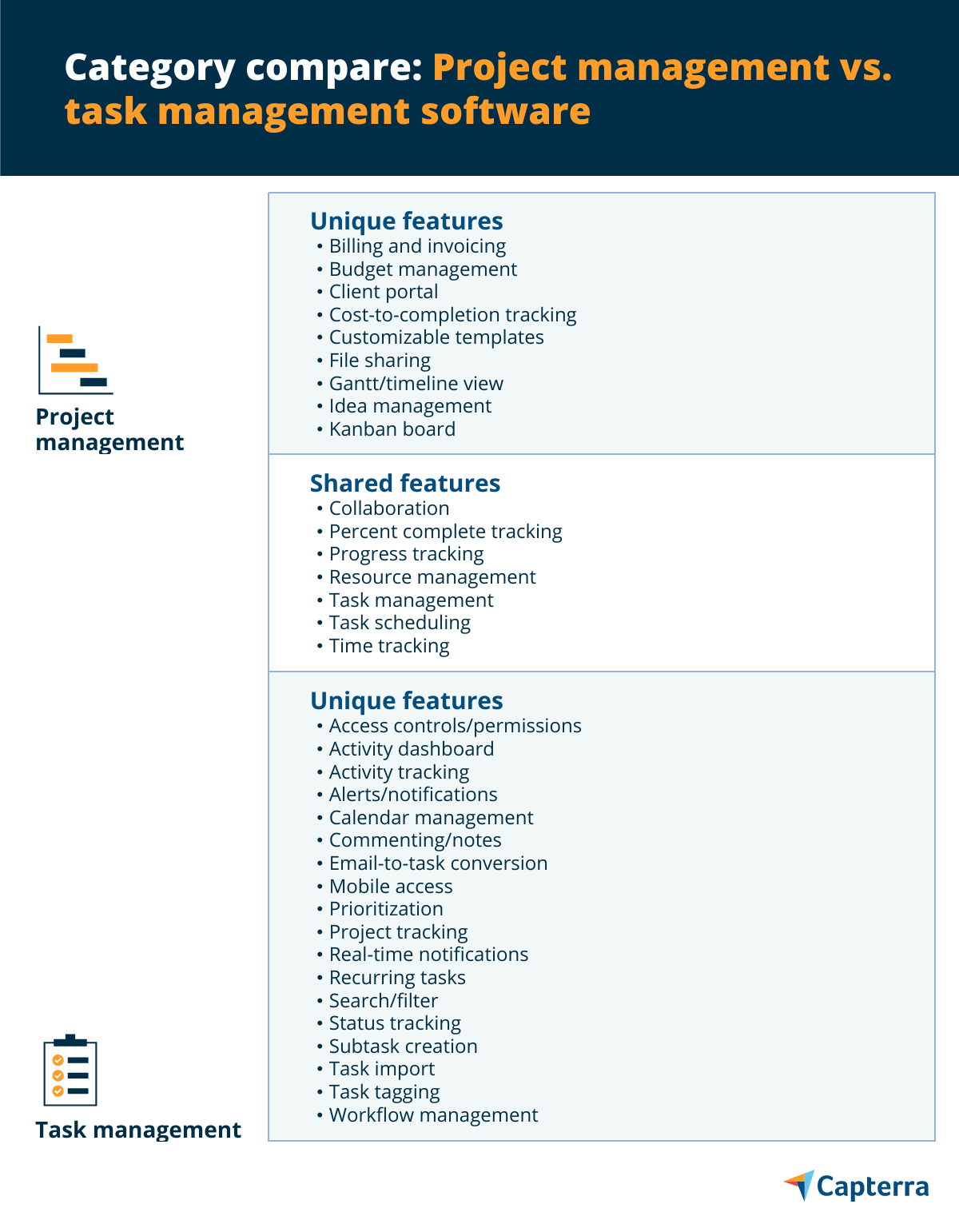
Online project management software generally falls into distinct architectural categories based on how teams visualize and execute work. Before diving into specific product comparisons, understanding these fundamental models helps clarify which system style matches your organizational maturity and team workflows.
Task-Centric and List-Based Platforms
Task-centric platforms focus heavily on hierarchical task breakdowns, subtasks, checklists, and straightforward list management. These environments mirror traditional to-do lists while adding collaborative layers like comments, file attachments, and due dates. They suit teams that prioritize administrative clarity, linear task execution, and straightforward operational tracking over complex visual data modeling.
Visual and Kanban-Oriented Workspaces
Kanban-style platforms emphasize workflow visualization through digital boards, swimlanes, and drag-and-drop card movements. This approach stems from Agile and Lean manufacturing methodologies, making it exceptionally popular among software engineering squads, creative agencies, and content marketing teams. Visual workspaces excel at highlighting bottlenecks, limiting work-in-progress, and providing immediate status updates at a glance.
Resource and Timeline Management Systems
Advanced platforms prioritize Gantt charts, workload balancing, dependency mapping, and time tracking. These solutions are built for project managers, construction firms, and professional service agencies who must manage fixed budgets, complex dependencies, and strict resource allocations. They require more rigorous setup but offer robust forecasting and financial visibility.
1. Asana: Best for Cross-Functional Collaboration
Asana has established itself as a premier work management platform designed to connect individual tasks to broader company goals. It bridges the gap between simple task lists and complex project portfolios.
Core Features and Architecture
Asana utilizes a flexible data model called Work Graph, which maps tasks, projects, goals, and portfolios into an interconnected web. Users can toggle between multiple views for the exact same project—including lists, Kanban boards, timelines (Gantt charts), calendars, and workload dashboards—without losing data integrity.
- Goal Tracking: Connects daily tasks directly to overarching company objectives, maintaining transparency across departments.
- Smart Rules: Automated workflows that assign tasks, update statuses, and move items across stages based on trigger conditions.
- Portfolios: High-level dashboards that aggregate multiple projects to monitor enterprise-wide health and progress.
Pricing and Scalability
Asana operates on a tiered subscription model, offering a robust free tier for small teams starting out. Paid tiers—such as Starter, Advanced, Enterprise, and Enterprise+—unlock advanced automation builder tools, custom field permissions, workload capacity planning, and enterprise-grade security controls like SAML-based single sign-on (SSO).
Limitations
While highly versatile, Asana can become expensive as organizations scale and require advanced administrative controls. Additionally, the sheer flexibility of the platform means teams must establish strict governance policies to prevent duplicate projects and disorganized tagging.
2. Trello: Best for Simplicity and Kanban Workflows
Trello popularized the digital Kanban board, utilizing cards, lists, and boards to make task tracking intuitive and visually engaging for teams of all technical backgrounds.
Core Features and Architecture
Trello’s core strength lies in its unpretentious, highly visual interface. Projects are represented as boards, tasks as cards, and workflow stages as lists. Through its built-in automation engine, Butler, users can create rule-based commands, custom buttons, and scheduled triggers without writing code.
- Power-Ups: Integrations that extend board functionality by adding calendar views, mapping tools, or cloud storage connections.
- Card Mirroring: The ability to display the same card across multiple boards, keeping synchronized updates visible to different departments.
- Checklists and Sub-tasks: Detailed breakdown mechanisms within individual cards to manage micro-deliverables.
Pricing and Scalability
Trello provides a generous free plan suitable for personal use or basic team collaboration. Standard, Premium, and Enterprise tiers introduce advanced workspace views (map, timeline, table, calendar), unlimited automation runs, board-level security permissions, and centralized administrative account management.
Limitations
Trello struggles when applied to deeply complex projects with intricate task dependencies, multiple sub-milestones, or heavy financial forecasting requirements. Large boards with hundreds of cards can also become cluttered, requiring disciplined archiving and labeling practices.
3. Monday.com: Best for Custom Workflows and Dashboards
Monday.com operates as a Work Operating System (Work OS) that allows organizations to build fully customized internal tools, project trackers, and CRM pipelines using modular building blocks.
Core Features and Architecture
Monday.com breaks away from rigid out-of-the-box templates by offering a highly visual, spreadsheet-like interface powered by modular columns. Users can add status columns, timeline bars, numbers, files, people tags, and formula calculations to craft a workspace tailored to their exact operational logic.
- Widgets and Dashboards: Real-time data visualization widgets that pull metrics from multiple boards to display budgets, timelines, and workload statuses.
- Advanced Automation Recipes: Pre-built and custom automation blocks that connect Monday.com with external applications like Slack, Gmail, and GitHub.
- Doc Integration: Collaborative documents that live inside projects, allowing teams to embed live board data directly into meeting notes and project briefs.
Pricing and Scalability
Monday.com offers a basic free tier for up to two users with limited features. Paid plans—Basic, Standard, Pro, and Enterprise—are priced based on user seat tiers (starting typically at minimum seat blocks) and scale up to include cross-board integrations, time tracking, formula columns, and advanced security certifications.
Limitations
The extreme customization capacity of Monday.com can lead to steep learning curves and setup fatigue for teams that simply need an out-of-the-box solution. Furthermore, higher-tier plans are required to unlock essential features like automated workflows and cross-project reporting.
4. ClickUp: Best for Feature-Rich All-in-One Workspaces
ClickUp markets itself as "one app to replace them all," combining task management, documents, whiteboards, spreadsheets, goal tracking, and time tracking into a single unified platform.
Core Features and Architecture
ClickUp organizes work hierarchically into Workspaces, Spaces, Folders, Lists, and Tasks. This deep structural depth gives enterprise teams granular control over permissions and departmental organization.
- ClickUp Docs: Built-in document creation tools with rich text editing, nested pages, and the ability to convert text snippets directly into actionable tasks.
- Native Time Tracking: Built-in timers and manual time-entry logs associated directly with tasks, eliminating the need for standalone billing extensions.
- Custom Fields and Views: Over 15 customizable views, including Gantt, Mind Maps, Tables, and Activity feeds.
Pricing and Scalability
ClickUp features a comprehensive Free Forever plan alongside Unlimited, Business, and Enterprise tiers. Pricing is highly competitive relative to the expansive feature set provided, making it an attractive option for startups looking to consolidate software subscriptions.
Limitations
The vast array of features creates a notoriously steep learning curve. Users often report interface bloat and occasional performance latency when loading deeply nested hierarchies or massive workspaces with extensive custom fields.
5. Jira: Best for Software Development and Agile Teams
Jira, developed by Atlassian, is the industry standard for software engineering squads, bug tracking, and rigorous Agile project management frameworks like Scrum and Kanban.
Core Features and Architecture
Jira is purpose-built to handle complex software development life cycles (SDLC). It maps user stories, bugs, epics, and sprints into structured backlogs and release pipelines.
- Advanced Roadmaps: High-level planning tools that forecast release dates, manage cross-team dependencies, and model capacity.
- Deep Developer Integrations: Seamless synchronization with Git repositories, CI/CD pipelines, automated testing tools, and code review platforms.
- Customizable Workflow Schemes: Strict state-transition rules that govern how an issue moves from discovery through testing, code review, and deployment.
Pricing and Scalability
Jira offers a free tier for up to 10 users. Standard, Premium, and Enterprise plans scale per user, providing advanced features such as release tracking, global automation rules, project archiving, and 99.9% uptime service-level agreements (SLAs).
Limitations
Jira is deliberately engineered for technical workflows. Non-technical departments—such as marketing, HR, or creative design—frequently find Jira rigid, unintuitive, and overly complex for day-to-day administrative tasks.
Comparative Analysis of Online Project Management Software
| Software | Best Suited For | Primary Strength | Notable Limitation | Entry Pricing Tier |
|---|---|---|---|---|
| Asana | Cross-functional teams | Work Graph model & multi-view flexibility | Complex governance required at scale | Free tier available; paid plans scale per user |
| Trello | Visual task tracking | Intuitive Kanban boards & fast setup | Struggles with complex task dependencies | Free tier available; paid plans scale per user |
| Monday.com | Custom operational workflows | Modular columns & real-time dashboards | Steep learning curve; modular setup required | Free tier available; seat-tier pricing |
| ClickUp | Feature consolidation | All-in-one docs, whiteboards, & tasks | Potential interface bloat and complexity | Free tier available; competitive paid tiers |
| Jira | Software engineering | Agile Scrum/Kanban & developer integrations | Unintuitive for non-technical teams | Free tier available; tiered per-user pricing |
Key Factors to Consider When Choosing Your Software
Selecting the optimal project management platform requires an internal audit of your team's operational habits, technical proficiency, and reporting requirements. Avoid choosing a platform based solely on marketing claims or sheer feature volume.
Assessing Team Technical Literacy
An advanced platform with endless customization options provides zero value if your team finds it too cumbersome to adopt. If your organization consists of non-technical creatives or administrative personnel, prioritize intuitive, visually driven interfaces like Trello or Asana. Conversely, if your team consists of software developers accustomed to issue tracking, Jira is an industry-standard fit.
Budget and Scalability Constraints
Evaluate not only current user counts but also projected organizational growth over the next 24 to 36 months. Many platforms implement aggressive pricing jumps when moving from starter plans to enterprise tiers, or require minimum seat purchases that can strain small business budgets.
Security and Compliance Requirements
Enterprise organizations must review data residency options, role-based access controls (RBAC), single sign-on (SSO) integration compatibility via SAML, and compliance certifications such as SOC 2, GDPR, and HIPAA. Always verify whether advanced security features are locked behind high-tier enterprise subscriptions.
Frequently Asked Questions
What is the difference between Kanban boards and Gantt charts?
Kanban boards use visual cards and columns to represent workflow stages, making them ideal for agile task progression and identifying immediate bottlenecks. Gantt charts display projects horizontally across a timeline, mapping exact start dates, end dates, and task dependencies, making them superior for long-term resource planning and deadline forecasting.
Can project management software replace communication tools like Slack or Microsoft Teams?
While most modern platforms include internal commenting threads and direct messaging features, they are generally not designed to replace real-time chat applications. Instead, project management software functions best when integrated with messaging tools to push automated notification alerts regarding status changes and upcoming deadlines.
How do I migrate existing project data from spreadsheets into a new platform?
Most modern project management systems support CSV and Excel file imports. During migration, you must map your existing spreadsheet columns (such as task name, assignee, due date, and priority) to the corresponding fields within the new software to ensure data integrity during import.
Is a free project management plan sufficient for growing businesses?
Free plans work well for freelancers, hobbyists, and very small teams testing out basic task lists. However, growing businesses quickly outgrow free tiers due to restricted storage limits, capped monthly automation runs, absence of guest access permissions, and lack of advanced reporting dashboards.
How long does team onboarding typically take?
Onboarding duration depends heavily on team size and platform complexity. Simple tools like Trello can be adopted within a few days, whereas comprehensive enterprise platforms like ClickUp, Monday.com, or Jira often require two to four weeks of dedicated training, workflow configuration, and testing before achieving full organizational adoption.
Conclusion and Next Action
Choosing the right online project management software requires balancing workflow complexity against team usability. Start by mapping your team's current operational bottlenecks, shortlist two platforms that align with your technical requirements, and utilize their free trial tiers to test real-world project execution before committing to an annual enterprise subscription.