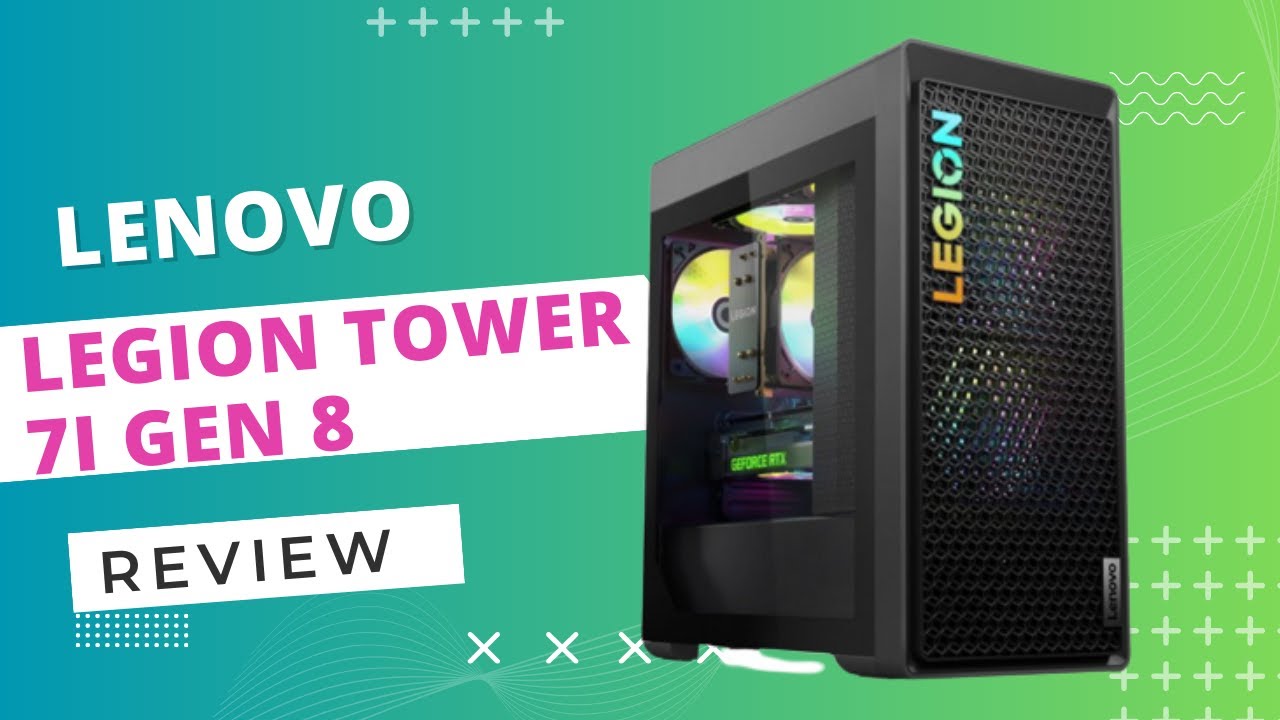
The Lenovo Legion Tower 7i Gen 8 remains a premier choice in 2026 for gamers seeking a high-performance, prebuilt desktop that balances raw power with sophisticated thermal management. By combining top-tier components like Intel’s 13th and 14th Gen processors with NVIDIA’s GeForce RTX 40-series graphics, it provides a stable, high-frame-rate experience for 4K gaming and intensive creative professional workloads.
The Evolution of the Legion Tower 7i Architecture
The Lenovo Legion Tower 7i Gen 8 represents a significant maturation of Lenovo’s gaming desktop philosophy. Moving away from the overly aggressive "gamer" aesthetics of the previous decade, the Gen 8 chassis focuses on a minimalist, functional design that prioritizes airflow and internal volume. This 34-liter chassis is designed to house the most demanding components on the market without the clearance issues often found in smaller mid-tower builds.
In 2026, the value proposition of this machine is centered on its reliability. While newer generations of hardware continue to push boundaries, the Gen 8 remains a "4-star choice" because it addresses the primary pain points of prebuilt systems: proprietary parts and thermal throttling. Lenovo utilizes a standardized Micro-ATX or ATX-adjacent motherboard layout that allows for easier upgrades compared to many of its direct competitors. This architectural decision ensures that "power-hungry gamers" aren't just buying a machine for today, but a platform that can be serviced and improved as their needs evolve.
The internal layout is exceptionally clean. Cables are routed through dedicated channels, and the power supply is shrouded at the bottom of the case, a standard practice in custom builds that Lenovo has successfully integrated into its mass-produced line. This cleanliness isn't just for show; it facilitates an unobstructed path for cool air to reach the GPU and the CPU’s liquid cooling radiator.
Performance Hardware: Why It Wins for Power Hungry Gamers
At the heart of the Legion Tower 7i Gen 8 are configurations that cater to the "enthusiast" bracket. The machine typically features the Intel Core i7-13700K or the i9-13900K (and their 14th Gen equivalents), which provide the high clock speeds necessary for high-refresh-rate gaming and the core counts required for multi-threaded tasks like video rendering or 3D modeling.
The inclusion of NVIDIA GeForce RTX 40-series GPUs, ranging from the RTX 4070 Ti up to the behemoth RTX 4090, allows this system to leverage DLSS 3 and 3.5 (Deep Learning Super Sampling) and advanced Ray Reconstruction. For gamers in 2026, these features are essential for maintaining playable frame rates in modern titles featuring path tracing. The 4-star rating is bolstered by the fact that Lenovo does not heavily throttle these components; the BIOS allows for the "K-series" processors to boost to their intended PL2 power limits, provided the cooling can keep up.
Memory and storage options are equally robust. The system supports DDR5 RAM, typically starting at 5600MHz, which provides the bandwidth necessary to feed modern CPUs. Unlike some competitors that use single-channel memory in base configurations, the Tower 7i Gen 8 is almost universally sold in dual-channel configurations, ensuring that users get the full performance they paid for right out of the box.
Legion Coldfront 5.0: Advanced Thermal Management
One of the most critical aspects of any high-end gaming PC is its ability to dissipate heat. The Legion Tower 7i Gen 8 employs the Coldfront 5.0 cooling system, which is a marked improvement over previous iterations. For configurations involving i9 processors, Lenovo utilizes a 360mm All-In-One (AIO) liquid cooler mounted at the top or front of the chassis.
The thermal design follows a high-airflow logic:
- Intake: Three 120mm ARGB fans behind a mesh front panel draw in massive amounts of cool air.
- Exhaust: A rear 120mm fan and the top-mounted AIO radiator fans expel hot air, creating a consistent pressure environment.
- GPU Cooling: The RTX 40-series cards used in these builds feature massive heatsinks, and the chassis provides enough clearance to ensure these cards don't suffer from "choking" against the side panel.
This cooling setup is the primary reason the Tower 7i wins for power-hungry users. When a CPU is pulling 250+ watts and a GPU is pulling 450 watts, a standard air cooler or a small 120mm AIO simply won't suffice. The Gen 8 handles these loads while maintaining acoustic levels that are surprisingly manageable, avoiding the "jet engine" noise profile common in smaller or poorly ventilated prebuilt PCs.
Build Quality and Aesthetic Appeal
The aesthetic of the Legion Tower 7i Gen 8 is characterized by its "Storm Grey" finish and a refined use of RGB lighting. The front mesh panel features a subtle 3D pattern that is both functional for airflow and visually distinct. Lenovo has struck a balance where the machine looks professional enough for a home office but can be transformed into a gaming centerpiece via the Lenovo Vantage software.
The side panel is made of tempered glass, allowing a full view of the internal components. Inside, the RGB lighting is applied to the fans, the CPU cooler, and sometimes a light bar along the bottom. For many users, the "4-star" appeal comes from this build quality; there is very little plastic flex, and the machine feels incredibly dense and well-constructed.
Port selection is another area where Lenovo excels. The top-front I/O provides easy access to USB 3.2 Gen 1 ports and audio jacks, which is vital for gamers who frequently swap peripherals or use wired headsets. The rear I/O is even more impressive, usually featuring a USB-C 3.2 Gen 2x2 port (20Gbps), which is excellent for high-speed external NVMe drives.
Comparing Legion Tower 7i Gen 8 Configurations
To help decide which version of this powerhouse fits your specific needs, the following table breaks down the most common configurations seen in the 2026 market.
| Component | Performance Tier (High) | Enthusiast Tier (Elite) | Purpose |
|---|---|---|---|
| CPU | Intel Core i7-13700K / 14700K | Intel Core i9-13900K / 14900K | High-end gaming vs. Professional Workstation |
| GPU | NVIDIA RTX 4070 Ti / 4080 | NVIDIA RTX 4080 / 4090 | 1440p Ultra vs. 4K Ultra/Ray Tracing |
| RAM | 32GB DDR5-5600 | 64GB DDR5-5600 | Multi-tasking vs. Heavy Content Creation |
| Storage | 1TB Gen4 NVMe SSD | 2TB+ Gen4 NVMe SSD | Standard Library vs. Massive Media Storage |
| Cooling | 240mm or 360mm AIO | 360mm AIO | Thermal Stability under Heavy Load |
| Power Supply | 850W 80+ Gold | 1200W 80+ Gold | Sustaining High-Transient Power Spikes |
Software and User Experience: Lenovo Vantage
The software experience on the Legion Tower 7i Gen 8 is anchored by Lenovo Vantage. Unlike the "bloatware" often associated with prebuilt computers, Vantage provides genuine utility. It allows users to monitor hardware thermals in real-time, adjust RGB lighting patterns, and, most importantly, toggle between different performance modes.
The three primary modes are:
- Quiet Mode: Reduces fan speeds and power limits for web browsing or watching movies.
- Balance Mode: Uses an AI-driven algorithm to shift power between the CPU and GPU based on the current workload.
- Performance Mode: Unlocks the highest power limits and increases fan curves to ensure maximum frame rates during intense gaming sessions.
For power-hungry gamers, the ability to overclock the GPU or adjust the CPU's behavior through a verified, manufacturer-supported interface is a significant advantage. This software-hardware integration is a key factor in why the system is highly rated, as it removes the intimidation factor often associated with BIOS-level performance tuning.
Upgradeability and Longevity
One reason the Legion Tower 7i Gen 8 earns a 4-star rating instead of a perfect 5 is the inevitable march of technology. However, Lenovo has mitigated this by using standardized components. The power supply uses standard ATX connectors, the motherboard uses standard mounting points, and the RAM slots are easily accessible.
In 2026, a user who bought this machine a few years ago can still easily upgrade the storage via the multiple M.2 slots available on the Z790 chipset. The GPU can be swapped for a newer model as long as it fits within the 34L dimensions and the power envelope of the installed PSU (which is usually a high-quality 850W or 1200W unit). This "open" approach is rare in the world of big-box OEMs and is a major win for enthusiasts who want to keep their system relevant for five years or more.
Potential Drawbacks: Why It’s 4 Stars (Not 5)
While the Legion Tower 7i Gen 8 is an exceptional machine, it is not without its limitations. For some, the price premium for the "Legion" branding can be steep compared to building a PC from scratch. While you get the benefit of a single warranty for the entire system, the cost of labor and the premium chassis can add several hundred dollars to the total.
Additionally, while the cooling is excellent, the 34-liter case is quite large. It requires significant desk or floor space and is quite heavy, making it less than ideal for those who frequently move their setup. Some users have also noted that while the BIOS is more open than most prebuilts, it still doesn't offer the granular control over memory timings that a high-end aftermarket motherboard (like an ASUS ROG or MSI Unify) would provide.
Verdict: Is the Legion Tower 7i Gen 8 Right for You?
The Lenovo Legion Tower 7i Gen 8 is designed for the gamer who wants to "set it and forget it" without sacrificing the performance of a custom-built rig. It wins for power-hungry gamers because it doesn't cut corners on the most important aspects: the power supply, the cooling, and the GPU tier.
If you are looking for a machine that can handle 4K gaming, stream at high bitrates simultaneously, and act as a powerhouse for video editing or 3D rendering, this desktop is a top-tier contender. Its 4-star status reflects its position as one of the best prebuilt options on the market, held back only by the inherent price premium of high-end prebuilt hardware and its substantial physical footprint.
FAQ
Can I upgrade the RAM in the Lenovo Legion Tower 7i Gen 8? Yes, the system typically features four DDR5 DIMM slots. You can upgrade the RAM by purchasing compatible DDR5 modules. However, it is recommended to use matching kits to ensure the best stability and to reach the advertised speeds (MT/s) via XMP profiles.
Does the Legion Tower 7i Gen 8 support Wi-Fi 6E? Yes, most configurations of the Gen 8 model come equipped with Wi-Fi 6E and Bluetooth 5.1 or higher. This allows for lower latency and higher speeds on the 6GHz band, provided you have a compatible router, which is essential for competitive online gaming.
Is the liquid cooling system maintenance-free? The All-In-One (AIO) liquid cooler used in the Tower 7i is a closed-loop system. This means it does not require refilling or specialized maintenance like a custom open-loop system would. You only need to ensure the radiator and fans remain free of dust.
What is the maximum GPU size the chassis can support? The 34L chassis is designed to accommodate even the largest triple-fan RTX 4090 cards. It typically supports GPUs up to approximately 340mm to 350mm in length, though you should always verify the specific dimensions if you plan on swapping the factory card for an aftermarket model.
Does this PC come with a keyboard and mouse? Usually, Lenovo includes a basic USB keyboard and mouse in the box. While these are functional for initial setup, power-hungry gamers will likely want to upgrade to mechanical keyboards and high-DPI gaming mice to match the performance level of the tower itself.
Practical Next Action: Before purchasing, verify the specific CPU generation and GPU model in your chosen configuration. Ensure the power supply (PSU) is at least 850W if you are opting for an RTX 4080 or 4090 to account for power spikes. Once unboxed, immediately run the Lenovo Vantage update tool to ensure your BIOS and thermal drivers are current for the best performance in 2026's latest titles.