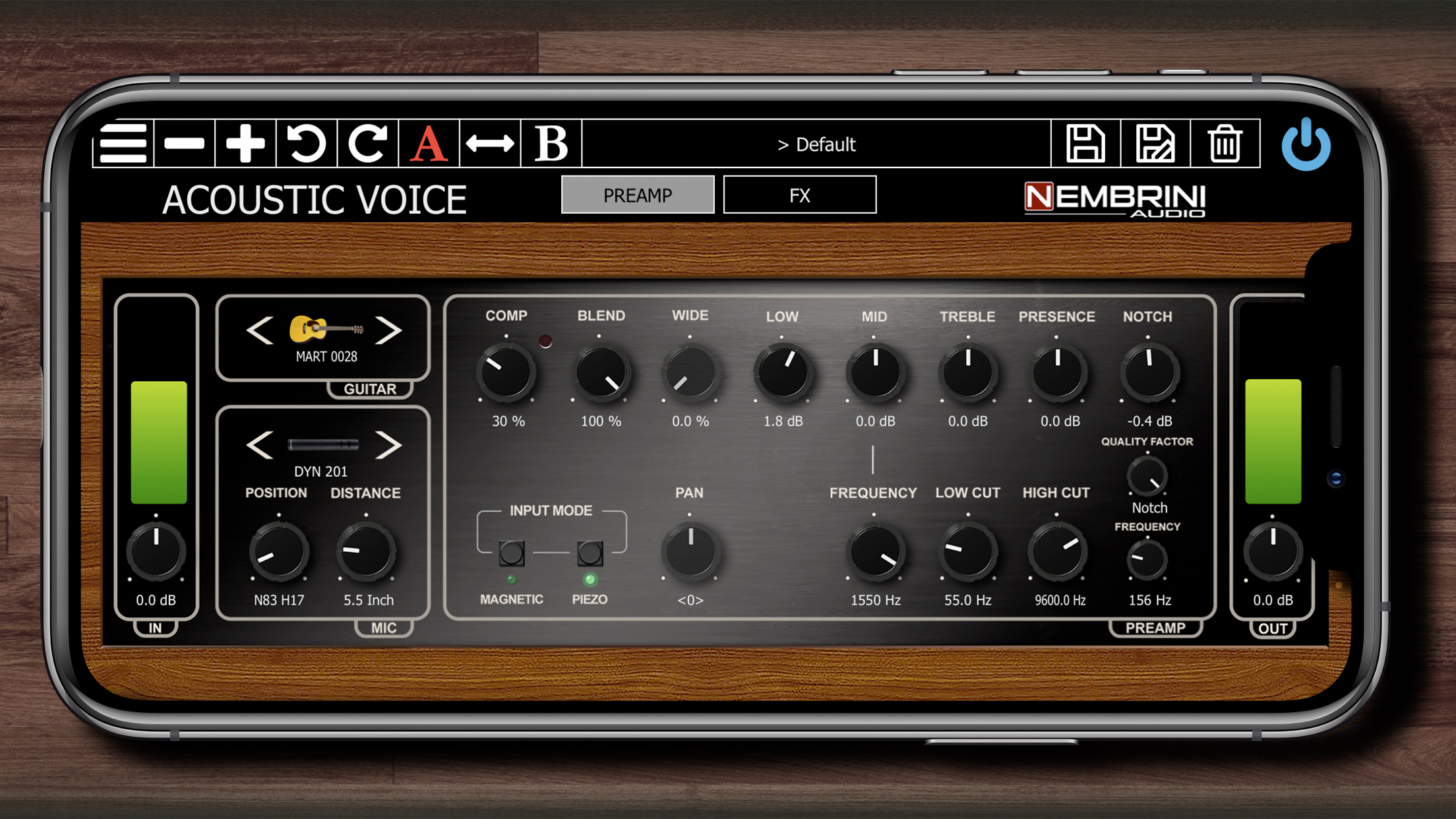
An acoustic guitar plugin is a software instrument or processor designed to emulate the physical sound of an acoustic guitar or enhance recorded DI (direct injection) guitar tracks within a digital audio workstation (DAW). These tools bridge the gap between electronic production and organic instrumentation, utilizing multi-sampled recordings, physical modeling, or algorithmic processing to deliver realistic strumming, fingerpicking, and mixing capabilities.
Introduction to Acoustic Guitar Virtual Instruments and Processors
In modern music production, achieving the warm, resonant, and dynamic tone of a physical acoustic guitar can present significant logistical challenges. High-end microphones, acoustically treated rooms, and pristine instrument conditions are often required to capture a professional recording. For electronic music producers, beatmakers, or composers working entirely "in the box," an acoustic guitar plugin provides an accessible alternative.
The market generally splits these software solutions into two distinct categories: virtual instruments (sample libraries and physical modeling synthesizers that generate notes from scratch) and audio processors (effects plugins designed to shape, compress, and refine a real guitar recording). Understanding the underlying technology, system requirements, and functional differences between these tools is essential for making informed purchasing and mixing decisions.
Types of Acoustic Guitar Plugins
Navigating the vast ecosystem of virtual instruments and audio effects requires categorizing tools by their primary function. Whether you need to generate realistic performances without owning a physical instrument or refine a raw DI track, selecting the right type of plugin dictates your workflow.
1. Sample-Based Virtual Instruments
Sample-based plugins rely on massive libraries of audio recordings captured from real guitars. Multi-sampling involves recording every fret, string, and articulation (such as sustain, palm mutes, harmonics, slides, and hammer-ons) at multiple velocity layers.
- Pros: Unmatched realism, organic timber, and detailed resonance.
- Cons: Massive hard drive footprints, high RAM usage, and potential latency issues if system resources are constrained.
2. Physical Modeling Plugins
Physical modeling bypasses large sample libraries by using mathematical algorithms to simulate the physical behavior of a guitar’s strings, body, bridge, and air cavity in real time.
- Pros: Extremely lightweight, tiny file sizes, zero loading times, and highly customizable parameters.
- Cons: Historically struggled to match the organic warmth of multi-sampled instruments, though modern iterations have closed this gap significantly.
3. Processing and Mixing Plugins
Unlike virtual instruments that generate sound, acoustic guitar processors are inserted onto audio tracks to improve raw recordings. These include specialized acoustic guitar preamps, dynamic EQs, body-resonance simulators, and transient shapers designed to correct the thin, sterile sound often produced by under-saddle piezo pickups.
Key Features to Evaluate Before Purchasing
Selecting the right plugin involves looking past marketing terminology and evaluating core technical capabilities. Poorly optimized plugins can disrupt a session, while feature-rich tools streamline the production process.
Articulations and Playability
A realistic acoustic track depends heavily on articulation variety. Look for plugins that offer:
- Strumming Engines: Automated pattern generators that follow MIDI chord inputs, mimicking upstrokes, downstrokes, and muting.
- Key-Switched Articulations: The ability to trigger slides, hammer-ons, pull-offs, and harmonics via MIDI keyboard shortcuts.
- Round-Robin Variation: Multiple samples for the same note and velocity layer to eliminate the robotic "machine-gun" effect caused by repeating identical samples.
Integration and Compatibility
Ensure the plugin supports your specific workflow environment:
- Plugin Formats: Verify compatibility with VST3, AU (Audio Units), and AAX formats depending on whether you use Ableton Live, Logic Pro, Pro Tools, or Cubase.
- DAW Integration: Some advanced instruments feature built-in MIDI pattern drag-and-drop functionality, allowing users to build complex arrangements directly inside the DAW timeline.
Comparison of Leading Acoustic Guitar Solutions
The following table compares prominent software options categorized by their primary function, technical requirements, and target workflows.
| Plugin Category / Product | Core Technology | Primary Use Case | System Resource Demand | Key Strengths |
|---|---|---|---|---|
| Sample-Based Libraries | Multi-sampled acoustic recordings | Realistic fingerpicking and solo arrangements | High (Requires 10GB–50GB SSD space, 8GB+ RAM) | Incredible organic detail, rich dynamic response |
| Strum Engine Plugins | Pattern-based MIDI generators | Pop, folk, and rock rhythm tracks | Medium (Moderate CPU and RAM usage) | Fast workflow, realistic chord phrasing, extensive pattern libraries |
| Physical Modeling Synths | Algorithmic acoustic synthesis | Scoring, lightweight live performance setup | Very Low (Minimal storage and CPU usage) | Instant loading, highly tweakable physical parameters |
| Acoustic DI Processors | Convolution & EQ shaping | Fixing direct-in (piezo) acoustic recordings | Low to Medium | Removes harshness, adds natural body resonance and air |
Installation and System Prerequisites
Running modern virtual instruments demands careful attention to computer hardware specifications. Neglecting these prerequisites can result in audio dropouts, crashing, or failure to load heavy sample libraries.
Storage Media Requirements
Large sample libraries containing tens of thousands of individual WAV files should always be installed on a dedicated Solid State Drive (SSD)—preferably an NVMe drive. Installing massive guitar libraries on a traditional mechanical Hard Disk Drive (HDD) will cause severe audio stuttering and disk-read bottlenecks as the plugin attempts to stream samples into RAM in real time.
RAM and CPU Allocation
- RAM: While physical modeling plugins require minimal memory, high-end sample libraries often recommend 16GB of system RAM or more to load multi-sampled patches comfortably without purging samples.
- Buffer Size: During tracking or live performance, set your DAW audio buffer size to 64 or 128 samples to minimize latency. For mixing stages involving heavy processing plugins, raise the buffer size to 512 or 1024 samples to relieve CPU strain.
Common Mistakes and Troubleshooting
Producers frequently encounter obstacles when integrating virtual guitars into a mix. Avoiding common pitfalls ensures a professional final product.
1. The "Robotic" Strumming Issue
- The Mistake: Drawing in straight, grid-aligned MIDI notes with uniform velocity values.
- The Fix: Humanize your MIDI performance. Slightly offset notes from the grid (micro-timing adjustments), vary velocities across different beats, and utilize the plugin's built-in humanization controls to introduce natural timing imperfections.
2. Frequency Clashing in the Mix
- The Mistake: Allowing the acoustic guitar to occupy the same low-mid frequency range (200Hz–400Hz) as vocals, pianos, or other mid-range instruments.
- The Fix: Use a high-pass filter to roll off unnecessary sub-frequencies below 80Hz–100Hz. Carve out a narrow EQ notch where the acoustic guitar conflicts with the lead vocal's fundamental frequencies to maintain vocal clarity.
3. Over-Processing DI Signals
- The Mistake: Applying heavy compression and distortion to a raw under-saddle pickup signal, resulting in a harsh, brittle tone.
- The Fix: Utilize an acoustic body-modeling plugin or impulse response (IR) loader first in the signal chain to simulate the acoustic chamber before applying compression or saturation.
Frequently Asked Questions
Can an acoustic guitar plugin completely replace a real guitar?
While high-end sample libraries and physical modeling tools offer exceptional realism, they cannot fully replicate the spontaneous physical interaction, string bend nuances, and unique micro-expressions of a human player on a physical instrument. However, for rhythm tracks, pop arrangements, and home studio productions, modern plugins deliver results that are virtually indistinguishable from live recordings to the average listener.
Why does my acoustic guitar plugin sound dry and boxy?
Virtual instruments are often recorded in dead, anechoic environments to give producers total control over the wet signal. If your track sounds boxy, it lacks natural room reflections. Apply a subtle stereo convolution reverb or a plate reverb with a short pre-delay to place the guitar in a virtual acoustic space.
Do I need a MIDI keyboard to use an acoustic guitar plugin?
A MIDI keyboard is helpful for playing melodies and fingerpicking patterns, but it is not strictly required. Many rhythm-oriented plugins allow you to trigger complex chords using single keys, and all DAWs feature a piano roll editor where you can manually draw in notes and automation data.
How do I eliminate latency when playing a virtual guitar live?
To reduce latency, lower your DAW's buffer size, freeze inactive tracks that are consuming CPU power, and ensure you are using native low-latency drivers such as ASIO on Windows or CoreAudio on macOS.
Practical Next Steps
Begin by auditing your current production setup, noting your available storage space and RAM capacity. If you primarily need rhythm tracks for songwriting, explore strum-engine sample libraries. If you are mixing raw direct-in recordings from a live acoustic-electric guitar, prioritize acoustic DI processors and impulse response loaders. Download trial versions where available to test compatibility with your preferred DAW workflow before making a final investment.