The Dell XPS 15 7590 is a powerful, premium Windows laptop that combines a sleek aluminum chassis, vibrant 4K OLED display options, and robust Intel Core processors with NVIDIA graphics, though it faces noted challenges regarding thermal management under heavy workloads.
When examining high-performance consumer laptops from recent technological generations, few devices generated as much discussion among power users, content creators, and mobile professionals as the Dell XPS 15 7590. Positioned as a desktop replacement in a remarkably thin and light form factor, this machine aimed to bridge the gap between portability and workstation-class performance. Reviewers and buyers alike scrutinized its hardware configurations, thermal limits, display fidelity, and overall value proposition. This comprehensive overview aggregates the essential review highlights for the Dell XPS 15 7590, breaking down its design, display choices, internal specifications, real-world performance metrics, connectivity options, and persistent operational limitations.
Identity, Positioning, and Target Audience
The Dell XPS 15 7590 arrived on the market as an iterative refinement of Dell’s highly successful XPS line. Rather than introducing a radical chassis redesign, Dell focused on internal hardware updates and display technology integration.
Who Was the XPS 15 7590 Built For?
- Content Creators: Photographers, videographers, and graphic designers who required color-accurate displays and robust multi-core processing power for Adobe Creative Cloud applications.
- Software Developers: Programmers who benefited from hexa-core or octa-core Intel processors and up to 64GB of RAM for compiling code and running virtual machines.
- Power Users: Professionals who needed a reliable, premium Windows laptop capable of handling demanding multitasking, data analysis, and moderate creative workloads while traveling.
Understanding this target audience is crucial because performance expectations for this laptop were exceptionally high. It was never marketed strictly as an entry-level productivity machine or an uncompromised gaming laptop; instead, it occupied the premium segment where design elegance met high-end utility.
Design, Build Quality, and Portability
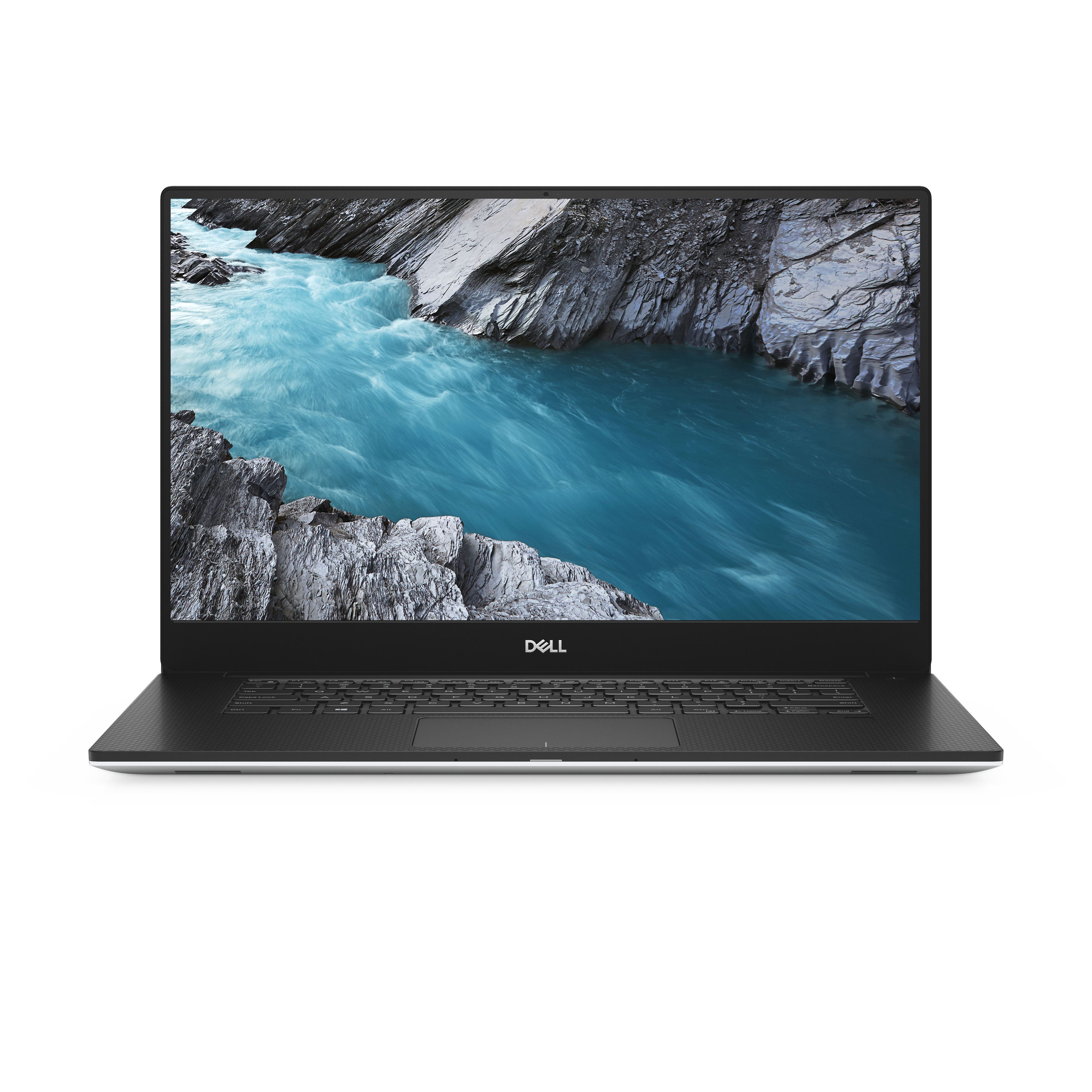
One of the most consistently praised aspects across virtually every review of the Dell XPS 15 7590 was its premium industrial design. Dell utilized a CNC-machined aluminum chassis paired with a carbon fiber composite palm rest (or woven glass fiber on certain silver configurations), resulting in a rigid, durable body that resisted flexing.
Dimensions and Weight
- Footprint: Approximately 14.06 inches by 9.27 inches (357 mm x 235 mm).
- Thickness: Tapering from 0.45 inches to 0.66 inches (11 mm to 17 mm).
- Weight: Starting at roughly 4.0 pounds (1.8 kg) for non-touch models with a solid-state drive and smaller battery, and increasing to approximately 4.5 pounds (2.0 kg) for configurations featuring the 4K OLED touch display and the larger 97Wh battery.
The keyboard featured comfortable key travel with tactile feedback, accompanied by a responsive Microsoft Precision glass trackpad that handled multi-touch gestures smoothly. However, the positioning of the HD webcam remained a frequent point of critique; located at the bottom bezel of the display due to the InfinityEdge design, it captured an unflattering upward angle during video calls.
Display Options: IPS vs. 4K OLED
Reviewers heavily analyzed the display configurations available for the XPS 15 7590. Dell offered multiple panels, catering to different user priorities ranging from battery longevity to absolute visual fidelity.
1. The 1080p Non-Touch IPS Panel (FHD)
For users prioritizing battery life and matte anti-glare properties, the baseline 1920x1080 IPS display was a reliable workhorse. Reviewers noted solid sRGB color reproduction, strong contrast ratios, and significantly lower power draw compared to higher-resolution alternatives.
2. The 4K UHD Touch IPS Panel
Bridging resolution and traditional LCD performance, this glossy panel offered wide color gamuts and high pixel density. While sharp for text and media consumption, it lacked the infinite contrast ratios of organic light-emitting diode technology.
3. The 4K UHD OLED Touch Panel
The crown jewel of the lineup for media professionals was the optional 3840x2160 Samsung-manufactured OLED display. Reviewers lauded its true blacks, infinite contrast ratio, and 100% DCI-P3 color gamut coverage. Watching HDR content or editing video on this screen provided an immersive, highly accurate visual experience, though it came with a noticeable penalty in battery runtime and susceptibility to reflections due to its glossy glass surface.
Hardware Specifications and Internal Performance
Beneath the exterior, the XPS 15 7590 packed desktop-grade components into a mobile chassis. Configuring options varied widely depending on user budget and workflow requirements.
| Component Category | Available Options | Reviewer Consensus & Performance Impact |
|---|---|---|
| Processor (CPU) | Intel Core i5-9300H, i7-9750H, i9-9980HK | The 6-core i7-9750H offered the best balance of thermal efficiency and speed. The 8-core i9 faced severe thermal throttling. |
| Graphics (GPU) | Intel UHD Graphics 630 + NVIDIA GeForce GTX 1650 (4GB GDDR5) | Capable of light gaming, video rendering acceleration, and CAD work, but outclassed by newer mobile GPUs. |
| Memory (RAM) | 8GB, 16GB, 32GB, or 64GB DDR4 (2666MHz) | User-upgradeable via two SO-DIMM slots, allowing future hardware scaling. |
| Storage | M.2 NVMe PCIe SSDs ranging from 256GB to 2TB | Excellent read and write speeds, providing rapid boot times and quick file transfers. |
Thermal Performance and Throttling
A recurring theme in hardware reviews for this laptop was thermal management. Packing a high-performance 45-watt Intel CPU and an NVIDIA dedicated GPU into a sub-0.7-inch chassis created intense heat concentration. Under sustained heavy multi-core loads—such as rendering long video files or running prolonged stress tests—the internal temperatures climbed rapidly.
Reviewers observed that the CPU frequently hit its thermal limit (100°C), triggering automatic clock speed reductions (thermal throttling) to protect the silicon. While casual tasks and short bursts of processing power ran smoothly, sustained professional workloads often required users to explore advanced cooling pads, manual undervolting via utility software, or thermal paste replacement to maintain peak performance.
Battery Life and Power Management
Battery endurance varied dramatically based on the chosen display panel and daily usage patterns.
- The 97Wh Battery Configuration: Paired with the 1080p FHD display, this larger battery option routinely yielded 8 to 10 hours of moderate web browsing, document editing, and email management.
- The OLED Configuration: Pairing the same 97Wh battery with the power-hungry 4K OLED screen reduced real-world battery life closer to 4 to 6 hours under similar light office workloads. Running intensive applications or gaming on battery power depleted the cell in less than two hours.
Connectivity and Expansion Ports
Reviewers appreciated that Dell maintained a diverse selection of physical ports, reducing the immediate need for external dongles compared to ultra-thin competitors.
- USB-A Ports: Two USB 3.1 Gen 1 ports for legacy peripherals.
- USB-C / Thunderbolt 3: One USB-C port with Thunderbolt 3 support, allowing high-speed data transfer, external GPU connection, and power delivery.
- Video Output: One full-size HDMI 2.0 port for external monitors and projectors.
- Audio: A 3.5mm headphone/microphone combo jack.
- Storage Expansion: A physical full-size SD card reader, which received high praise from photographers and videographers who frequently offloaded camera media.
- Wireless: Killer Wi-Fi 6 (AX1650) and Bluetooth 5.0 for robust wireless connectivity.
Common Criticisms and Limitations
While the Dell XPS 15 7590 earned strong review scores for its build quality and display options, independent evaluations highlighted several persistent drawbacks that prospective buyers needed to consider:
- Thermal Bottlenecking: The cooling system struggled to dissipate heat effectively under maximum load, leading to performance dips during prolonged rendering or compilation tasks.
- Awkward Webcam Placement: The bottom-bezel camera angle remained a frustrating compromise driven by the otherwise attractive narrow-bezel display design.
- DPC Latency Issues: Early firmware and driver iterations experienced Digital Deferred Procedure Call (DPC) latency spikes, which occasionally caused audio popping or stuttering during real-time audio production work (though many of these were mitigated through subsequent driver updates).
- Serviceability Quirks: While RAM and storage were user-accessible and replaceable, removing the T5 Torx screws and plastic clips on the bottom cover required patience and care to avoid cosmetic damage.
Suitability and Final Verdict
The Dell XPS 15 7590 established itself as a versatile, beautifully crafted multimedia powerhouse. Its brilliant 4K OLED display option, sturdy aluminum and carbon fiber chassis, upgradeable memory, and legacy port selection made it a favorite among creative professionals who valued screen real estate and build aesthetics. However, its thermal limitations under sustained loads meant that buyers requiring continuous, unthrottled maximum CPU performance needed to manage expectations or invest in auxiliary cooling solutions. For everyday productivity, software development, and content creation, it remained a formidable standard in mobile computing.
Frequently Asked Questions
Can the RAM and storage be upgraded on the Dell XPS 15 7590?
Yes, the Dell XPS 15 7590 features two user-accessible SO-DIMM memory slots supporting up to 64GB of DDR4 RAM. Additionally, the M.2 NVMe solid-state drive can be removed and replaced with a higher-capacity storage module after removing the bottom cover.
Is the Dell XPS 15 7590 suitable for modern gaming?
It is capable of handling moderate 1080p gaming thanks to the NVIDIA GeForce GTX 1650 graphics card. However, it is not a dedicated gaming laptop; demanding modern titles require reduced graphics settings, and thermal throttling may occur during extended gaming sessions.
How does the 4K OLED display affect battery life?
The 4K OLED panel consumes significantly more power than the baseline 1080p IPS display. While a configuration with the 97Wh battery and a 1080p screen can easily last a full workday, the OLED version typically reduces battery runtime by several hours under similar workloads.
Does the laptop support Thunderbolt 3 eGPUs?
Yes, the single USB-C port on the XPS 15 7590 supports Thunderbolt 3 with four lanes of PCIe bandwidth, allowing users to connect external graphics card enclosures (eGPUs) to boost graphical processing power for gaming or heavy rendering.
What causes thermal throttling on this model, and can it be fixed?
Thermal throttling occurs because the slim chassis houses high-wattage Intel processors and NVIDIA graphics in a tight space where fans struggle to expel heat fast enough under continuous heavy load. Users often mitigate this by undervolting the CPU, replacing factory thermal paste, or using an elevated laptop stand to improve airflow.