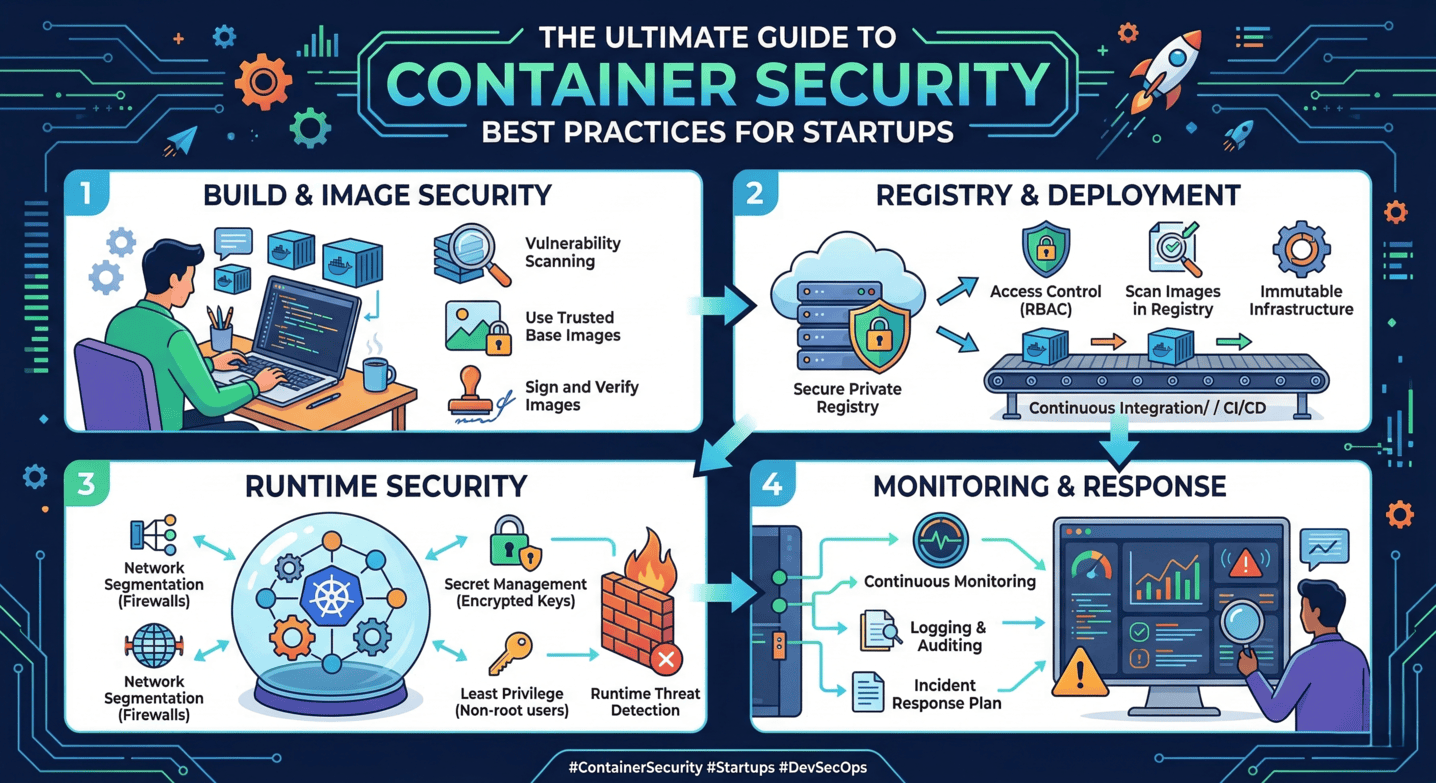
Effective container security in 2026 requires moving away from traditional server-based patching toward an automated, image-centric lifecycle. To secure cloud environments, organizations must implement continuous vulnerability scanning, enforce immutable infrastructure by replacing rather than updating containers, prioritize fixes based on reachability analysis, utilize minimal base images, and govern deployments through automated admission controllers.
In the fast-evolving landscape of cloud-native computing, the sheer volume of microservices has made manual intervention impossible. As of 2026, the concept of "patching" a running container is considered a critical security failure. Instead, modern patch management is an orchestrated process of identifying vulnerabilities in the software supply chain and triggering automated CI/CD (Continuous Integration/Continuous Deployment) pipelines to build, test, and roll out updated images.
Managing this at scale requires a departure from legacy IT mindsets. The following five best practices provide a comprehensive framework for maintaining a secure, patched, and resilient container environment.
1. Implement Continuous Image Scanning and SBOM Integration
The foundation of container patch management is visibility. In 2026, it is no longer sufficient to scan an image only when it is built. New vulnerabilities (CVEs) are discovered daily, meaning a "clean" image today may be critical-risk tomorrow.
The Role of the Software Bill of Materials (SBOM)
A Software Bill of Materials (SBOM) has become a mandatory standard for cloud-native security. An SBOM is a formal, machine-readable inventory of all libraries, modules, and dependencies within a container image. By maintaining an active SBOM for every container in production, security teams can instantly identify which services are affected by a newly disclosed vulnerability without re-scanning the entire registry.
Continuous scanning should occur at three distinct stages:
- At the Build Stage: Integrating scanners (like Trivy, Snyk, or Grype) into the CI pipeline to catch vulnerabilities before they reach the registry.
- In the Registry: Periodically scanning dormant images to ensure that "gold images" remain secure for future use.
- At Runtime: Monitoring the active state of containers in clusters (e.g., Kubernetes) to identify vulnerabilities that were discovered after the container was deployed.
Automating the "Find-to-Fix" Loop
Automation is the only way to handle the scale of modern cloud environments. When a scanner detects a high-severity vulnerability in a base image, it should trigger a webhook that alerts the development team or, in advanced setups, automatically initiates a pull request to update the dependency version in the Dockerfile.
2. Embrace Immutable Infrastructure and the "Rebuild-and-Replace" Model
One of the most dangerous mistakes an organization can make is attempting to "patch" a container while it is running. In a cloud-native world, containers are designed to be ephemeral and immutable.
Why Live Patching Fails
Patching a live container via SSH or an exec command creates "configuration drift." This leads to a situation where the running environment no longer matches the source code or the image stored in the registry. This inconsistency makes troubleshooting nearly impossible and creates security blind spots, as the changes won't persist if the container restarts or scales.
The Immutable Workflow
The correct approach to patch management is the Rebuild-and-Replace model. When a patch is required, the workflow must follow these steps:
- Update the source code or the base image reference in the configuration.
- Trigger the CI/CD pipeline to create a new version of the container image.
- Push the updated image to the container registry.
- Deploy the new image using a rolling update or blue/green deployment strategy, which gracefully terminates old containers and starts new ones.
This ensures that the environment is always reproducible and that every container in production is a direct reflection of its verified image.
3. Prioritize Fixes Using Reachability Analysis and VEX
By 2026, many security teams suffer from "vulnerability fatigue." A single container image might contain dozens of reported vulnerabilities, but not all of them are exploitable in your specific context. Patching everything indiscriminately is inefficient and often unnecessary.
Understanding Reachability
Reachability analysis uses static and dynamic analysis to determine if the vulnerable code path in a library is actually executed by the application. If a container includes a library with a "Critical" CVE, but the application never calls that library's functions, the actual risk is significantly lower. Focusing on "reachable" vulnerabilities allows teams to prioritize the 10-20% of flaws that pose a genuine threat.
Utilizing Vulnerability Exploitability eXchange (VEX)
VEX is a companion to the SBOM. It allows software producers to communicate the status of vulnerabilities within their products. For example, a VEX statement might clarify that while a specific CVE exists in a sub-component, the product is not affected because the vulnerable feature is disabled. Integrating VEX data into your patch management workflow prevents wasted effort on "false positive" patches and streamlines the compliance process.
4. Minimize the Attack Surface with Distroless and Minimal Base Images
The most effective way to manage patches is to have fewer components to patch. Traditional Linux distributions (like Ubuntu or CentOS) include package managers, shells, and various utilities that are rarely needed by a microservice but require constant patching.
The Shift to Minimal Images
Modern cloud-native organizations have shifted toward Distroless or Alpine Linux base images.
- Distroless Images: These contain only your application and its runtime dependencies. They do not contain package managers (like
aptoryum), shells, or standard Unix binaries. Because there is no shell, an attacker who gains access to the container cannot easily run commands, and because there are fewer packages, the frequency of required patches drops by up to 80%. - Multi-Stage Builds: Use multi-stage Dockerfiles to compile code in a heavy environment but copy only the resulting binary into a slim, hardened production image.
By reducing the inventory of software inside the container, you drastically reduce the surface area that security scanners monitor and that your team must maintain.
5. Enforce Compliance via Admission Controllers and Policy as Code
The final piece of an essential patch management strategy is enforcement. You cannot rely on manual checks to ensure that only patched images are running in your cloud environment.
Leveraging Admission Controllers
In Kubernetes and other orchestrators, Admission Controllers (such as Kyverno or Open Policy Agent/Gatekeeper) act as gatekeepers. They intercept requests to the API server before an object is persisted.
You can configure policies that:
- Reject any image that has not been scanned in the last 24 hours.
- Block the deployment of any image containing "Critical" or "High" vulnerabilities that have an available fix.
- Verify digital signatures (using tools like Sigstore/Cosign) to ensure the image has not been tampered with since it was scanned and approved.
Policy as Code (PaC)
Treating security policies as code means that your patch requirements are version-controlled and transparent. This ensures that the same security standards are applied across development, staging, and production environments, preventing "unpatched" containers from slipping through the cracks during urgent deployments.
Comparison of Patching Approaches
| Feature | Legacy VM Patching | Modern Container Patching (2026) |
|---|---|---|
| Primary Action | Update packages on a running system | Rebuild image and replace container |
| Persistence | Changes persist on the disk | Containers are ephemeral; changes are in the image |
| Consistency | High risk of configuration drift | Guaranteed consistency via immutability |
| Speed | Slow (requires maintenance windows) | Fast (automated CI/CD rollouts) |
| Tooling | Ansible, Chef, Puppet, WSUS | Trivy, Snyk, Kyverno, GitHub Actions |
| Visibility | Limited to installed package lists | Deep visibility via SBOM and VEX |
Frequently Asked Questions
What is the difference between image scanning and runtime security?
Image scanning is a "static" check that looks at the files and libraries inside a container image before it runs. It identifies known vulnerabilities in the code. Runtime security is "dynamic"; it monitors the container while it is running to detect unusual behavior, such as unauthorized process execution or unexpected network connections, which might indicate a zero-day exploit or a configuration error that static scanning couldn't catch.
How often should container images be scanned for vulnerabilities?
In 2026, scanning should be continuous. At a minimum, images should be scanned during every build and again every 24 hours while they are in a registry or production environment. Because new CVEs are published constantly, a container that was secure at 9:00 AM could be vulnerable by 5:00 PM. Automated alerts should be configured to notify teams the moment a new vulnerability matches an entry in your SBOM.
Can we use "latest" tags in our container deployments?
No. Using the :latest tag is a major security and operational risk. It makes it impossible to track which version of an image is actually running and can lead to accidental deployments of unpatched or untested code. Always use specific version tags or, even better, the unique SHA-256 digest of the image. This ensures that the exact code you scanned and approved is the exact code that runs in production.
Does using a minimal base image like Alpine eliminate the need for patching?
It does not eliminate the need, but it significantly reduces the frequency. Minimal images still contain a kernel (shared with the host), a C library (like musl), and your application's dependencies. While there are fewer components to break, those that remain must still be monitored and updated. Minimal images are about reducing the noise of irrelevant vulnerabilities, not ignoring security altogether.
What should we do if a vulnerability has no fix (patch) available?
This is a common scenario in patch management. If no patch exists, you must perform a risk assessment. You can either:
- Mitigate: Use runtime security policies to block the specific network port or function the vulnerability exploits.
- Accept: If reachability analysis shows the vulnerable code isn't used, you may formally accept the risk.
- Isolate: Move the vulnerable workload to a separate, highly restricted network segment until a patch is released.
Practical Recommendations for 2026
To master container patch management in 2026, start by automating your SBOM generation for every build. This provides the data needed for all other security activities. Next, integrate Policy as Code into your Kubernetes clusters to ensure that no image with a fixable "Critical" vulnerability can ever be deployed. Finally, move toward distroless images to minimize your maintenance burden. By shifting from a mindset of "fixing" to a mindset of "replacing," you create a more secure, predictable, and scalable cloud environment.