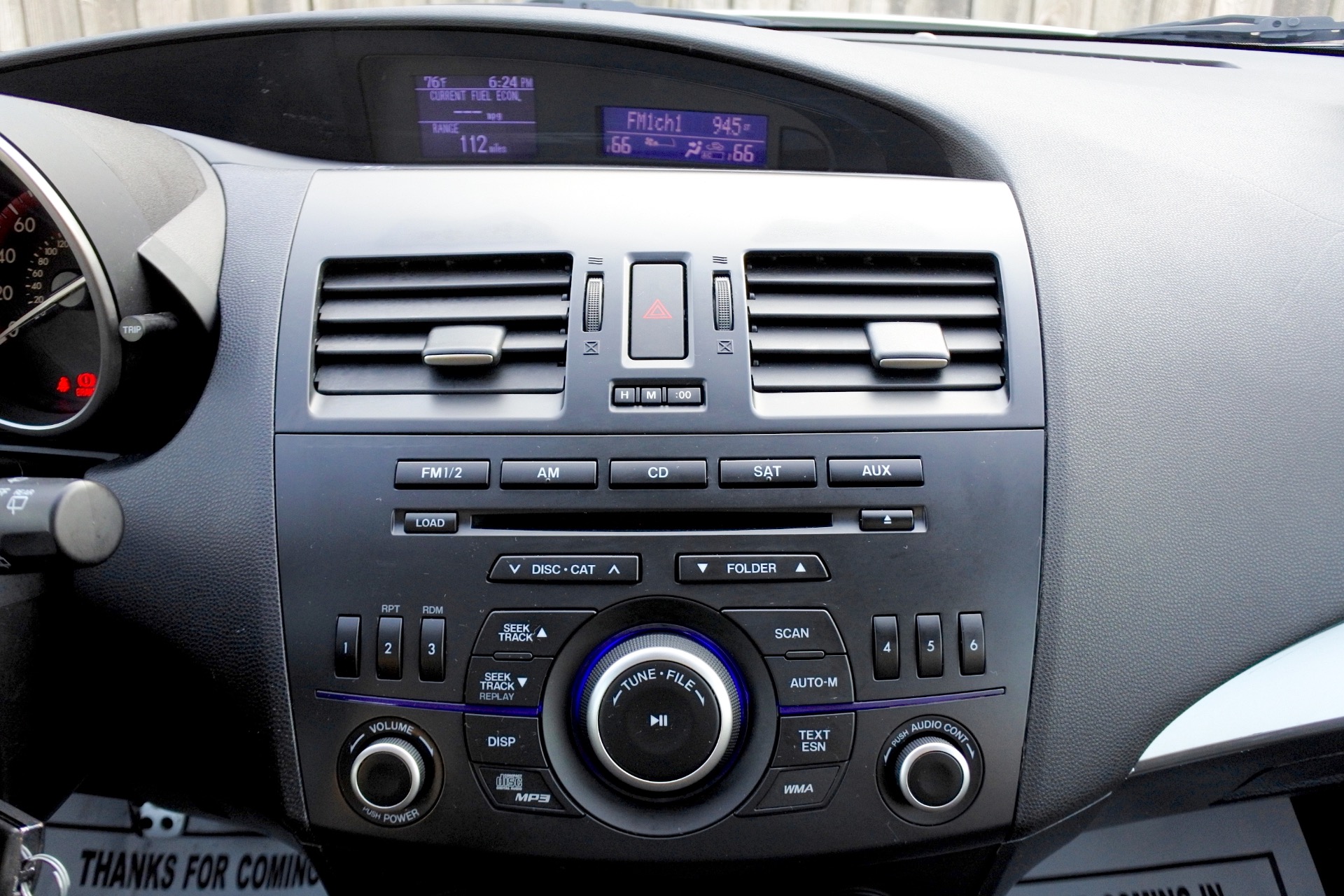
To pair your phone to a 2012 Mazda 3, press the Talk button on the steering wheel and say "Setup." Follow the voice prompts by saying "Pairing Options" and then "Pair." Locate "Mazda" on your phone's Bluetooth menu, enter the four-digit code provided by the car, and confirm the connection.
The 2012 Mazda 3 remains a staple of reliability and driver engagement in the compact car market. Even as we move through 2026, many of these vehicles are still on the road, often serving as dependable daily commuters or excellent first cars for new drivers. However, the technology of the early 2010s reflects a transitional period in automotive infotainment. Unlike modern capacitive touchscreens that mimic smartphone interfaces, the 2012 Mazda 3 relies heavily on a voice-activated "Hands-Free" system. Understanding the nuances of this system is essential for modern drivers who want to integrate their contemporary smartphones for calls and music streaming.
Understanding the 2012 Mazda 3 Bluetooth Architecture
Before attempting the pairing process, it is important to understand what hardware you are working with. In 2012, Mazda offered several different audio configurations for the Mazda 3 (the BL generation). The Bluetooth system is not a single unified interface across all trims; rather, it varies depending on whether your vehicle is equipped with the standard audio system, the Bose Premium Sound system, or the integrated TomTom-based navigation unit.
Most 2012 Mazda 3 models utilize a Bluetooth module located behind the dashboard that communicates with the driver primarily through voice synthesis and the steering wheel controls. This system supports two main profiles:
- HFP (Hands-Free Profile): Used for making and receiving phone calls.
- A2DP (Advanced Audio Distribution Profile): Used for streaming high-quality audio, such as music, podcasts, or GPS turn-by-turn directions.
One common point of confusion for owners is that the 2012 model year allows for up to seven different devices to be paired, but only one can be active at a time. If you are buying this car used in 2026, the previous owner’s device list is likely full, which will prevent you from adding your own device until the old ones are cleared.
Prerequisites for a Successful Pairing
For the Bluetooth pairing process to work without errors, several conditions must be met. The system is designed with safety lockouts to prevent pairing while the vehicle is in motion.
- Vehicle State: The car must be in Park (for automatic transmissions) or have the Parking Brake engaged (for manual transmissions). The ignition should be in the "ON" or "ACC" position, though it is often better to have the engine running to ensure a stable voltage supply to the Bluetooth module.
- Phone Visibility: Ensure your smartphone’s Bluetooth is turned on and that the device is in "Discovery Mode." On modern iOS and Android devices, simply staying on the Bluetooth settings screen usually keeps the device discoverable.
- Quiet Environment: Because the 2012 Mazda 3 uses voice recognition for the pairing process, excessive cabin noise from an open window, a loud AC fan, or passengers talking can cause the system to misinterpret your commands.
- Clear the Memory: If you have just purchased the vehicle, it is highly recommended to check if the pairing list is full. If the system tells you "Memory Full," you must delete a previous device before proceeding.
Detailed Voice-Command Pairing Process
The majority of 2012 Mazda 3 trims (i Touring, i Grand Touring, s Touring, s Grand Touring) use the voice-prompt method. Follow these steps precisely, as the system requires specific phrases to advance through the menus.
Step 1: Initialize the System
Locate the Talk button on the left side of your steering wheel. It usually looks like a silhouette of a person speaking. Press it once and wait for the system to emit a beep. Do not speak before the beep, as the microphone will not be active.
Step 2: Access the Setup Menu
After the beep, clearly say "Setup." The system will respond with a list of options such as "Pairing options, confirmation prompts, or select phone."
Step 3: Select Pairing Options
Wait for the system to finish speaking and beep again. Say "Pairing Options." The voice prompt will then ask if you want to pair a phone, delete a phone, or list paired phones.
Step 4: Initiate the Pairing Search
Say "Pair." The system will then provide a four-digit pairing code (the default is often "0000," but the car may generate a random sequence) and begin searching for a signal. At this point, the car is broadcasting its Bluetooth ID.
Step 5: Connect on Your Smartphone
On your phone, look for a device named "Mazda" or "Handsfree" in the list of available Bluetooth devices. Tap on it to connect. When prompted, enter the four-digit code that the car's voice system provided.
Step 6: Name the Device
Once the connection is established, the car will ask you to name the phone. Say a short, clear name like "My Phone" or your own name. This name is used only by the car’s internal voice system to identify which device to connect to in the future.
Step 7: Assign Priority (Optional)
The system may ask you to assign a priority level from one to seven. If this is your primary phone, assign it "Priority One." This ensures the car attempts to connect to your phone first if multiple paired devices are in the cabin at the same time.
Pairing via the Navigation Screen (If Equipped)
If your 2012 Mazda 3 is an s Grand Touring with the technology package, you likely have a small color display (MID) or a larger navigation screen. In these models, you can use the physical buttons on the dash to pair without voice commands.
- Press the MENU or CONFIG button on the center console.
- Use the selector knob to scroll to Bluetooth Settings and press the knob to select.
- Choose Add New Device or Pairing.
- The screen will display a PIN. Search for "Mazda" on your phone and enter that PIN.
- Confirm the connection on both the screen and your phone.
Bluetooth Compatibility and Audio Streaming (A2DP)
In 2012, Bluetooth audio streaming (listening to music wirelessly) was not always automatically linked to the "Phone" pairing. Some users find that they can make calls, but their music doesn't play through the car speakers.
To ensure audio streaming is active:
- Ensure the phone is paired as an "Audio Player" in addition to a "Phone."
- Press the AUX button on the dashboard repeatedly until the display shows "BT Audio."
- Check your phone’s Bluetooth settings for the "Mazda" connection and ensure that "Media Audio" or "A2DP" is toggled on.
| Feature | Standard Audio (i Sport) | Bluetooth Hands-Free (Touring) | Navigation Tech Package |
|---|---|---|---|
| Bluetooth Calls | Optional / Dealer Install | Standard | Standard |
| Audio Streaming | Not Standard | Standard | Standard |
| Control Method | Buttons Only | Voice + Steering Wheel | Color Screen + Knob |
| Device Limit | N/A | 7 Devices | 7 Devices |
| Visual Feedback | Head Unit Text | MID (Upper Dash) | 5.8-inch Color Display |
Troubleshooting Common Pairing Failures
Even with the correct steps, the 2012 system can be temperamental. Here are the most frequent issues and how to resolve them.
"System Busy" or Voice Recognition Errors
The 2012 Mazda 3 uses an older generation of voice processing. If the system says "System Busy" or doesn't recognize "Setup," wait 30 seconds and try again. Ensure the cabin is completely silent. Avoid using the voice system immediately after starting the car; wait for the system to fully boot up (about 10-15 seconds).
The "Memory Full" Error
As mentioned earlier, the system caps out at seven devices. If you cannot add a new phone, follow the "Setup" -> "Pairing Options" -> "Delete" path via voice commands to remove old profiles. You can also say "List Phones" to hear which slots are currently occupied.
Connection Drops or Stuttering Audio
If your phone is paired but the connection is unstable, it is often due to a "Bluetooth Handshake" error.
- Delete the pairing from both the car and the phone.
- Restart the phone.
- Re-pair from scratch. In the 2012 Mazda 3, the Bluetooth module (located behind the glovebox area) can sometimes experience software freezes. Disconnecting the car's negative battery terminal for 10 minutes can perform a "hard reset" of the module, which often resolves persistent connectivity issues.
Phone Book Not Syncing
The car may ask for permission to access your contacts via a pop-up on your smartphone screen. If you ignore this pop-up, you won't be able to use voice commands like "Call Mom." Always check your phone notifications immediately after the initial pairing to grant these permissions.
Modern Considerations for 2026
As of 2026, smartphone Bluetooth protocols (Bluetooth 5.3 and newer) are significantly more advanced than the Bluetooth 2.1 or 3.0 standards used in 2012. While Bluetooth is designed to be backward compatible, modern "Battery Optimization" settings on Android and iOS can sometimes put the Bluetooth radio to sleep, causing the Mazda system to lose the connection.
If you find that your 2012 Mazda 3 doesn't automatically reconnect when you get in the car, try disabling "Power Saving Mode" on your phone or marking the Mazda Bluetooth connection as a "Trusted Device" in your phone's security settings.
Frequently Asked Questions
Can I pair my phone while driving?
No. For safety reasons, the 2012 Mazda 3 disables the "Pairing Options" menu once the vehicle exceeds approximately 3-5 mph. You must be completely stopped with the parking brake engaged or the car in Park to access the pairing menu.
Why can I hear calls but my music won't play?
This usually happens because the phone is paired only for "Phone" services and not "Media" services. Go into your phone’s Bluetooth menu, find the Mazda connection, and ensure "Media Audio" is checked. Also, ensure the car's source is set to "BT Audio" by pressing the AUX button.
What is the default Bluetooth passcode?
The most common default passcode is 0000. However, during the pairing process, the vehicle’s voice system may generate a random four-digit code and announce it to you. You must use the specific code the car provides during that session.
How do I delete a previously paired phone?
Press the Talk button, say "Setup," then "Pairing Options," and then "Delete." The system will list the names of the paired phones. When you hear the name of the phone you wish to remove, say "Delete" again or "Yes" when prompted for confirmation.
Can I use Apple CarPlay or Android Auto in a 2012 Mazda 3?
The factory system in a 2012 Mazda 3 does not support Apple CarPlay or Android Auto. To get these features, you would need to install an aftermarket head unit. However, you can still achieve basic functionality like music streaming and hands-free calling through the native Bluetooth system.
Does the 2012 Mazda 3 support voice-to-text?
The 2012 system is primarily designed for voice-dialing and audio streaming. It does not have native support for reading or sending text messages. Most drivers in 2026 bypass this limitation by using their phone's native assistant (Siri or Google Assistant) while connected to the car's Bluetooth.
Practical Recommendation for Drivers
If you are struggling with the aging voice-command system, the most effective long-term solution for a 2012 Mazda 3 is to use a high-quality smartphone mount. Because the car lacks a modern navigation screen, keeping your phone visible allows you to use your phone's superior voice recognition (like Siri or Google) to handle navigation and messaging, while the Mazda's Bluetooth system handles the high-quality audio output through the speakers.
If the internal Bluetooth module has failed—a common issue in older Mazdas—consider a Bluetooth-to-Aux adapter. While this won't integrate with the steering wheel buttons, it provides a reliable bridge for music and calls without the need for expensive dashboard repairs.