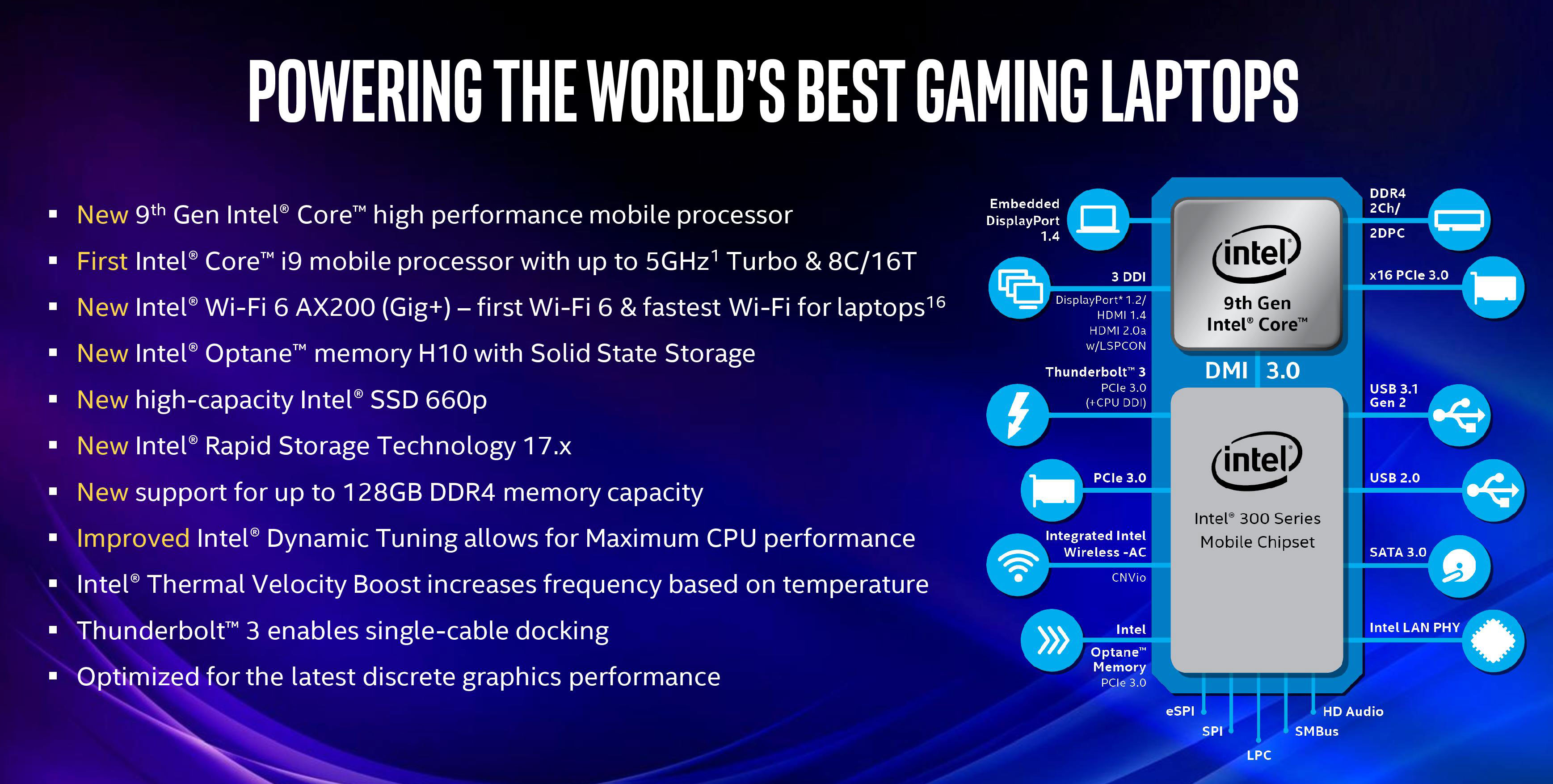
The Intel Core i7-9750H is a high-end, 9th-generation mobile processor featuring 6 cores and 12 threads, based on the Coffee Lake Refresh architecture. Released in 2019, it offers a base clock of 2.6 GHz and a maximum turbo boost of 4.5 GHz, serving as a reliable workhorse for legacy gaming and productivity laptops.
The Architecture of the Intel Core i7-9750H
To understand the 6 core Intel i7-9750H specs and performance, one must first examine the architecture that defines its capabilities. The i7-9750H belongs to the 9th Generation "Coffee Lake Refresh" family. This generation was a refined version of the previous 14nm++ process, representing one of the final peaks of Intel’s reliance on that specific lithography before transitioning to smaller nodes.
The "H" suffix in its name denotes high-performance graphics, but more importantly, it signifies a processor designed for mobile workstations and gaming laptops with a standard Thermal Design Power (TDP) of 45W. Unlike the "U" series processors found in thin-and-light ultrabooks, the i7-9750H was built to sustain higher clock speeds under heavy loads, provided the laptop's cooling solution could keep up.
Core Configuration and Hyper-Threading
The inclusion of 6 physical cores was a significant step for Intel in the late 2010s. For years, the mobile i7 lineup was capped at 4 cores. The jump to 6 cores and 12 threads (utilizing Intel Hyper-Threading Technology) allowed this chip to handle multi-threaded workloads with much greater efficiency than its predecessors. In 2026, while 14-core and 16-core mobile processors are common, the 6-core architecture of the i7-9750H still provides enough parallel processing power for standard office multitasking, web browsing, and light content creation.
Cache and Memory Support
The processor features 12 MB of Intel Smart Cache. Cache size is critical because it allows the CPU to access frequently used data at lightning speeds, reducing the time the processor spends waiting for the system RAM. The i7-9750H supports DDR4 memory at speeds up to 2666 MHz. While modern 2026 systems utilize DDR5-5600 or higher, the DDR4-2666 interface remains functional for most applications, although it does introduce a bottleneck in memory-intensive tasks like high-resolution video editing or complex 3D rendering compared to contemporary standards.
Detailed Technical Specifications
Understanding the raw numbers is essential for assessing the longevity of a system powered by this CPU. The following table outlines the foundational specifications of the i7-9750H.
| Specification | Details |
|---|---|
| Generation | 9th Gen (Coffee Lake Refresh) |
| Cores / Threads | 6 Cores / 12 Threads |
| Base Clock Speed | 2.60 GHz |
| Max Turbo Frequency | 4.50 GHz |
| L3 Cache | 12 MB Intel Smart Cache |
| TDP (Thermal Design Power) | 45 Watts |
| Configurable TDP-down | 35 Watts |
| Lithography | 14nm++ |
| Max Memory Capacity | 128 GB |
| Memory Type | DDR4-2666, LPDDR3-2133 |
| Integrated Graphics | Intel UHD Graphics 630 |
| PCI Express Revision | 3.0 |
Performance Analysis: Productivity and Gaming
When evaluating the 6 core Intel i7-9750H specs and performance in 2026, we have to look at how it bridges the gap between legacy hardware and modern software requirements.
Multi-Core Productivity
In its prime, the i7-9750H was a top-tier choice for video editors and software developers. With 12 threads, it handles multi-tasking across several applications—such as running a browser with dozens of tabs, a coding IDE, and a communications suite like Slack or Discord—without significant stuttering. In 2026, it remains a "capable" chip for 1080p video editing in Adobe Premiere Pro or DaVinci Resolve, though 4K timelines will likely see significant frame drops during playback unless proxy files are used.
Single-Core Performance and Snappiness
Single-core performance is what makes a computer feel "snappy" during everyday use. With a turbo boost of 4.5 GHz, the i7-9750H is no slouch. However, compared to the IPC (Instructions Per Clock) improvements seen in 12th through 14th Gen Intel chips, the 9750H requires more energy and generates more heat to achieve the same result as a modern entry-level i5. In 2026, users may notice that complex websites or heavy JavaScript applications take a few seconds longer to load than on a current-gen machine.
Gaming Capabilities
The i7-9750H was typically paired with NVIDIA GeForce GTX 16-series or RTX 20-series GPUs. In the current 2026 gaming landscape, the CPU is rarely the absolute bottleneck for 1080p gaming at medium settings. However, it does lack support for the latest instruction sets that optimize modern game engines.
- eSports Titles: Games like Counter-Strike 2, League of Legends, and Valorant run exceptionally well, often exceeding 144 FPS if paired with a decent GPU.
- AAA Titles: For modern 2024-2026 AAA releases, the i7-9750H will show its age. You may experience lower 1% low frame rates, leading to occasional stuttering in open-world environments where the CPU must track numerous NPCs and physics objects simultaneously.
Power Consumption and Thermal Challenges
One of the most discussed aspects of the 6 core Intel i7-9750H specs and performance is its thermal profile. The 14nm++ process was pushed to its absolute limits with this chip.
Thermal Throttling
Many laptops equipped with the i7-9750H, especially "thin and light" gaming models, struggled with heat. When all 6 cores are engaged at high frequencies, the chip quickly reaches its 100°C T-junction limit. Once this limit is hit, the processor automatically reduces its clock speed to prevent damage—a process known as thermal throttling. This can lead to a sudden drop in performance during long gaming sessions or extended video renders.
Undervolting and Optimization
Because of these thermal characteristics, the i7-9750H became a favorite for enthusiasts who use tools like Throttlestop or Intel Extreme Tuning Utility (XTU). By "undervolting"—reducing the voltage sent to the CPU without changing the clock speed—users can often reduce temperatures by 10-15°C, allowing the chip to maintain its 4.5 GHz turbo boost for much longer periods. If you are using this processor in 2026, undervolting is highly recommended to extend the hardware's lifespan and maintain consistent performance.
Integrated Graphics: Intel UHD 630
The i7-9750H includes Intel UHD Graphics 630. By 2026 standards, this integrated GPU is essentially a display adapter rather than a performance component.
- Primary Use: Handling Windows desktop operations, video playback (supporting 4K at 60Hz), and driving multiple external monitors.
- Limitations: It is not capable of running modern 3D games. It lacks the execution units found in newer Intel Iris Xe or Arc integrated graphics.
- Codec Support: It supports Intel Quick Sync Video, which helps with hardware-accelerated encoding and decoding of H.264 and HEVC video, a saving grace for budget video editing setups.
Longevity and Compatibility in 2026
As we navigate 2026, the question of software compatibility is paramount. The i7-9750H is fully compatible with Windows 11, as it meets the TPM 2.0 and secure boot requirements.
Windows 12 and Beyond
While Windows 11 runs smoothly, the rumored or newly released Windows 12 features heavily rely on AI-driven tasks that utilize NPUs (Neural Processing Units). The i7-9750H lacks a dedicated NPU. While it can still run these operating systems, the AI-specific features (such as real-time system-wide translation or advanced background blur) will fall back on the CPU and GPU, which may lead to higher power consumption and slower response times compared to "AI PCs" of the 2025-2026 era.
Physical Degradation and Maintenance
For a processor that has likely been in service since 2019 or 2020, the surrounding components are more likely to fail than the silicon itself. In 2026, if you are looking to maintain the performance of an i7-9750H system, you must consider:
- Thermal Paste: The original thermal compound has likely dried out. Replacing it with a high-quality paste (like Kryonaut or Arctic MX-6) can restore lost performance.
- Dust Accumulation: Cleaning the laptop fans is essential to prevent the thermal throttling mentioned earlier.
- Battery Health: Most laptops from this era will require a third or fourth battery replacement by now to maintain any level of portability.
Comparison: i7-9750H vs. Modern Alternatives
To provide perspective on where this 6-core chip stands today, it is helpful to compare it against a modern entry-level mobile processor from 2024-2026, such as a hypothetical 14th Gen i5 or a Core Ultra 5.
- IPC Gains: A 2026-era Core Ultra 5 might have similar clock speeds but can perform 30-40% more instructions per cycle. This means a modern 4-core chip could potentially outperform the 6-core i7-9750H in many tasks.
- Efficiency: Modern chips are built on much smaller process nodes (Intel 4 or TSMC 3nm), meaning they provide significantly better performance-per-watt. The i7-9750H is a "power-hungry" chip by current standards.
- Connectivity: The i7-9750H is limited to PCIe 3.0. Modern systems use PCIe 5.0, allowing for much faster NVMe SSD speeds. While a PCIe 3.0 SSD is still fast, it cannot reach the 10,000+ MB/s transfer rates seen in 2026 storage solutions.
Common Troubleshooting and Optimization
If you are experiencing sluggishness with your i7-9750H in 2026, follow these steps:
- Check Power Plans: Ensure the Windows Power Plan is set to "Balanced" or "High Performance." Sometimes, firmware updates default these to "Power Saver," which aggressively clocks down the 9750H.
- Monitor Background Processes: Because it "only" has 6 cores, modern background agents (anti-virus, cloud syncing, update managers) can consume a larger percentage of total resources than they did five years ago.
- BIOS Updates: Check the manufacturer's website (Dell, MSI, ASUS, etc.) for the latest BIOS. Late-stage updates for these motherboards often included microcode fixes for security vulnerabilities like Spectre or Meltdown, though these can sometimes slightly decrease performance in exchange for security.
Frequently Asked Questions
Is the Intel i7-9750H good for gaming in 2026?
Yes, it remains a viable option for 1080p gaming, especially for eSports titles and older AAA games. However, it may struggle with the latest 2025 and 2026 releases that are optimized for high core counts and newer instruction sets. Pair it with at least 16GB of RAM to ensure the CPU isn't waiting on the swap file.
How many cores does the i7-9750H have?
The i7-9750H features 6 physical cores and 12 threads. This was a significant increase from the 4-core standard of earlier generations and allows it to remain relevant for multi-tasking even in 2026.
Does the i7-9750H support Windows 11 and 12?
Yes, the i7-9750H is on the official Intel and Microsoft compatibility list for Windows 11. It includes the necessary security features like TPM 2.0. While Windows 12 (or subsequent updates) may place higher demands on AI hardware, the 9750H's fundamental architecture is supported.
Why does my i7-9750H get so hot?
This chip uses the 14nm++ process and has a 45W TDP, which can peak much higher during Turbo Boost. Many laptops from the 2019-2021 era had cooling systems that were barely sufficient. Over time, dust and dried thermal paste exacerbate this issue. Undervolting and physical cleaning are the best solutions.
Is it worth buying a used laptop with an i7-9750H in 2026?
It is a "budget" choice in 2026. If the price is significantly lower than a modern i5 or Ryzen 5 laptop, it can be a great value for students or general office work. However, for professional video editing or high-end gaming, you would be better served by a newer architecture that offers better efficiency and modern features like WiFi 7 and Thunderbolt 4/5.
Practical Recommendation
If you currently own a laptop with an Intel i7-9750H, there is no urgent need to upgrade for general productivity or moderate gaming. To maximize its remaining lifespan, perform a clean install of your OS, replace the thermal paste, and upgrade the RAM to 32GB if your motherboard supports it. This will alleviate many of the bottlenecks introduced by modern software.
For those looking to purchase a used device, the i7-9750H is a solid "legacy" choice that offers a stable, well-understood performance profile. Just be aware of the thermal limitations and the lack of modern AI-acceleration hardware, which will become increasingly relevant as we move further into the late 2020s.