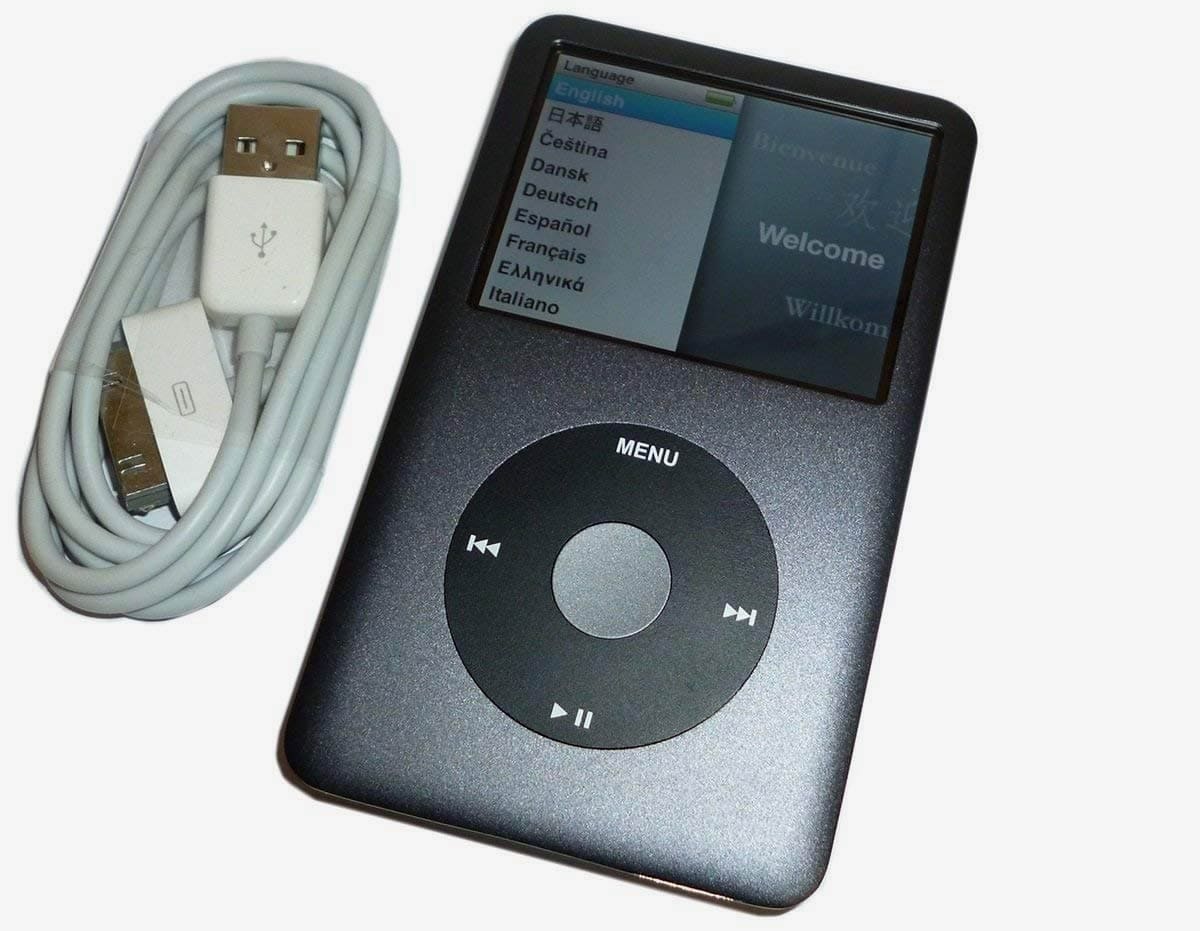
The 1TB iPod Classic is a custom-modified version of Apple’s iconic portable media player, retrofitted with modern flash storage to replace the original mechanical hard drive. By 2026, these devices have transitioned from nostalgic relics to high-end tools for audiophiles who prioritize local file ownership, distraction-free listening, and massive storage capacities that far exceed the original factory limit of 160GB.
Expanding an iPod Classic to 1TB is more than a simple storage upgrade; it is a comprehensive overhaul of the device’s architecture. This modification allows users to carry entire libraries of lossless audio—such as ALAC, FLAC, or AIFF—without the constraints of cloud subscriptions or cellular data requirements. However, achieving a stable 1TB build requires specific hardware revisions and an understanding of the device's logical limitations.
The Evolution of the 1TB iPod Classic
The concept of the "Super Pod" began shortly after Apple discontinued the iPod Classic in 2014. Initially, enthusiasts used 1.8-inch Solid State Drives (SSDs), but these were prone to overheating and high power consumption. The breakthrough came with the development of specialized adapters, most notably from Tarkan Akdam (iFlash), which allowed the use of SDHC and microSDXC cards via the iPod's ZIF (Zero Insertion Force) connector.
By 2026, the 1TB threshold has become the "sweet spot" for collectors. While 2TB and even 4TB builds are technically possible, 1TB offers the best balance between storage volume, database stability, and cost-effectiveness. In an era where streaming services frequently remove albums due to licensing disputes, the 1TB iPod represents a permanent, offline sanctuary for a lifetime of music.
Critical Hardware Prerequisites: The Logic Board Factor
Not every iPod Classic can support a 1TB upgrade. The most significant bottleneck is not the physical space inside the chassis, but the Random Access Memory (RAM) soldered onto the logic board. The iPod uses this RAM to index the music database; if the database exceeds the RAM's capacity, the device will become unstable, crash, or fail to boot.
The 7th Generation (Late 2009) Advantage
The 7th Generation iPod Classic (specifically the 160GB "Thin" model) is the gold standard for 1TB builds. It features a logic board with 64MB of RAM, which is sufficient to handle the metadata for approximately 50,000 tracks. Furthermore, this model does not suffer from the "128GB Limit" found in its predecessors.
The 6th Generation Limitation
The 6th and 6.5th Generation models (80GB, 120GB, and the 160GB "Thick" version) are restricted by their firmware to only recognize up to 128GB of storage when using the stock Apple operating system. To bypass this on a 6th Gen device and reach 1TB, users must install third-party firmware like Rockbox.
The 5.5 Generation (iPod Video) Alternative
The 5th and 5.5th Generation iPods are also popular for 1TB mods. The 80GB version of the 5.5 Generation features the same 64MB of RAM as the 7th Gen and is famous for its Wolfson DAC (Digital-to-Analog Converter), which many audiophiles believe provides a "warmer" and more "analog" sound signature compared to the Cirrus Logic DAC found in later models.
Flash Storage Technologies: SD vs. microSD vs. SSD
Choosing the storage medium is the most important decision in a 1TB build. The mechanical hard drives originally used in these devices were slow, fragile, and power-hungry. Modern flash storage solves all three issues.
- SDXC and microSDXC Adapters: This is the most common method. Using an adapter like the iFlash-Quad, you can install four 256GB microSD cards to reach 1TB. This configuration is incredibly power-efficient, extending battery life significantly beyond original specifications.
- M.2 and mSATA SSDs: While these were popular in the early days of modding, they have largely been phased out for 1TB builds. SSDs generate significant heat inside the cramped iPod casing and drain the battery much faster than SD cards.
- CF (CompactFlash) Cards: These are highly reliable but generally more expensive and lack the density required to reach 1TB affordably.
| Feature | Original HDD (160GB) | 1TB Flash Upgrade (SD/microSD) |
|---|---|---|
| Storage Capacity | 160 GB | 1,000 GB (1 TB) |
| Weight | ~140g - 160g | ~110g - 120g (Lighter) |
| Battery Life | 30-40 Hours | 100+ Hours (with battery mod) |
| Shock Resistance | Low (Mechanical parts) | High (Solid state) |
| Sync Speed | Slow (USB 2.0 / HDD) | Improved (Limited by 30-pin bus) |
| Track Limit | ~40,000 | ~50,000 (Stock) / Unlimited (Rockbox) |
Software and Library Management
A 1TB iPod presents unique challenges for software. With a potential library of 1,000GB, the default Apple firmware (the "Stock OS") begins to struggle with the sheer volume of data.
The iTunes/Apple Music Limitation
When using the stock firmware, the iPod must "parse" the library every time it boots or disconnects from a computer. For a 1TB library, this can take several minutes. Additionally, the metadata (artist names, album titles, and especially album art) takes up RAM. If you use high-resolution album art for 40,000 songs, you may hit the RAM limit before you hit the 1TB storage limit.
Rockbox: The Power User Choice
Rockbox is an open-source firmware that replaces or sits alongside the original Apple software. For a 1TB build, Rockbox is highly recommended because:
- No Database Limit: It does not rely on RAM for the entire database index, allowing you to exceed the 50,000-track barrier.
- File Format Support: It natively plays FLAC, OGG, and other formats that iTunes does not support.
- Customization: It offers advanced EQ settings, themes, and even games.
The Physical Build: Beyond Storage
A 1TB iPod Classic overview is incomplete without discussing the secondary modifications that usually accompany a storage upgrade. Since the device must be opened anyway—a difficult process involving metal prying tools—most builders perform several other upgrades simultaneously.
Battery Upgrades
Removing the thick mechanical hard drive creates a significant amount of empty space inside the chassis. Builders often fill this space with "extended" batteries. While the original battery was approximately 580mAh to 850mAh, modern custom batteries can range from 2000mAh to 3000mAh. When paired with the low power draw of SD cards, a 1TB iPod can provide over 100 hours of continuous playback.
Aesthetic Customization
The aftermarket for iPod parts in 2026 is robust. It is now possible to replace every exterior component.
- Transparent Faceplates: Clear plastic fronts that show off the internal storage adapters.
- Thick/Thin Backplates: Custom-engraved backplates that correctly state "1TB" instead of the original capacity.
- Colors: Anodized aluminum faceplates in colors Apple never offered, such as purple, matte black, or gold.
The Taptic Engine Mod
One of the most popular "luxury" mods for the 1TB iPod is the removal of the original piezo clicker (the tiny speaker that makes the "click" sound). It is replaced with a Taptic Engine salvaged from an iPhone. This provides haptic feedback through the click wheel, making the 20-year-old interface feel modern and premium.
Cost Considerations and Market Value in 2026
Building or buying a 1TB iPod Classic is a significant investment. As of 2026, the price of "unmodified" iPod Classics has stabilized as they are now considered vintage collectibles.
- DIY Route: An used 7th Gen iPod ($80-$120), a 1TB iFlash adapter kit ($40-$60), four 256GB microSD cards ($80-$100), and a new battery ($20). Total: ~$220 - $300.
- Pre-Built Professional Mod: Specialized vendors sell refurbished, "boxed" 1TB units with all the upgrades (Taptic engine, 3000mAh battery, custom colors). These typically retail for $450 to $650 depending on the quality of the components and the warranty provided.
Challenges and Troubleshooting
Despite the benefits, a 1TB iPod is a "hacker" device and can be finicky.
- Opening the Case: The 6th and 7th Gen iPods are notorious for being the hardest Apple products to open. The metal clips are easily bent, and the ribbon cables for the battery and hold switch are fragile.
- SD Card Compatibility: The iPod is picky about flash memory. Using "generic" or unbranded microSD cards often leads to corruption or the "Red X" error. SanDisk and Samsung cards are generally the most reliable for these builds.
- Formatting: The storage must be formatted to FAT32. Windows natively struggles to format drives larger than 32GB to FAT32, requiring third-party tools like GUIFormat or Rufus to prepare the 1TB volume.
Frequently Asked Questions
Can I sync a 1TB iPod with modern versions of macOS or Windows?
Yes. In 2026, the 1TB iPod Classic still appears as a standard device in the Finder (on macOS) or the Apple Devices app (on Windows). If you are using Rockbox, you can also set the device to "USB Mass Storage" mode and simply drag and drop files onto the drive like a standard USB stick.
Does a 1TB iPod support Bluetooth?
Not natively. However, many 1TB builds include an internal Bluetooth 5.0 or 5.2 transmitter mod. These are soldered to the logic board and allow the iPod to pair with modern wireless headphones. Without this mod, you must use the 3.5mm headphone jack or an external 30-pin Bluetooth adapter.
Will 1TB of music slow down the user interface?
If you use the stock Apple firmware, you will notice a slight delay when waking the device or navigating very large menus, as the iPod has to access the database. If you use Rockbox, the interface remains snappy regardless of the library size because of how it handles file caching.
Is the 1TB iPod Classic better than a modern DAP?
It depends on your needs. Modern Digital Audio Players (DAPs) from companies like FiiO or Astell&Kern offer better native support for high-res codecs, balanced outputs, and Wi-Fi. However, the iPod Classic offers a legendary user interface (the Click Wheel), vastly superior battery life, and a more durable, repairable design.
How many songs can actually fit on 1TB?
If you are using standard 256kbps AAC or MP3 files, you could fit approximately 200,000 to 250,000 songs. However, since the iPod's RAM can only index about 50,000, most 1TB users fill their space with ALAC (Apple Lossless) files. At lossless quality, 1TB holds roughly 30,000 to 40,000 tracks—fitting perfectly within the hardware's indexing limits.
Summary and Recommendation
The 1TB iPod Classic is the pinnacle of the "retro-tech" movement. It solves the primary complaint of the original hardware—storage capacity and battery life—while retaining the tactile satisfaction of the physical click wheel.
For the best experience, aim for a 7th Generation 160GB (Thin) base model. Use an iFlash-Quad adapter with high-quality microSD cards and consider a battery upgrade to ensure the device can handle the massive library. If you plan to exceed 50,000 tracks or want to use FLAC files, installing Rockbox is essential. While the initial cost and effort are high, the result is a distraction-free, high-fidelity music vault that remains functional and relevant even in 2026.