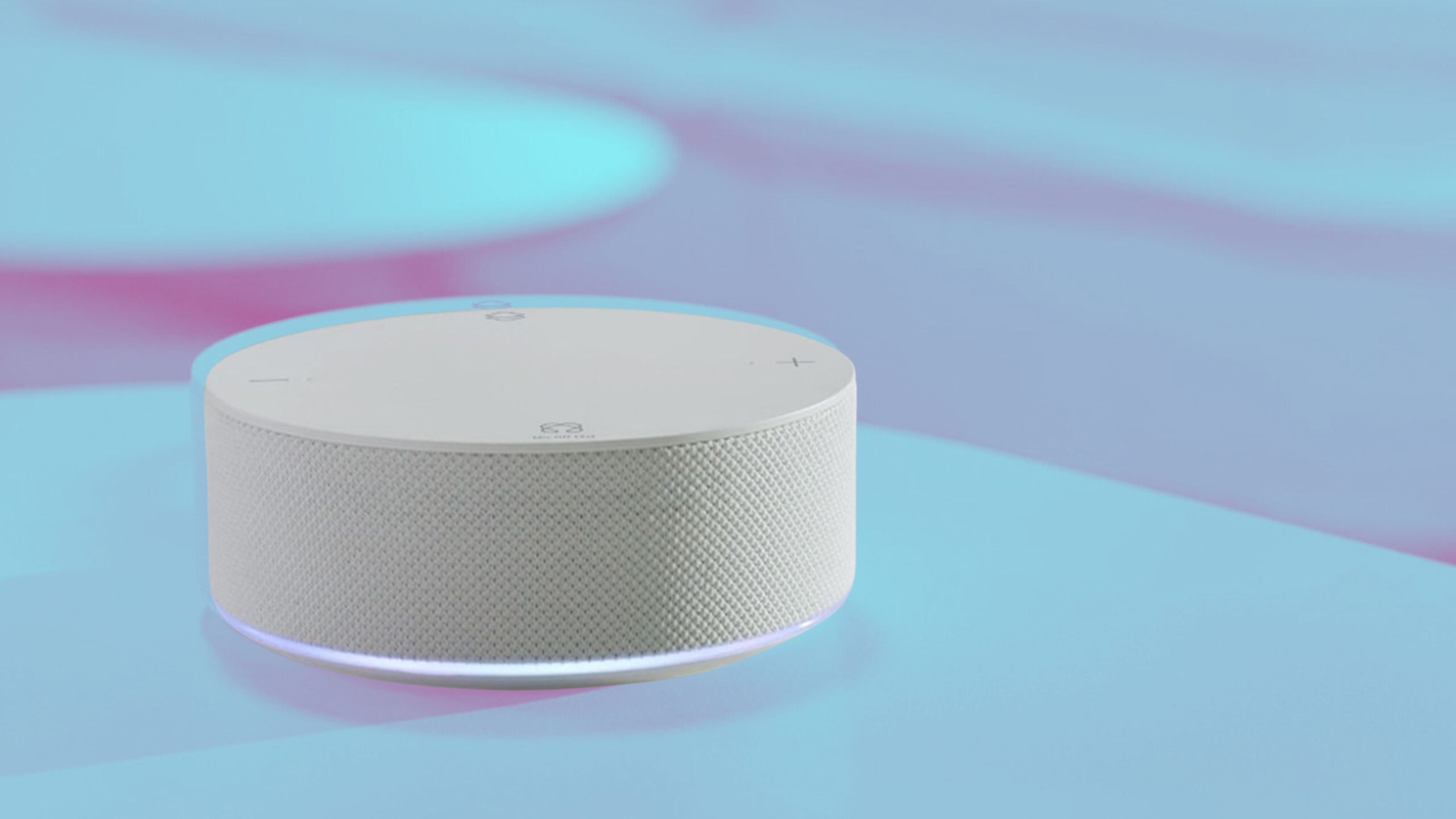
The Jax S8 Smart Hub serves as a centralized control interface for modern home automation ecosystems, designed to bridge various wireless communication protocols and streamline device management. It empowers users to coordinate lighting, climate control, security sensors, and entertainment systems through a single, cohesive hardware and software gateway.
Introduction to the Jax S8 Smart Hub
Modern smart home ecosystems have evolved from isolated, single-brand app controllers into intricate, interconnected networks. As homeowners adopt smart bulbs, automated locks, security cameras, and environmental monitors from dozens of different manufacturers, managing these disparate appliances can quickly become overwhelming. The Jax S8 Smart Hub addresses this fragmentation by acting as a central nervous system for residential automation. Designed with broad protocol compatibility and a robust local processing architecture, it minimizes latency and reliance on cloud-dependent servers, offering a resilient solution for both novice users and advanced automation enthusiasts.
Understanding the layout, technical capabilities, and operational requirements of the Jax S8 Smart Hub is essential for anyone looking to build a stable, scalable smart home network. This overview details the fundamental features, protocol support, hardware architecture, installation prerequisites, and potential limitations of the S8 to help you determine how it fits into your home automation strategy.
Core Architectural and Design Features
At first glance, the Jax S8 Smart Hub presents a sleek, minimalist aesthetic designed to blend unobtrusively into modern living spaces. Unlike bulky enterprise-grade networking gear or older automation controllers that required dedicated server racks, the S8 is engineered for desktop placement or wall mounting in a central household location.
Physical Build and Interface Options
The hardware design prioritizes both passive cooling and reliable connectivity. Constructed from durable, flame-retardant polymers, the chassis houses an array of internal transceivers and a multi-core processor capable of handling concurrent automation routines.
- Connectivity Ports: The rear panel typically features a Gigabit Ethernet port for high-speed wired backhaul, USB ports for external storage or peripheral expansion, and a DC power input.
- Visual Indicators: A subtle, dimmable LED status light ring or indicator panel provides clear feedback regarding network connection status, pairing modes, and system health without creating intrusive light pollution in dark rooms.
- Audio and Tactile Controls: Depending on the specific hardware revision, some models include integrated speakers for voice prompts or chime notifications, alongside a physical multi-function button for factory resets or emergency pairing triggers.
Internal Processing and Storage
To execute complex automation scripts and local rule engines without lag, the Jax S8 Smart Hub relies on a capable system-on-chip (SoC) architecture paired with ample RAM and internal flash storage. This local processing power ensures that routine automations—such as turning on a hallway light when a motion sensor triggers—execute in milliseconds, entirely independent of internet connectivity or external cloud availability.
Supported Protocols and Connectivity Standards
The primary strength of any smart hub lies in its ability to translate and unify different communication languages. The Jax S8 Smart Hub supports a comprehensive suite of wireless and wired protocols, making it a versatile choice for multi-vendor ecosystems.
Wireless Protocols
Smart home devices communicate using various radio frequencies and mesh topologies. The S8 bridges these technologies seamlessly:
- Zigbee: Providing a low-power, self-healing mesh network, Zigbee support allows the hub to connect dozens of sensors, switches, and smart bulbs efficiently without clogging the home Wi-Fi network.
- Z-Wave: Operating on lower sub-GHz frequencies (varying by regional regulatory standards), Z-Wave offers exceptional range and resistance to interference from household Wi-Fi routers and Bluetooth devices.
- Wi-Fi and Bluetooth: Dual-band Wi-Fi connectivity allows the hub to link directly to the home router, while Bluetooth Low Energy (BLE) facilitates rapid device discovery and initial provisioning during setup.
- Thread and Matter: Modern iterations of the hub incorporate support for emerging standards like Thread and Matter, ensuring forward-compatibility with next-generation smart home appliances across competing technology giants.
Wired Integration
While wireless convenience drives smart home adoption, mission-critical systems often benefit from wired reliability. The inclusion of local network bridging ensures that IP-enabled cameras, network-attached storage, and hardwired automation panels can integrate smoothly into the S8's management dashboard.
Technical Specifications Comparison
To better understand where the Jax S8 Smart Hub positions itself in the broader home automation market, examining its core specifications alongside standard industry benchmarks is helpful. The table below outlines key technical parameters.
| Feature / Specification | Jax S8 Smart Hub | Typical Entry-Level Hub | Advanced Custom Controller |
|---|---|---|---|
| Primary Processor | Multi-core ARM Cortex | Single-core Low Power | Quad-Core Enterprise Grade |
| RAM & Storage | 2GB RAM / 16GB eMMC | 512MB RAM / 4GB eMMC | 4GB+ RAM / 32GB+ Storage |
| Zigbee / Z-Wave Support | Native Dual-Radio | Often Single-Radio or Optional | Extensive Modular Expansion |
| Local Processing | Full Local Automation Engine | Cloud-Dependent / Hybrid | Fully Local / Docker Support |
| Matter / Thread Ready | Yes (Built-in Transceivers) | Varies by Model / Firmware | Optional via USB Dongles |
| Wired Network | Gigabit Ethernet Port | 100Mbps Ethernet or Wi-Fi Only | Dual Gigabit Ethernet |
Software Ecosystem and User Interface
Hardware is only as effective as the software driving it. The Jax S8 Smart Hub runs a customized, Linux-based operating system optimized for real-time event processing and security.
Dashboard Customization and Control Apps
Users interact with the S8 primarily through a companion mobile application available for iOS and Android, as well as a responsive web-based management console for advanced desktop configuration. The user interface allows homeowners to organize devices by room, floor, or functional category (e.g., Lighting, Climate, Security).
- Scene Creation: Users can group multiple actions into a single command, such as a "Movie Night" scene that dims living room lights, lowers motorized blinds, and powers on the AV receiver.
- Automated Routines: Advanced conditional logic (If-This-Then-That statements, time-based triggers, geo-fencing, and sensor-driven events) allows for deeply customized home behavior.
- User Access Control: Administrators can assign different permission levels to family members or guests, restricting access to security arming controls or sensitive smart locks.
Privacy and Local Data Management
In an era where cloud data leaks and subscription fatigue frustrate consumers, the Jax S8 Smart Hub emphasizes local data privacy. Telemetry data, camera feeds (where supported by local storage setups), and automation logs remain stored on the local device rather than being perpetually routed through third-party servers. This architecture ensures uninterrupted operation during internet outages and safeguards personal data against external cloud breaches.
Installation, Prerequisites, and Setup Workflow
Deploying the Jax S8 Smart Hub requires careful planning to ensure optimal wireless coverage and network stability. Before unboxing the unit, review the following requirements and step-by-step initialization sequence.
Prerequisites for Deployment
- Stable Internet Connection: A reliable broadband router with an available LAN port for initial setup and firmware updates.
- Smartphone or Tablet: A mobile device running a compatible iOS or Android version with Bluetooth enabled for initial device pairing.
- Central Physical Location: A centralized spot in the residence—ideally equidistant from heavy clusters of smart devices—to maximize Zigbee and Z-Wave mesh propagation.
- Power Source: Uninterrupted access to a standard electrical outlet, preferably protected by an uninterruptible power supply (UPS) to maintain security automation during brief power fluctuations.
Step-by-Step Setup Workflow
- Unbox and Connect: Plug the power adapter into the S8 Hub and connect an Ethernet cable from the hub directly to your home Wi-Fi router.
- Download Companion App: Install the official management application from the Apple App Store or Google Play Store onto your mobile device.
- Initiate Pairing: Open the app, create or log into your administrator account, and follow the on-screen prompts to discover the new hub via local network scanning or QR code scanning.
- Update Firmware: Allow the hub to check for and install the latest firmware updates to ensure optimal security and protocol stability.
- Add Peripherals: Begin pairing your smart sensors, bulbs, and switches room by room, testing each device’s response time and signal strength before finalizing its physical installation.
Operational Limitations and Potential Challenges
While the Jax S8 Smart Hub offers a robust feature set, prospective buyers should remain aware of potential limitations that come with advanced automation hubs.
- Learning Curve: Unlike plug-and-play consumer smart plugs that operate instantly out of the box, configuring advanced routines, conditional logic, and multi-protocol bridges on the S8 requires patience and a basic understanding of smart home networking principles.
- Mesh Interference: Zigbee and Z-Wave networks operate on the 2.4 GHz spectrum or regional sub-GHz bands. Poor placement near heavy appliances, thick concrete walls, or congested Wi-Fi channels can degrade mesh performance, requiring the strategic addition of repeating nodes (such as plugged-in smart switches).
- Ecosystem Compatibility: While the hub supports a vast array of devices through official integrations and community-developed plugins, niche proprietary ecosystems may require specialized gateways or workarounds to interface smoothly.
Frequently Asked Questions
Does the Jax S8 Smart Hub require an active internet connection to function?
No, core local automations, schedule triggers, and direct device-to-device commands executed within the local network continue to operate normally during an internet outage. However, an internet connection is required for initial setup, firmware updates, remote access away from home, and third-party cloud-based integrations like voice assistants.
Can the Jax S8 integrate with popular voice control platforms?
Yes, the hub is designed to bridge with major voice ecosystems, allowing users to control connected peripherals using voice commands through compatible smart speakers and assistants, subject to proper account linking and local network configuration.
How many devices can a single Jax S8 Smart Hub manage?
Device capacity depends heavily on the communication protocol used. Zigbee and Z-Wave mesh networks typically support up to several dozen direct nodes, with total network capacity expanding significantly when routing devices (like mains-powered switches) are added to strengthen the mesh.
Is professional installation required to set up the S8 Hub?
The hub is engineered for consumer-friendly deployment and does not strictly require professional installation. However, homeowners configuring complex multi-system integrations, enterprise-grade networking rules, or extensive hardwired sensor arrays may benefit from professional smart home consulting.
What happens if the hub loses power?
Upon power restoration, the Jax S8 Smart Hub automatically reboots, re-establishes local network connectivity, and resumes all pre-programmed automation routines. Utilizing an entry-level uninterruptible power supply (UPS) is recommended to protect the internal storage drive and keep security sensors active during short blackouts.
Conclusion and Next Actions
The Jax S8 Smart Hub represents a powerful, privacy-focused solution for unifying fragmented smart home devices under a single, cohesive control layer. By supporting multiple wireless protocols, prioritizing local data processing, and offering extensive automation flexibility, it bridges the gap between simple consumer gadgets and professional home automation systems.
To take the next step, evaluate your current smart home inventory to verify protocol compatibility, assess your home's central networking layout, and ensure you have the necessary mobile tools ready for a seamless deployment. Reviewing manufacturer documentation and community forums can also provide tailored insights for integrating specific legacy devices into your new S8-powered ecosystem.