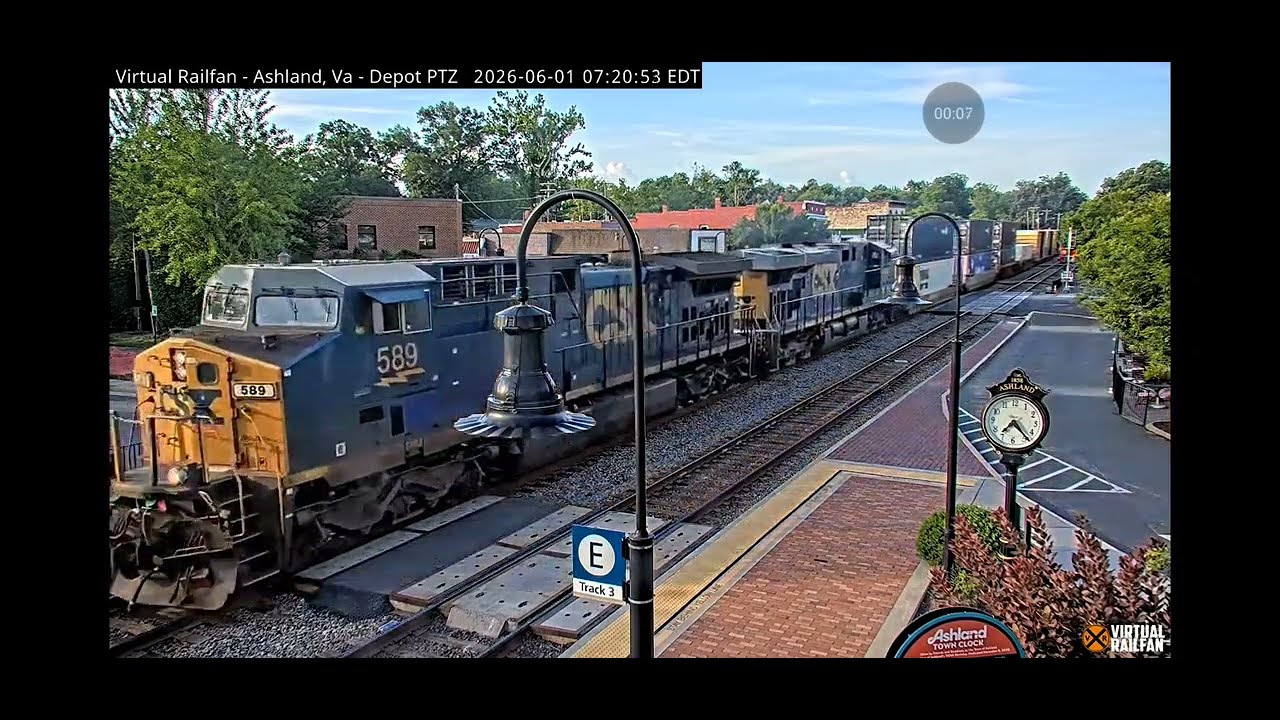
The Ashland virtual railfan experience offers remote rail enthusiasts live, high-definition camera feeds of busy rail corridors, most notably centering around Ashland, Virginia, through dedicated streaming services like Virtual Railfan. Viewers can observe live train movements, listen to synchronized railroad radio communications, and engage with an online community of train watchers from anywhere in the world.
Understanding the Ashland Virtual Railfan Phenomenon
For decades, railfanning—the hobby of tracking, photographing, and observing locomotives and trains—required enthusiasts to stake out physical locations near active tracks. Popular towns with heavy freight and passenger traffic, such as Ashland, Virginia, historically drew crowds of railfans equipped with lawn chairs, cameras, and radio scanners. The advent of high-speed internet, remote pan-tilt-zoom (PTZ) camera technology, and dedicated streaming platforms transformed this pastime. The Ashland virtual railfan experience brings these high-traffic rail junctions directly to computer and mobile screens.
Ashland, Virginia, holds legendary status in the railroading community. The town features a unique configuration where the CSX Transportation tracks run directly down the center of railroad-themed Hanover Avenue, acting as a functional main street. Amtrak passenger trains and heavily laden CSX freight consists roll right through the heart of the historic downtown district, flanked by local shops and Randolph-Macon College. Because of this picturesque and active layout, Ashland became one of the prime locations for round-the-clock streaming through platforms like Virtual Railfan, allowing viewers worldwide to experience the sights and sounds of East Coast railroading without traveling to Virginia.
The core appeal of this virtual experience lies in its authenticity. Unlike pre-recorded railway documentaries, these streams are live 24 hours a day, 7 days a week, barring maintenance or severe weather outages. Viewers do not simply watch a static video loop; they experience real-time rail operations influenced by weather, scheduling, mechanical delays, and dispatching decisions made miles away.
Technical Requirements and Accessing the Streams
Participating in the Ashland virtual railfan experience requires understanding how streaming platforms deliver high-definition video and synchronized audio. Most professional railfan streams, including the famous Ashland cams, are hosted on subscription-based networks or specialized streaming portals rather than standard free-to-watch outlets, though occasional public teaser streams appear on platforms like YouTube.
Platform Subscription Models
To access the primary Ashland cameras, users typically need an active subscription to a dedicated rail camera network. These services operate similarly to niche streaming video-on-demand providers. Subscription tiers generally provide:
- Access to multiple camera angles at a single location (such as north-facing and south-facing views of the Ashland tracks).
- Ad-free viewing experiences across desktop and mobile devices.
- Access to rewind features, allowing users to look back at train actions that occurred hours earlier.
- Entry into subscriber-only chat rooms where railfans discuss locomotive models, train symbols, and railroad operations in real time.
Hardware and Network Specifications
While the streaming service handles the heavy lifting of video encoding and transmission, end users must meet basic technical thresholds to enjoy an uninterrupted viewing experience:
- Internet Connection: High-definition video streams require a stable broadband connection. A minimum download speed of 10 Mbps is recommended for standard HD viewing, while 25 Mbps or higher is ideal for multi-view or 4K setups.
- Browsers and Devices: Modern HTML5-compatible web browsers (Google Chrome, Mozilla Firefox, Apple Safari, Microsoft Edge) or official mobile applications for iOS and Android are required.
- Audio Setup: Because a significant portion of the railfanning experience involves listening to the railroad radio feed (often referred to as the scanner feed), having clear speakers or headphones is essential. Many platforms synchronize the live audio feed of the dispatcher and train crews directly with the video stream.
Key Operational Features of the Ashland Camera Feeds
The Ashland virtual railfan setup is engineered to replicate or exceed the experience of standing trackside. Understanding the operational components helps viewers appreciate what is happening on screen and why certain sights and sounds occur.
Camera Technology and Controls
The cameras used for professional railfan streaming are not consumer webcams. They are commercial-grade, weather-resistant PTZ units equipped with optical zoom lenses capable of reading locomotive reporting marks and tracking numbers from a distance. While some platforms grant subscribers direct manual control over the cameras on a rotating queue basis, most Ashland streams operate on automated presets or are managed by station operators to track fast-moving intermodal or passenger trains safely through the corridor.
Audio Integration (Railroad Scanners)
A critical element of the virtual railfan experience is the audio feed. Listeners hear the voice communications between locomotive engineers, conductors, and the dispatcher. In the Ashland area, operations are governed by specific rail dispatching desks. Experienced viewers learn to recognize radio terminology, such as train symbol designations (e.g., Q-trains for manifest freights, I-trains or R-trains for intermodals, and P-trains for Amtrak), signal block names, and defect detector reports.
Understanding Train Traffic in Ashland
The tracks passing through Ashland are part of the CSX RF&B Subdivision (Richmond, Fredericksburg, and Potomac), a vital freight and passenger artery linking Washington, D.C., and Richmond, Virginia. Viewers will regularly encounter:
- Amtrak Northeast Regional and Carolinian / Silver Service Trains: High-speed passenger rail that makes scheduled station stops right in Ashland.
- CSX Intermodal and Manifest Freights: Long trains carrying containers, automobiles, coal, grain, and mixed industrial goods.
- Maintenance of Way Equipment: Track geometry cars, ballast regulators, and work trains utilized during overnight track maintenance windows.
Comparison of Railfan Viewing Options
To help enthusiasts choose how to spend their time and resources, the following table compares traditional trackside railfanning with virtual railfan platforms and casual public streams.
| Feature / Aspect | Traditional Trackside Viewing | Dedicated Virtual Railfan Platform (e.g., Ashland Cam) | Casual Public Streaming (e.g., YouTube Live) |
|---|---|---|---|
| Financial Cost | High (Travel, lodging, equipment) | Low to Moderate (Monthly/Annual subscription) | Free (Ad-supported) |
| Geographic Flexibility | None (Must physically travel to Ashland, VA) | Unlimited (Stream from anywhere globally) | Unlimited (Stream from anywhere globally) |
| Weather Dependency | Fully dependent on local conditions | Unaffected by local weather; captures Ashland weather | Unaffected by local weather |
| Audio Access | Requires personal VHF scanner radio | Integrated synchronized audio stream | Varies; often lacks audio or has low quality |
| Community Interaction | In-person conversations with fellow local fans | Moderated global chat rooms and forums | Public live chat streams (often unmoderated) |
| Rewind / Playback | Impossible (Live events happen once) | Often available via DVR-style rewind features | Rarely available on live-only feeds |
Common Mistakes and Best Practices for New Virtual Railfans
Diving into a live rail camera stream can be overwhelming for beginners. Avoiding common pitfalls ensures a more rewarding experience.
Expecting Constant Action
Railroading is a dynamic industry driven by logistics, traffic congestion, and scheduled maintenance windows. There may be periods lasting an hour or more where no trains pass through Ashland. New viewers often mistakenly assume the stream is frozen or broken when the line is simply experiencing a lull between scheduled Amtrak runs and freight slots. Checking dispatch schedules or community chat rooms can provide insight into upcoming traffic.
Ignoring Chat Etiquette
Subscription platforms and active streaming communities maintain strict chat rules. Spamming questions about when the next train is arriving, using inappropriate language, or arguing about railroad politics will typically result in moderation actions. Experienced virtual railfans use the chat to share operational insights, identify locomotive paint schemes, and discuss train symbols.
Overlooking Audio Settings
Failing to balance or understand the audio feed detracts from the experience. Railroad radio communication uses specific shorthand and radio discipline. Taking time to learn basic Association of American Railroads (AAR) radio channel frequencies and common terminology transforms unintelligible static into a fascinating narrative of ongoing train movements.
Troubleshooting Common Viewing Issues
When experiencing technical difficulties while watching the Ashland stream, users can systematically isolate and resolve the most frequent issues.
- Buffering or Video Freezing:
- Cause: Insufficient local bandwidth or server-side traffic spikes.
- Solution: Lower the video resolution setting in the player (e.g., dropping from 1080p to 720p) or clear browser cache.
- Audio Desynchronization:
- Cause: Lag between the video encoding pipeline and the audio stream broadcast.
- Solution: Refresh the browser tab to re-establish a synchronized handshake with the streaming server.
- Login or Authentication Failures:
- Cause: Expired subscription credentials or session token errors.
- Solution: Log out completely, clear site cookies, and sign back in with verified account credentials.
Frequently Asked Questions
Can I control the Ashland camera myself?
Direct camera control depends entirely on the hosting platform's features. Some premium services offer PTZ control queues for subscribers, allowing users to take turns panning and zooming the camera. Other setups use fixed angles or automated operator sweeps to ensure all viewers get a clear, unobstructed view of passing trains.
Why is the audio delayed compared to what I see on screen?
A minor audio delay of a few seconds is normal in digital streaming architecture due to encoding, packet transmission, and decoding processes. Additionally, radio transmissions from train crews often occur slightly before or as the locomotive enters the camera's field of view, depending on the distance to the signal block or defect detector.
Are the Ashland cameras operational 24 hours a day?
Yes, primary streams operate continuously around the clock. However, temporary outages can occur due to scheduled internet maintenance, severe local weather events causing power disruptions, or camera hardware servicing.
Do I need to pay to watch the Ashland stream?
While limited preview clips or occasional promotional broadcasts may be available for free on public video-sharing sites, uninterrupted access to the primary multi-angle Ashland live cams and archives generally requires a paid subscription to a dedicated rail camera network.
How can I learn to identify the trains passing through Ashland?
The best resources include tracking community chat rooms where experienced railfans post train symbols, consulting online railfan wikis, and learning the standard locomotive models (such as GE Evolution series or EMD SD70ACEs) and freight car types.
Next Actions for Enthusiasts
To get the most out of the Ashland virtual railfan experience, begin by exploring official streaming platforms that feature the Ashland junction. Review subscription options, verify your home network speed, and join the platform's community forums to connect with other enthusiasts. By combining live video, synchronized audio scanners, and community knowledge, you can fully immerse yourself in the vibrant world of modern American railroading right from your desktop or mobile device.