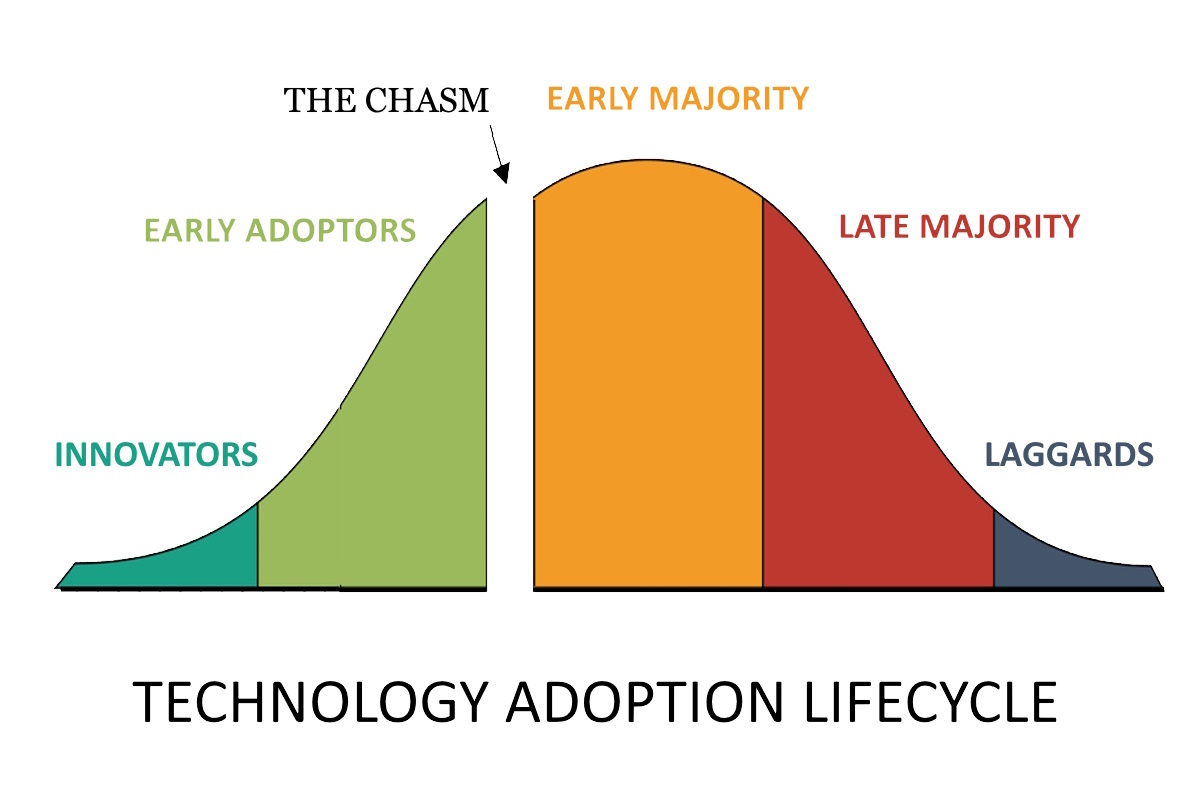
Successful technology adoption requires aligning digital tools with specific organizational goals, fostering a culture of continuous learning, and implementing structured change management protocols. It is a multi-stage process involving rigorous needs assessment, stakeholder buy-in, comprehensive user training, and ongoing performance evaluation to ensure long-term productivity gains and employee satisfaction.
In the current professional landscape of 2026, technology adoption has transitioned from a periodic upgrade cycle to a continuous state of evolution. Organizations no longer simply "buy software"; they integrate intelligent ecosystems that redefine how work is performed. This shift demands a sophisticated approach that balances technical requirements with the human element of change.
Understanding the Landscape of Modern Workplace Technology
To effectively adopt technology, leadership must first understand what constitutes a modern tech stack. By 2026, the baseline for "modern" has shifted significantly toward decentralized, AI-integrated, and highly mobile-accessible systems.
The Role of Agentic AI and Automation
Unlike the generative tools of several years ago, 2026 marks the era of agentic AI. These are systems capable of executing complex workflows with minimal supervision, such as managing project timelines or automating procurement based on real-time data. Adopting these tools requires more than a login; it requires a fundamental restructuring of job descriptions to focus on oversight rather than manual execution.
Spatial Computing and Virtual Collaboration
The integration of spatial computing—using augmented and virtual reality for daily tasks—has moved from niche design sectors into mainstream management and training. High-fidelity virtual meeting spaces are now standard for global teams, providing a sense of "presence" that traditional video conferencing lacks. Adoption here involves hardware logistics as much as software literacy.
Cybersecurity Mesh Architecture
As the perimeter of the workplace continues to dissolve through remote and hybrid work, the adoption of Cybersecurity Mesh Architecture (CSMA) has become a prerequisite. This approach ensures that security is built around the identity of the person or thing, rather than a physical office location.
Prerequisites for Successful Integration
Before a single line of code is deployed or a new device is issued, certain foundational elements must be in place. Failure to address these prerequisites is the primary cause of "shelfware"—expensive technology that remains unused.
Technical Debt Assessment
Organizations must evaluate their existing infrastructure. Technical debt refers to the cost of additional rework caused by choosing an easy, limited solution now instead of a better approach that takes longer. If your legacy database cannot communicate with a 2026-standard AI orchestrator, the new technology will fail. An audit of API capabilities and cloud readiness is the first step.
Cultural Readiness and Psychological Safety
Technology adoption is a psychological hurdle as much as a technical one. Employees must feel a sense of psychological safety, meaning they are not afraid that new automation will immediately render their roles obsolete. A culture that rewards experimentation and views "failure" during a pilot phase as a learning opportunity will adopt new tools far more rapidly than a rigid, punitive culture.
Strategic Goal Alignment
Every technological investment must answer a specific business problem. "Modernizing for the sake of modernizing" leads to fragmented workflows. Whether the goal is reducing customer response times by 30% or decreasing operational overhead, these objectives must be quantified and communicated to the entire staff.
The Structured Framework for Technology Adoption
A haphazard rollout often leads to employee frustration and data silos. A structured framework, such as the Prosci ADKAR model (Awareness, Desire, Knowledge, Ability, and Reinforcement) or a bespoke internal lifecycle, provides a roadmap for transition.
1. Discovery and Needs Assessment
This phase involves deep-diving into the "pain points" of different departments. IT should not choose tools in a vacuum; instead, "power users" from various teams should be consulted to identify what features are actually necessary. This prevents the adoption of over-engineered solutions that complicate simple tasks.
2. The Pilot Program
Never roll out a major system to the entire organization at once. Select a diverse "pilot group" to test the technology in a real-world environment. This group serves two purposes: they identify bugs and friction points in a controlled setting, and they become "internal champions" who can assist their peers during the wider rollout.
3. Comprehensive Training and Literacy
Training in 2026 has moved away from long, boring webinars toward micro-learning and "just-in-time" support. This includes:
- In-app guidance: Tooltips and walkthroughs embedded directly in the software.
- Sandbox environments: Safe spaces where employees can practice using the tool without risking live data.
- Peer-to-peer mentoring: Leveraging the expertise of the pilot group.
4. Full-Scale Deployment and Support
Once the pilot feedback has been integrated, the full rollout begins. During this phase, the IT support desk must be over-staffed to handle the inevitable surge in "how-to" queries. Clear documentation, accessible via AI-powered knowledge bases, is essential for self-service troubleshooting.
5. Iteration and Feedback Loops
The process does not end at deployment. Continuous feedback loops—surveys, usage analytics, and focus groups—ensure that the technology is actually delivering on its promises. If a feature is consistently ignored, it may require further training or be a candidate for removal to simplify the interface.
Comparison of Adoption Strategies
Different organizational structures require different approaches to bringing in new tech. The following table compares three common methodologies used in 2026.
| Strategy | Speed of Rollout | Risk Level | Best For | Primary Challenge |
|---|---|---|---|---|
| Big Bang | Very Fast | High | Small startups or critical security patches | High potential for total workflow disruption |
| Phased Rollout | Moderate | Low | Mid-to-large enterprises (SaaS transitions) | Maintaining data parity between old and new systems |
| Parallel Running | Slow | Very Low | Mission-critical systems (Finance/Healthcare) | High cost and employee "double-work" during transition |
Overcoming Common Barriers to Adoption
Even with a perfect plan, resistance is inevitable. Understanding the root causes of this resistance allows leadership to pivot their strategy effectively.
Addressing the "Skills Gap"
The rapid pace of technological change often outstrips the ability of the workforce to keep up. This "skills gap" can lead to anxiety. Organizations must invest in upskilling and reskilling programs that are part of the paid workday, not an "extra" task for employees to complete on their own time.
Managing Information Overload
The modern workplace is often cluttered with too many notifications. When adopting a new tool, it is often wise to "sunset" an old one. If a team adopts a new AI-driven project manager but is still required to update a manual spreadsheet and send daily email updates, the cognitive load will lead to burnout and rejection of the new system.
Ensuring Interoperability
In 2026, the average enterprise uses over 200 different SaaS applications. If a new technology does not integrate seamlessly with the existing ecosystem (e.g., Slack, Microsoft 365, Salesforce), it becomes an "island" of data. Prioritizing tools with robust API (Application Programming Interface) support is non-negotiable for modern adoption.
Measuring Success: KPIs for Technology Adoption
To justify the investment, organizations must track specific Key Performance Indicators (KPIs). Looking at "logins" is a vanity metric; true success is measured by depth of usage and impact.
- Time to Proficiency: How long does it take for a new user to reach the same level of productivity they had with the old system?
- Feature Adoption Rate: Are users utilizing the advanced features that justified the purchase, or are they only using the basic functions?
- Support Ticket Volume: A spike is expected at launch, but it should trend downward within 30 to 60 days.
- Employee Net Promoter Score (eNPS): Do employees feel the new technology makes their lives easier or harder?
External Resources for Further Guidance
For organizations seeking deep technical standards and frameworks, the following bodies provide authoritative guidance on digital transformation and workplace technology:
- Gartner: Information Technology Research – For trends in enterprise software and adoption cycles.
- IEEE Computer Society – For technical standards in hardware and software integration.
- Project Management Institute (PMI) – For structured methodologies regarding organizational change.
- The Center for Digital Government – Specific insights for public sector technology adoption.
Frequently Asked Questions
How long does the typical technology adoption process take?
For a mid-sized organization, a full transition—from discovery to stable adoption—usually takes between 6 and 18 months. This timeline depends on the complexity of the tool and the size of the user base. Minor software updates may take weeks, while migrating to a new Enterprise Resource Planning (ERP) system often requires over a year of planning and execution.
What is the biggest mistake companies make when adopting new tech?
The most common error is focusing entirely on the technical specifications while ignoring the user experience and cultural impact. If employees don't understand why a change is happening or how it benefits them personally, they will find workarounds to avoid using the new system, leading to fragmented data and wasted investment.
How can we encourage older or less tech-savvy employees to embrace new tools?
Focus on "benefit-led" training rather than "feature-led" training. Instead of showing how a button works, demonstrate how that button saves them two hours of manual data entry every Friday. Providing dedicated mentors and ensuring that training materials are available in multiple formats (video, written, and hands-on) ensures that different learning styles are accommodated.
Is it better to build custom internal tools or buy off-the-shelf software in 2026?
In 2026, the trend has shifted toward "Buy and Configure." Off-the-shelf SaaS products are now so modular and AI-extensible that building custom software from scratch is rarely cost-effective unless you have highly specialized, proprietary requirements. Configuring an existing platform allows you to benefit from the vendor’s security updates and continuous feature releases.
How do we handle "Shadow IT" during a technology transition?
Shadow IT—where employees use unauthorized tools because the official ones are too cumbersome—is a signal that your official tech stack is failing. Rather than simply banning these tools, IT departments should investigate why they are being used. Often, the best path is to officially vet and integrate the popular "shadow" tools into the company’s managed ecosystem.
Practical Next Action
To begin improving your organization's technology adoption, perform a Usage Audit of your current primary software tools. Identify any platform where the "Feature Adoption Rate" is below 40%. Conduct a focus group with the heaviest and lightest users of that tool to determine if the gap is caused by a lack of training, poor interface design, or a fundamental misalignment with business processes. Use these insights to draft your next implementation roadmap.