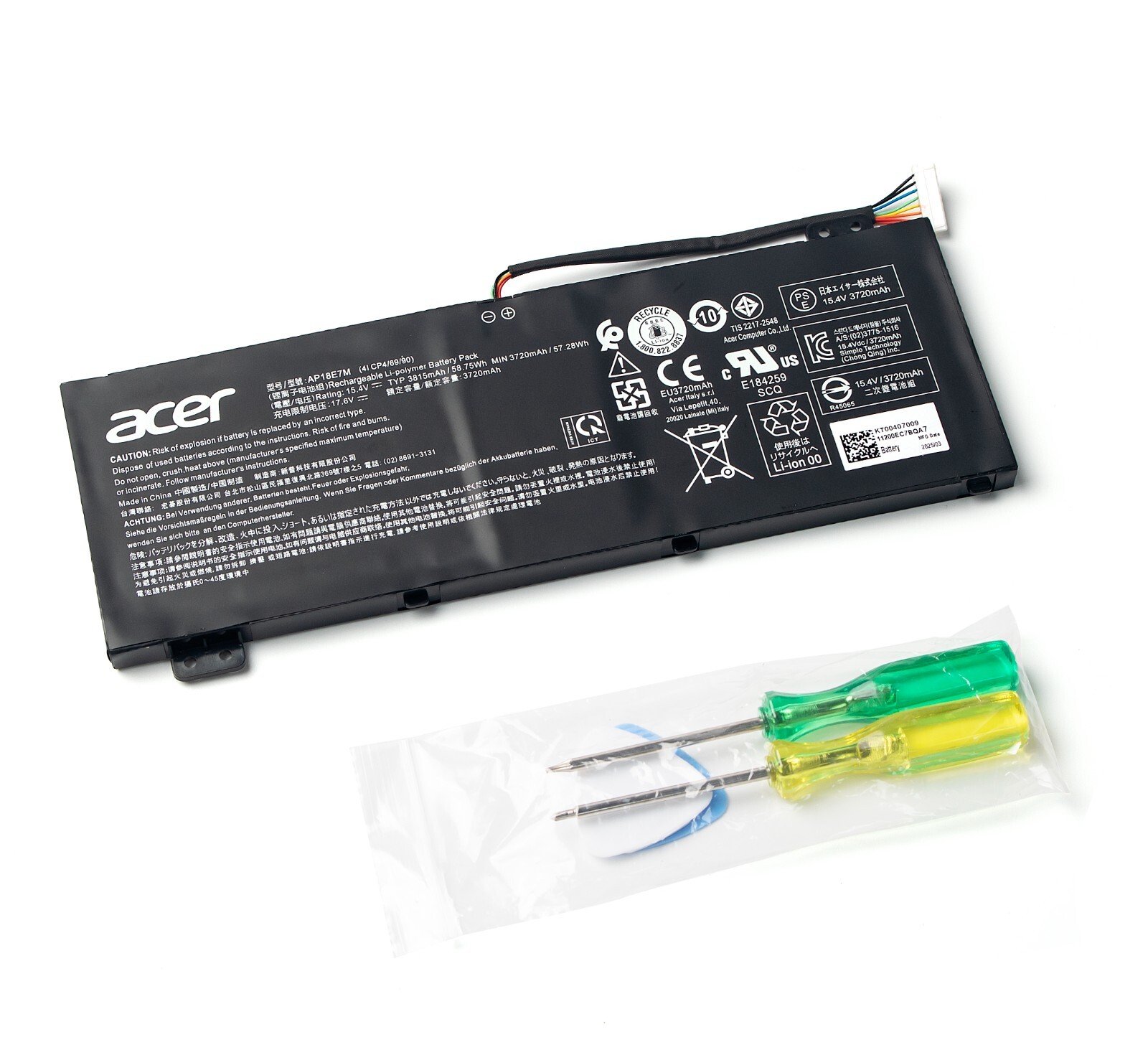
The Acer Predator Helios 300 gaming laptop relies on a high-capacity lithium-ion or lithium-polymer battery designed to balance mobile usage with the intense power demands of discrete graphics cards and high-refresh-rate displays. Understanding its specifications, operational characteristics, and maintenance requirements helps users maximize runtime, prevent premature degradation, and ensure safe replacement when necessary across various generation models.
1. Introduction and Core Identity of the Predator Helios 300 Battery
The Acer Predator Helios 300 has evolved through multiple generations since its introduction, featuring various Intel Core (from 7th Gen up to modern architectures) and AMD Ryzen processors paired with NVIDIA GeForce GTX and RTX graphics processing units (GPUs). Because gaming laptops require substantial electrical current to drive these high-performance components, the battery system must handle rapid discharge cycles and high thermal outputs.
Unlike standard office laptops designed for all-day battery life, the Predator Helios 300 is engineered primarily for desktop replacement performance. Consequently, its internal power storage serves a dual purpose: providing moderate unplugged productivity for web browsing or document editing, and sustaining transient power spikes when external AC power is momentarily interrupted during heavy workloads. Navigating this hardware ecosystem requires a clear grasp of capacity ratings, cell configurations, and the software ecosystem used to monitor battery health.
2. Technical Specifications and Evolution Across Generations
Battery capacities in the Predator Helios 300 lineup have shifted over successive hardware iterations to accommodate more power-efficient chipsets alongside increasingly demanding displays. Early generations often shipped with smaller 4-cell, 48Wh (Watt-hour) or 58Wh lithium-ion batteries, which offered limited unplugged runtime under heavy loads. Later iterations expanded chassis efficiency to accommodate larger 4-cell or 3-cell configurations ranging from 59Wh to 90Wh.
Cell Chemistry and Voltage Ratings
Most Helios 300 variants utilize Lithium-ion (Li-ion) or Lithium-ion Polymer (LiPo) cells operating at a nominal voltage typically between 15.2V and 15.4V. Higher voltage configurations help reduce the current draw through internal circuitry, minimizing heat generation during intensive gaming sessions.
Power Delivery and Thermal Integration
The battery communicates with the motherboard via an advanced Power Management Integrated Circuit (PMIC). This controller monitors cell temperature, state of charge (SoC), and voltage imbalance. Because gaming laptops generate significant heat, the battery compartment is typically positioned away from the primary CPU and GPU heat pipes, though thermal transfer through the aluminum or plastic chassis remains a factor in long-term battery health.
3. Real-World Performance and Unplugged Limitations
Running a high-performance gaming laptop on battery power involves distinct compromises. When disconnected from the 180W, 230W, or 330W power brick, the Predator Helios 300 automatically throttles system performance to conserve energy and match the safe discharge limits of the battery cells.
Expected Runtime by Workload
- Idle / Light Productivity: Web browsing, text editing, and video playback at reduced screen brightness (50%) typically yield between 2 to 4 hours of runtime, depending on the specific battery capacity (e.g., 58Wh vs. 90Wh).
- Intensive Gaming: Launching a modern 3D title on battery power drastically cuts runtime to 30 to 45 minutes. More importantly, frame rates are heavily capped, and stuttering may occur because the battery cannot match the wattage delivered by a wall outlet.
- Content Creation / Rendering: Video editing or 3D modeling tasks will similarly drain the battery within an hour while triggering thermal and power safety limits.
Power Profiles and NVIDIA BatteryBoost
Utilities such as NVIDIA GeForce Experience feature tools like BatteryBoost, which caps frame rates during mobile gaming to extend session lengths. Combined with Acer's proprietary software suite, users can adjust fan profiles and power modes to optimize efficiency when an outlet is unavailable.
4. Software Monitoring and Health Management: Acer NitroSense and PredatorSense
Monitoring the physical health and charge state of the Predator Helios 300 battery is managed primarily through Acer's pre-installed system control software, known in this lineup as PredatorSense (or NitroSense on sibling models).
| Feature / Metric | Description & Operational Impact |
|---|---|
| Current Charge State | Displays exact percentage and estimated time remaining. |
| Battery Health Status | Indicates normal, degraded, or replacement needed. |
| Charge Limit Mode | Limits maximum charge to 80% to extend lifespan. |
| Calibration Utility | Resets fuel gauge circuitry for accurate readings. |
Acer Care Center and Charge Limit Settings
Keeping a laptop plugged in continuously at a 100% state of charge accelerates chemical degradation in lithium-ion cells due to elevated internal voltages and heat. Acer Care Center and PredatorSense include a Battery Health Charger feature, allowing users to cap maximum charging at 80%. This mode is strongly recommended for users who keep their laptops plugged into AC power for extended desk setups, as it significantly extends the total operational lifespan of the battery pack.
5. Identifying Battery Degradation and Failure Symptoms
All rechargeable batteries lose maximum capacity over time due to chemical aging, charge cycles, and thermal stress. Recognizing early warning signs prevents unexpected shutdowns and potential hardware risks.
Common Signs of Failure
- Drastic Runtime Drop: The laptop loses charge within 15 to 30 minutes of light use.
- Sudden Percentage Drops: The battery indicator drops from 50% to 10% instantly, indicating cell voltage collapse under load.
- Physical Swelling: The battery pack expands, putting pressure on the trackpad, keyboard deck, or bottom chassis. A swollen battery is a severe fire hazard and must be replaced immediately.
- AC Adapter Dependency: The laptop shuts down the moment the power cable is unplugged, even if the battery icon shows a full charge.
Generating a Windows Battery Report
Users can verify exact health metrics directly within Windows without third-party tools:
- Open the Windows Start menu, type
cmd, right-click Command Prompt, and select Run as administrator. - Type the following command and press Enter:
powercfg /batteryreport - Navigate to the file path displayed in the command prompt (usually
C:\Users\YourUsername\battery-report.html) and open it in any web browser. - Compare the DESIGN CAPACITY (factory specification) against the FULL CHARGE CAPACITY to determine the current wear level.
6. Replacement Procedures, Precautions, and Sourcing
Replacing a degraded Predator Helios 300 battery requires careful adherence to safety protocols and correct hardware matching. Because designs vary by manufacturing year (e.g., PH315-51, PH315-52, PH315-53, PH315-54), verifying the exact model number on the bottom label is essential.
Safety Prerequisites
- Power down the laptop completely and disconnect the AC adapter.
- Work on an anti-static, non-conductive surface.
- Wear ESD protection or discharge static electricity by touching an unpainted metal object.
Step-by-Step Replacement Workflow
- Remove Bottom Panel: Unscrew all Phillips-head screws securing the lower aluminum or plastic chassis cover. Keep track of screw lengths, as they may differ.
- Pry Open Chassis: Use a plastic spudger tool to gently release the plastic clips around the perimeter of the bottom cover.
- Disconnect the Battery (Crucial First Step): Unplug the battery cable connector from the motherboard header before performing any other internal maintenance to prevent short circuits.
- Remove Fasteners: Unscrew any internal fasteners securing the battery pack to the chassis frame.
- Lift Out Old Battery: Carefully lift the old battery away, avoiding punctures or bending of the lithium cells.
- Install Replacement: Position the new compatible battery pack, secure the fasteners, and plug the connector firmly into the motherboard header.
- Reassemble: Snap the bottom cover back into place and fasten all screws securely.
7. Frequently Asked Questions
Can I upgrade my Predator Helios 300 battery to a larger capacity?
In most cases, you cannot upgrade to a larger physical capacity than what was originally engineered for your specific chassis generation. Internal space is strictly allocated for cooling fans, heat pipes, and storage drives. Always purchase a replacement battery that matches the exact voltage and part number of your original factory unit.
Is it safe to leave my Helios 300 plugged in while gaming?
Yes. Modern laptops and power adapters include intelligent charging circuits that bypass the battery once it reaches full capacity, drawing power directly from the wall. However, using Acer's 80% charge limit setting in PredatorSense or Acer Care Center is recommended to reduce long-term chemical wear from heat and high voltage state.
How many charge cycles should a Helios 300 battery last?
Standard lithium-ion batteries used in gaming laptops are rated for approximately 300 to 500 complete charge cycles before dropping to 80% of their original design capacity. Actual longevity depends heavily on operating temperatures, charging habits, and whether the 80% charge limit is utilized.
What should I do if my replacement battery is not recognized by Windows?
If Windows displays a "No battery is detected" error after a replacement, first ensure the internal cable connector is pushed fully and securely into the motherboard header. If the connection is secure, perform a hard reset by holding down the laptop's power button for 30 to 40 seconds while unplugged, then reconnect the AC adapter and power on.
Can I run my Predator Helios 300 without a battery installed?
Some older laptops could run directly from AC power without a battery, but modern high-performance gaming laptops like the Helios 300 often throttle performance severely or fail to boot without a functional battery connected, as the system relies on the battery to supplement power during heavy GPU/CPU spikes that exceed the AC adapter's rated wattage.
8. Conclusion and Best Practices
Maintaining the battery health of an Acer Predator Helios 300 requires a balance of smart software configuration and thermal management. By utilizing Acer's built-in charge limiting features, monitoring capacity trends via Windows battery reports, and replacing degraded packs with exact-match components using proper safety procedures, users can ensure reliable mobile performance and long-term hardware safety.