The 2025 Microsoft SQL Server timeline marks a pivotal shift in the database ecosystem, defined by the General Availability (GA) of SQL Server 2025 and the transition of older, stable versions into critical lifecycle phases. For database administrators and IT architects in 2026, understanding this timeline is essential for maintaining security compliance, leveraging new AI-driven capabilities, and planning migration paths for legacy systems approaching their final end-of-life dates.
The Evolution of SQL Server in 2025
The year 2025 was a transformative period for Microsoft’s relational database management system. Following the announcement at Microsoft Ignite in late 2024, SQL Server 2025 moved through its preview phases and reached General Availability. This version was specifically designed to bridge the gap between traditional on-premises relational data and the rapidly expanding requirements of generative AI and cloud-hybrid architectures.
The introduction of SQL Server 2025 was not merely a routine update; it represented a fundamental change in how Microsoft treats data residency and performance. By integrating native vector search capabilities directly into the engine, Microsoft allowed organizations to build Retrieval-Augmented Generation (RAG) patterns without moving their sensitive data into specialized vector databases. This "AI-ready" status dominated the 2025 roadmap, influencing how organizations prioritized their upgrades throughout the year.
Beyond the new release, 2025 served as a critical deadline for users of SQL Server 2019. In January 2025, this widely adopted version officially exited its Mainstream Support phase. This milestone shifted the burden of maintenance from feature updates and non-security bug fixes to a strict security-only posture under Extended Support. For enterprises, this transition typically signals the start of a two-to-three-year migration window to avoid the risks associated with aging infrastructure.
Key Support Dates and Lifecycle Milestones
Managing a database environment requires a precise understanding of the Microsoft Fixed Lifecycle Policy. This policy generally provides five years of Mainstream Support followed by five years of Extended Support. The following table summarizes the support status for all major versions as we look back at the 2025 timeline and forward into the remaining months of 2026.
| SQL Server Version | Release Date | Mainstream Support End | Extended Support End | Current Status (2026) |
|---|---|---|---|---|
| SQL Server 2025 | 2025 | 2030 | 2035 | Current GA Version |
| SQL Server 2022 | Nov 2022 | Jan 11, 2028 | Jan 11, 2033 | Mainstream Support |
| SQL Server 2019 | Nov 2019 | Jan 14, 2025 | Jan 8, 2030 | Extended Support |
| SQL Server 2017 | Oct 2017 | Oct 11, 2022 | Oct 12, 2027 | Extended Support |
| SQL Server 2016 | June 2016 | July 13, 2021 | July 14, 2026 | Ending Soon |
| SQL Server 2014 | April 2014 | July 9, 2019 | July 9, 2024 | Out of Support |
The Significance of the SQL Server 2019 Transition
On January 14, 2025, SQL Server 2019 officially entered Extended Support. For the thousands of organizations still running this version, the change meant that Microsoft no longer accepted requests for new features or design changes. While security updates continue to be provided at no additional cost, the lack of functional bug fixes can lead to operational challenges if new hardware or operating system updates introduce incompatibilities.
The Looming Deadline for SQL Server 2016
As of early 2026, the most urgent date on the calendar is July 14, 2026. This marks the end of Extended Support for SQL Server 2016. Once this date passes, instances of SQL Server 2016 will no longer receive security patches, leaving them vulnerable to new exploits. This "cliff" often drives the majority of migration activity in the first half of 2026, as organizations rush to move workloads to SQL Server 2022 or the newer SQL Server 2025.
Technical Innovations Introduced in the 2025 Release
The release of SQL Server 2025 brought several technical enhancements that changed the deployment timeline for many high-performance applications. By understanding these features, teams can better justify the costs associated with a 2026 upgrade project.
Native Vector Support
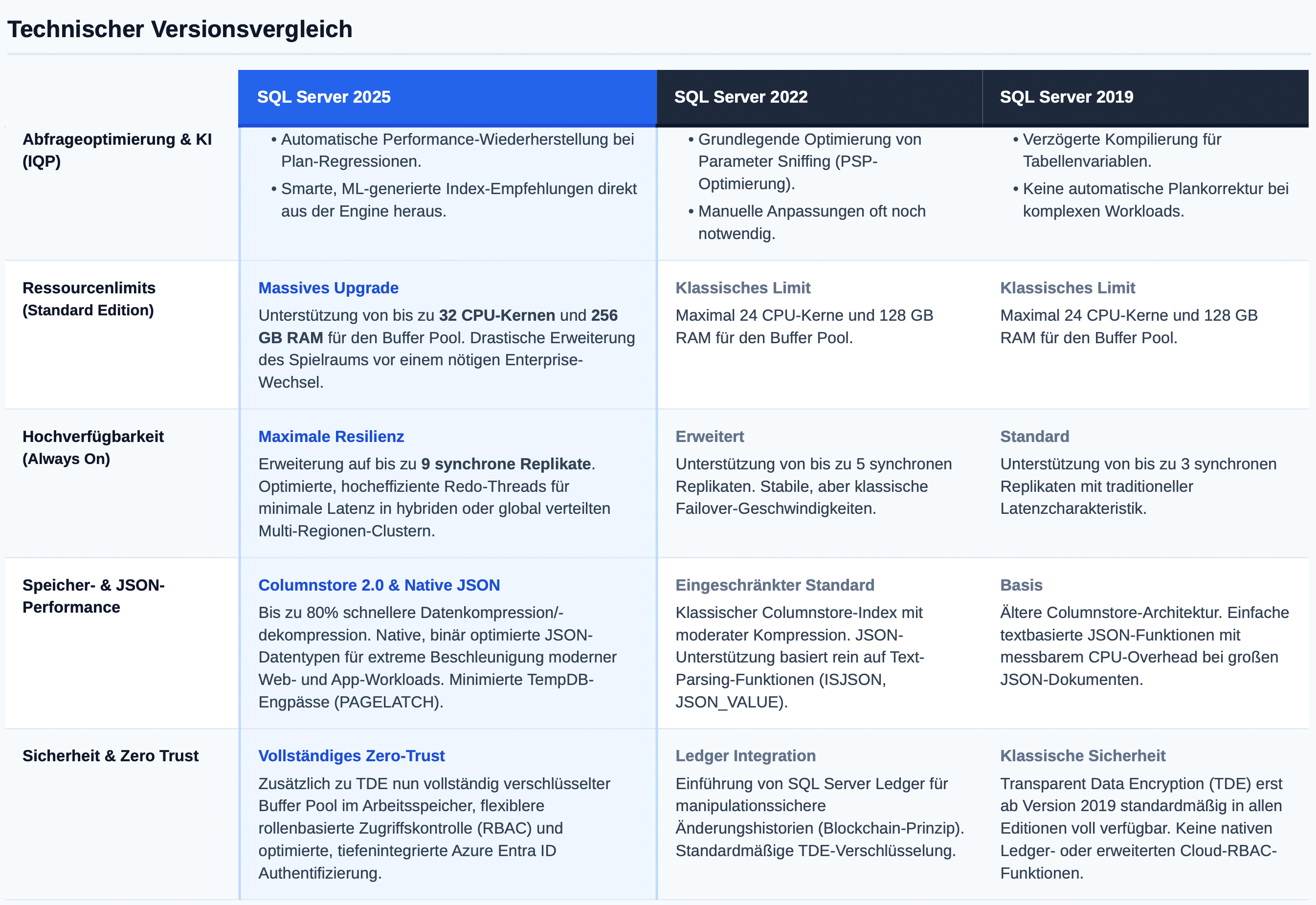
The flagship feature of the 2025 timeline was the introduction of vector data types and vector functions. This allows SQL Server to store embeddings—mathematical representations of text, images, or audio—directly alongside traditional relational data. Developers can now perform similarity searches using T-SQL, making it easier to integrate SQL Server with LLMs (Large Language Models) like Azure OpenAI.
Azure Fabric Integration
In 2025, Microsoft deepened the "OneLake" integration. SQL Server 2025 introduced improved Mirroring capabilities, allowing data to be replicated into Microsoft Fabric in near real-time without complex ETL (Extract, Transform, Load) pipelines. This shifted the timeline for many business intelligence projects, as it removed the latency traditionally associated with data warehousing.
Security and Managed Instances
SQL Server 2025 enhanced the Hardware Enclave support for Always Encrypted. This technology ensures that data is encrypted even while in use in the server's memory, protecting it from privileged users or compromised operating systems. Throughout 2025, this feature became a requirement for many financial and healthcare institutions looking to modernize their security posture.
Migration Strategies and Planning for 2026
With the 2025 milestones now in the rearview mirror, the focus for 2026 is execution. Upgrading a database is a high-stakes operation that requires a structured approach to minimize downtime and data loss.
1. Assessment and Inventory
The first step is a comprehensive audit. You must identify every instance of SQL Server in your environment, particularly those running version 2016 or earlier. Tools like the Microsoft Assessment and Planning (MAP) Toolkit or Azure Arc can help automate this discovery process.
2. Choosing the Target Version
While SQL Server 2025 is the latest version, some organizations choose to move to SQL Server 2022 for its perceived maturity. However, migrating directly to SQL Server 2025 is generally recommended for new AI initiatives or if you want to maximize the time until your next major upgrade.
3. Migration Methodology
- Side-by-Side Migration: This involves installing a new instance of SQL Server on a new server (physical or virtual) and moving the databases over. This is the safest method, as it allows for extensive testing before the final cutover and provides an easy rollback path.
- In-Place Upgrade: This replaces the existing SQL Server bits on the current hardware. While faster, it carries higher risk and is generally discouraged for mission-critical production environments.
- Cloud Migration (Replatforming): Many organizations use the end of a version's life as a catalyst to move to Azure SQL Managed Instance or Azure SQL Database, shifting the burden of lifecycle management to Microsoft.
Financial Considerations: Licensing in the 2025-2026 Era
The cost of running SQL Server changed slightly during the 2025 timeline, specifically regarding how Azure Arc is used for licensing. Microsoft has increasingly incentivized the "Pay-as-you-go" model for on-premises servers.
Organizations running SQL Server 2025 can choose traditional per-core licensing or a flexible consumption model via Azure Arc. For those stuck on older versions like SQL Server 2014 or 2016 past their end-of-life dates, Extended Security Updates (ESU) are available but come at a significant premium—often doubling the cost of the license each year for up to three years. This financial pressure is a primary driver for completing migrations within the 2025-2026 window.
For more detailed information on licensing costs and official policy changes, refer to the Microsoft SQL Server Licensing Guide.
Frequently Asked Questions
What is the current version of SQL Server in 2026?
The current major version is SQL Server 2025, which reached General Availability in 2025. It is the successor to SQL Server 2022. It introduced several AI-specific features, such as native vector search, and enhanced integration with the Microsoft Fabric data ecosystem.
When does support for SQL Server 2019 end?
SQL Server 2019 exited Mainstream Support on January 14, 2025. It is currently in the Extended Support phase, which is scheduled to last until January 8, 2030. During this period, the software receives security updates, but functional updates and warranty support are no longer provided.
Can I still get security updates for SQL Server 2016?
Yes, but only until July 14, 2026. After this date, SQL Server 2016 will reach the end of its Extended Support lifecycle. To continue receiving updates after that point, you would need to migrate to a newer version or move the workload to an Azure VM to qualify for Extended Security Updates (ESUs), which are generally a temporary and costly solution.
What are the hardware requirements for SQL Server 2025?
SQL Server 2025 maintains similar core requirements to SQL Server 2022 (x64 processor, minimum 6GB of hard drive space, and 4GB of RAM). However, to utilize the new AI and vector search capabilities effectively, higher memory allocations and modern CPUs with advanced instruction sets (like AVX-512) are highly recommended for optimal performance.
Is SQL Server 2025 available on Linux?
Yes, following the trend started with SQL Server 2017, SQL Server 2025 is available on multiple platforms, including Red Hat Enterprise Linux (RHEL), Ubuntu, and SUSE Linux Enterprise Server, as well as in Docker containers. The feature parity between Windows and Linux versions has reached its highest point yet in this release.
Final Recommendations for Database Administrators
As we move through 2026, the data landscape is defined by the need for agility and the looming expiration of legacy support. If you are still running SQL Server 2016, your primary objective for the next quarter must be a full migration to SQL Server 2022 or 2025. Delaying past the July 2026 deadline introduces unacceptable security risks to your organization's data.
For those on SQL Server 2019 or 2022, 2026 is the year to evaluate the AI capabilities of SQL Server 2025. Even if a full upgrade isn't immediate, starting a pilot program for vector-based search or Fabric mirroring will position your team to take advantage of the modern data stack. Always ensure that your backup and disaster recovery plans are tested against the new version's architecture before committing to a production cutover.