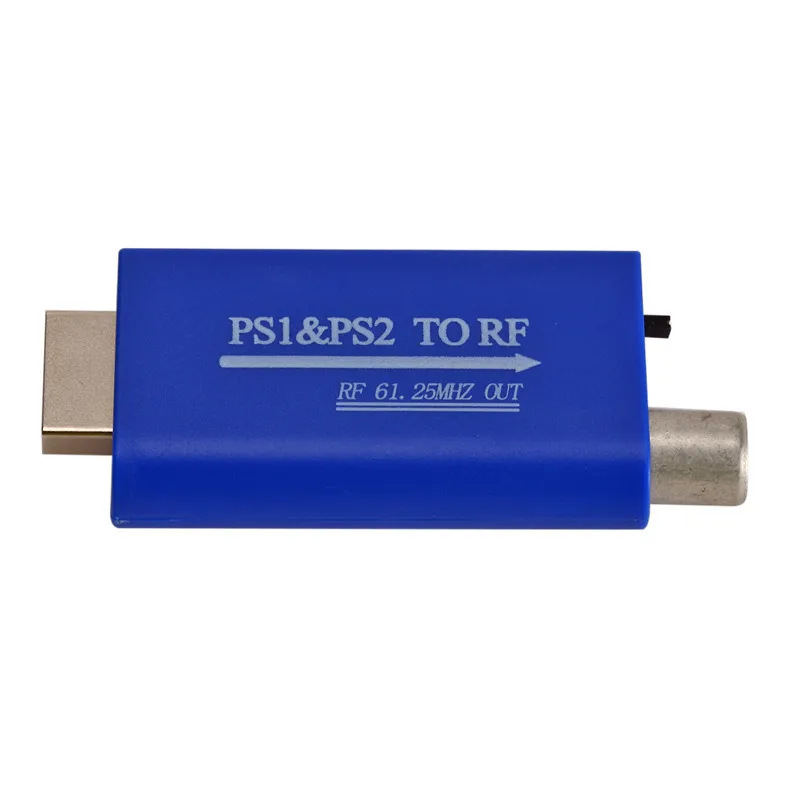
The PS1 RF adapter, specifically the SCPH-1121 and SCPH-1060 models, is a legacy hardware peripheral designed to connect the original PlayStation console to televisions that lack standard RCA (composite) audio-video inputs. By modulating the console’s video and audio signals into a radio frequency (RF) broadcast, it allows gameplay on Channel 3 or 4. While technically functional for retro gaming, it represents the lowest possible signal quality available for the platform.
1. The Specific Model Numbers and Hardware Variants
When discussing the PS1 RF adapter, it is essential to distinguish between the official Sony peripherals and the myriad of third-party clones that flooded the market in the late 1990s. The most common official unit is the SCPH-1121 RFU Adaptor. This device was the successor to the earlier SCPH-1060, which was bundled with or sold for the original "fat" PlayStation models.
The SCPH-1121 is characterized by its "pass-through" design. It features a proprietary PlayStation Multi-Out connector on one end and a small silver box on the other. This box has a short length of coaxial cable (F-type connector in North America) and an input jack for an external antenna or cable line. The primary purpose of this design was convenience: users could keep their TV antenna or cable box plugged into the RF adapter, which would then automatically "switch" the signal to the PlayStation when the console was powered on.
In 2026, these units are frequently found in "as-is" condition in retro gaming shops. It is vital for collectors to verify the integrity of the proprietary 12-pin connector. Unlike modern USB or HDMI cables, the Multi-Out pins are relatively fragile; if the plastic housing is cracked or the pins are bent, the signal will suffer from extreme ghosting or a total loss of color.
2. Signal Modulation and Why Quality Suffers
To understand why the PS1 RF adapter is generally avoided by modern enthusiasts, one must understand the physics of RF modulation. The PlayStation internally generates a video signal and a stereo audio signal. However, an RF adapter must "squash" all of this information—color (chrominance), brightness (luminance), and audio—into a single frequency band that a standard analog TV tuner can interpret.
This process is inherently destructive. Because the audio and video data are transmitted on the same wire at nearly the same frequency, they cause mutual interference. This results in several visual artifacts:
- Color Bleeding: Saturated colors, particularly reds and blues, often spill over the edges of polygons and textures.
- Snow and Static: Any external electromagnetic interference (EMI) from nearby power cables or cell phones can introduce "snow" into the image.
- Audio Buzzing: In high-contrast scenes (such as white text on a black background), the video signal can leak into the audio channel, causing a distinct 60Hz hum or buzz.
Furthermore, the RF adapter converts the PlayStation’s native stereo output into a mono signal. Even if you are playing a game with a high-fidelity soundtrack, such as Final Fantasy VII or Ridge Racer, the RF adapter strips away the directional audio, outputting the same compressed sound to both TV speakers.
3. The Proprietary Multi-Out Port Legacy
The PS1 RF adapter utilizes Sony’s proprietary AV Multi-Out port. This port is one of the most successful examples of hardware standardisation in gaming history. Introduced with the original PlayStation (SCPH-1001) in 1994, the same physical port and pinout were used for the PlayStation 2 and the PlayStation 3 (up until the transition to HDMI).
Because of this cross-generational compatibility, a PS1 RF adapter can physically plug into a PS2 or a PS3. However, there are technical limitations to keep in mind. While the adapter will work perfectly on a PS2 to play both PS1 and PS2 games, the results on a PS3 are often disappointing. Most PS3 games output at resolutions that the RF adapter cannot handle, and the console’s internal software may restrict the output to 480i, which looks significantly worse on an RF connection than it does via HDMI or Component.
The 12-pin layout of the Multi-Out port includes pins for Composite, S-Video, and RGB signals. The RF adapter only draws from the Composite and Audio pins, ignoring the higher-quality RGB pins entirely. This is the primary reason why the RF adapter is considered a "bottom-tier" connection method.
4. Regional Engineering and Connection Standards
Not all PS1 RF adapters are created equal, and their functionality is strictly tied to the television standards of the region where they were sold. In 2026, with global shipping making it easy to buy consoles from overseas, it is crucial to match the adapter to your local TV hardware.
- NTSC (North America/Japan): These adapters typically output to VHF Channel 3 or 4. They use the F-type screw-on connector, which is the standard for coaxial cables in these regions.
- PAL (Europe/Australia/UK): These adapters utilize Belling-Lee connectors (often called "IEC 169-2" connectors). They modulate the signal to the UHF band, typically requiring the user to manually tune the television to a frequency around 591.25 MHz to find the console’s signal.
Using a PAL RF adapter on an NTSC television (or vice versa) will generally result in a signal that the TV tuner cannot lock onto. Even if a picture appears, it will likely be in black and white or suffer from severe vertical rolling because of the difference in refresh rates (60Hz for NTSC vs. 50Hz for PAL).
5. The "Automatic" RF Switch Mechanism
A common point of confusion for new users is the "Auto-Switch" feature found in the SCPH-1121. Unlike older consoles like the NES or Atari 2600, which often required a physical slide switch to toggle between "Game" and "TV," the Sony adapter uses an internal sensing circuit.
When the PlayStation is powered on, the adapter detects the voltage coming through the Multi-Out port and electronically disconnects the antenna/cable input, replacing it with the console's signal. When the console is turned off, the circuit relaxes, and the TV signal is passed through once again.
This mechanism is prone to failure over decades of use. The internal capacitors and diodes can degrade, leading to "signal bleed" where you might see ghostly images of a television broadcast faintly behind your PlayStation game. If you encounter this, the only real solution is to disconnect the antenna cable entirely or replace the adapter.
6. Comparison of Video Connection Methods
To put the PS1 RF adapter in perspective, it is helpful to compare it to the other cables available for the system. In the hierarchy of video quality, the RF adapter sits at the very bottom.
| Connection Type | Signal Quality | Audio Output | Best Use Case |
|---|---|---|---|
| RF Adapter | Poor (High Noise) | Mono | Old TVs with only an antenna jack. |
| Composite (RCA) | Standard (Moderate) | Stereo | Standard CRT televisions. |
| S-Video | Good (Sharp) | Stereo | High-end CRTs and early Plasma/LCDs. |
| RGB SCART | Excellent (Pure) | Stereo | PVMs, BVMs, or upscale processors. |
| Component | Excellent (Pure) | Stereo | PS2/PS3 hardware playing PS1 games. |
| Modern HDMI | Superior (Digital) | Digital | 4K/8K Modern Displays (requires converter). |
As shown in the table, the jump from RF to Composite (the yellow, red, and white cables) is significant, primarily because it restores stereo sound and reduces the interference caused by modulation.
7. The 2026 Context: Why Use an RF Adapter Today?
In 2026, the use case for a PS1 RF adapter has narrowed to two very specific groups: collectors and retro-purists. Most modern televisions manufactured in the last decade have completely removed analog tuners. If your TV does not have a "Coax" or "Antenna" input that supports analog NTSC or PAL signals, the PS1 RF adapter is physically impossible to use without an additional digital-to-analog converter.
However, there is a small movement of "lo-fi" gamers who prefer the RF look. Because the PS1 often used "dithering" (a technique of checkerboarding pixels to create the illusion of more colors), the blurry, noisy nature of an RF connection naturally blends these pixels together. This can make early 3D games look smoother and more organic than they do on a crisp, pixel-perfect HDMI connection, which reveals the harsh edges of the low-resolution textures.
If you are not seeking that specific, noisy aesthetic, your money is better spent on a dedicated HDMI solution like the RetroTINK or a RAD2X cable, which provides a clean signal compatible with modern displays.
Frequently Asked Questions
Can I use a PS1 RF adapter on a PlayStation 2?
Yes. The PS1 and PS2 share the same AV Multi-Out port. The SCPH-1121 RF adapter will function perfectly on a PS2 console. This is a common solution for gamers using "portable" 5-inch or 8-inch CRT televisions that were often manufactured with only an RF input.
Why is the picture black and white when using the RF adapter?
This usually happens due to a regional mismatch or a weak signal. If you are using a PAL console/adapter on an NTSC TV, the color subcarrier frequency will not match, resulting in a monochrome image. Additionally, if the coaxial cable is not screwed in tightly, or if there is a "kink" in the wire, the color signal is usually the first thing to be lost.
Is there a way to get stereo sound out of an RF adapter?
No. The RF modulation standard used by these adapters is inherently monaural. To get stereo sound, you must use a connection method that provides separate Left and Right (Red and White) audio jacks, such as Composite, S-Video, or a dedicated Multi-Out to RCA breakout cable.
Do I need to "tune" my TV to use the PS1 RF adapter?
If you are using a modern TV with an analog tuner or an older CRT, yes. You must set the TV to the correct channel (usually Channel 3 or 4 in the US). On many TVs, you may need to run an "Auto-Program" or "Channel Scan" with the PlayStation turned on so the TV can "find" and save the frequency.
Are third-party RF adapters safe to use?
Generally, yes, but they are often built with inferior shielding. Cheap third-party adapters often lack the "Auto-Switch" circuitry, requiring you to manually swap cables. They are also much more susceptible to external interference, which can cause significant horizontal lines or "hum bars" to scroll across the screen during gameplay.
Final Recommendation
If you are troubleshooting an old PlayStation or setting up a period-correct "90s bedroom" gaming nook with an ancient TV, the PS1 RF adapter is a necessary tool. It is a robust, if low-fidelity, piece of engineering that reflects the era of its birth. However, for the vast majority of players in 2026, it should be viewed as a backup option. To truly appreciate the art and design of the PlayStation library, upgrading to at least a Composite or S-Video connection will provide a vastly superior experience with clearer visuals and full stereo sound.