Tome is an AI-powered multimedia canvas designed to replace static documents, slides, and traditional books with interactive, generative narratives. By leveraging artificial intelligence to build layouts, text, and visuals, it allows creators to share complex ideas through responsive "tomes" that adapt to any screen size and integrate live, interactive data.
In the landscape of 2026, the definition of a "book" or a "document" has shifted significantly. For decades, digital alternatives to books were limited to flat files like PDFs or linear presentations like PowerPoint. Tome represents a fundamental departure from these formats. It is not merely a word processor or a slide builder; it is a generative storytelling engine that treats content as a fluid, living entity. Whether you are a founder pitching a venture, a product manager outlining a roadmap, or an educator building a modern curriculum, Tome provides a structural alternative to the rigid, page-bound limitations of traditional media.
The Evolution of the Digital "Tome"
Historically, a "tome" referred to a large, heavy book, often part of a multi-volume work. In the modern technical context, the platform Tome has reclaimed this word to describe a digital container that holds more than just ink and paper. The transition from physical books to digital formats initially stalled at the "digitized paper" phase—think of the PDF, which is essentially a digital photograph of a physical page.
Tome breaks this cycle by moving toward a "mobile-responsive canvas." Unlike a book, which has fixed dimensions, a Tome adjusts its layout dynamically. In 2026, where the majority of professional and educational consumption happens on varied screen sizes—from foldable phones to ultra-wide monitors—the fixed-ratio book format has become a liability. Tome addresses this by using a tile-based system that reflows content, ensuring that the "book" is readable and interactive regardless of the hardware.
Core Features of the Tome Platform
To understand why Tome is considered a viable alternative to books and legacy documentation, one must examine its foundational technology. The platform is built on three pillars: Generative AI, Interactive Tiles, and Fluid Design.
AI-Driven Narrative Generation
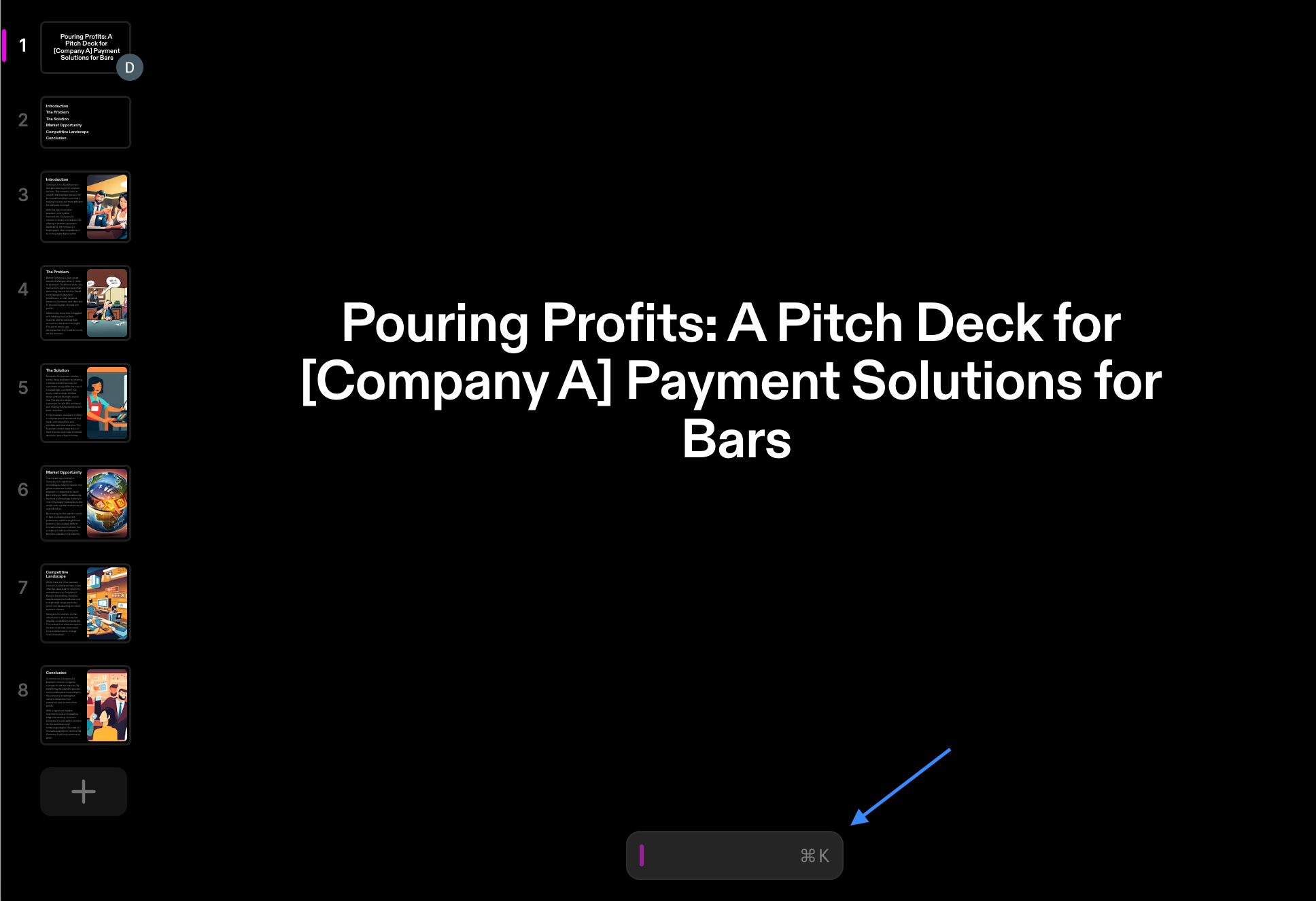
The most striking feature of Tome is its ability to generate a full narrative structure from a single text prompt. By using advanced Large Language Models (LLMs), the platform does not just generate text; it understands the intent behind a "book" or presentation. If a user prompts the system to "Create a guide on renewable energy transitions for urban planners," Tome will generate a multi-page structure including an introduction, regional case studies, financial modeling pages, and a conclusion.
This generative capability solves the "blank page" problem that plagues traditional book writing and document creation. It acts as a co-author, providing a skeleton that the user can then refine, expand, or pivot.
Interactive and Live Tiles
Traditional books are static. Even most e-books are limited to text and occasional embedded images. Tome utilizes a "tile" architecture that allows for the embedding of live, functional software within the narrative.
- Figma Tiles: Designers can embed live prototypes that readers can interact with directly inside the Tome.
- Data Visualization: Instead of a static chart image, Tome can pull live data from sources like Airtable or Google Sheets, ensuring the "book" is always up to date.
- Media Integration: Native support for 3D models (via Spline), video, and interactive maps transforms the reading experience from passive consumption to active engagement.
Responsive Web-Based Delivery
Tome exists as a web-native application. This means there are no files to download or version control issues to manage. Sharing a Tome is as simple as sharing a URL. For those seeking an alternative to the cumbersome process of publishing or distributing a book, this cloud-first approach ensures that any updates made by the author are instantly reflected for all readers.
Comparing Tome to Traditional Media Formats
When evaluating Tome as an alternative to books or slide decks, it is helpful to look at how it performs across key utility metrics.
| Feature | Traditional Books (PDF/Epub) | Legacy Slides (PPT/Keynote) | Tome AI Narratives |
|---|---|---|---|
| Layout | Fixed/Static | Fixed Ratio (16:9) | Fluid & Responsive |
| Creation Speed | High Effort (Manual) | Medium Effort | Low Effort (AI-Assisted) |
| Interactivity | Low (Text/Hyperlinks) | Low (Animations) | High (Live Apps/3D/Web) |
| Updates | Requires Re-distribution | Requires Re-upload | Instant/Cloud-Sync |
| Mobile UX | Poor (Zooming required) | Poor | Native/Optimized |
| Data Source | Static/Manual | Static/Manual | Live/Dynamic Integrations |
Use Cases: When to Choose Tome Over a Book
While Tome is a powerful tool, it serves specific intents better than others. It is not necessarily a replacement for a 500-page historical novel, but it is a superior alternative for information-dense, visual, or persuasive content.
1. Business Proposals and Pitch Decks
In the high-stakes world of venture capital, the "pitch book" is a staple. However, static slides often fail to convey the complexity of a product. Tome allows founders to embed their actual product demo within the pitch. This reduces the friction between "reading about the idea" and "experiencing the product," making it a more effective persuasive tool than a traditional PDF deck.
2. Product Documentation and Manuals
Technical manuals are notoriously difficult to maintain. By the time a physical or PDF manual is printed, the software has often changed. Using Tome as an alternative to a technical book allows companies to create "living documentation." When a feature updates, the manual updates globally. Furthermore, the ability to embed video tutorials and 3D diagrams helps users understand complex hardware or software more effectively than text alone.
3. Educational Courseware
For educators in 2026, the static textbook is increasingly obsolete. Tome enables the creation of "micro-books" or lesson modules that include interactive quizzes, live coding environments, and generative summaries. Students can consume the content on their smartphones during a commute or on a laptop in a classroom, with the layout adjusting perfectly to both.
4. Creative Portfolios
For artists, architects, and photographers, a traditional portfolio book is a major investment. Tome offers a digital-first alternative that can showcase high-resolution imagery alongside interactive 3D models of their work. The AI can also assist in writing the "Artist Statement" or project descriptions, ensuring the narrative is as compelling as the visuals.
Prerequisites and Getting Started
Accessing Tome in 2026 is straightforward, as it operates on a Freemium SaaS (Software as a Service) model. To begin using it as an alternative to traditional book-making tools, users should follow these steps:
- Account Creation: Users sign up via Tome.app. The platform typically supports SSO (Single Sign-On) through Google or Apple for quick onboarding.
- Workspace Configuration: For teams, Tome offers "Workspaces" where multiple collaborators can edit the same "book" in real-time, similar to Google Docs but with a focus on visual storytelling.
- Prompt Engineering: To get the best results from the AI, users should provide specific context. Instead of "Write a book about coffee," use "Create a 10-page guide for baristas on the chemistry of espresso extraction and milk texturing."
- Refining the Output: Once the AI generates the initial structure, users can click on any text or image to regenerate it, change the tone (e.g., from "professional" to "playful"), or replace static placeholders with interactive tiles.
Limitations and Considerations
Despite its advantages, Tome is not a universal solution for every "book" need. Users should be aware of specific constraints:
- Offline Access: As a web-native platform, Tome requires an internet connection for full interactivity and AI generation. While some offline caching exists, it is not as robust as a physical book or a downloaded PDF.
- SEO and Discoverability: Unlike a blog post or a traditional website, the content within a Tome is sometimes harder for search engines to index deeply if the "book" is set to private or restricted access.
- Export Restrictions: While you can export Tomes to PDF, you lose the interactivity (live tiles, video, 3D) that makes the platform unique. If your primary goal is to eventually print a physical book, Tome may not be the ideal starting point.
- Subscription Costs: While there is a free tier for casual users, professional features like custom branding, advanced analytics, and unlimited AI compute often require a monthly subscription.
Troubleshooting Common Issues
When transitioning from traditional books to Tome, users often encounter a few technical hurdles:
- Tile Displacement: If a Tome looks cluttered on mobile, it is usually because too many tiles were forced into a single row. Use the "Duo" or "Single" tile layout to ensure the responsive engine can stack content correctly.
- AI Hallucinations: Like all generative AI in 2026, Tome can occasionally produce factual errors. It is essential to treat the AI-generated "book" as a first draft that requires human verification.
- Integration Breaking: If an embedded Figma or Airtable tile isn't loading, check the permissions on the source file. Tome can only display what the external service allows.
Frequently Asked Questions
Is Tome better than a PDF for sharing reports?
Yes, in most professional contexts. A PDF is a static "dead" file that is often difficult to read on mobile devices. A Tome is a live link that is fully responsive, allows for embedded video and live data, and provides analytics to the sender so they can see who has viewed the document.
Can I use Tome to write a long-form novel?
While you can, Tome is optimized for "visual storytelling" and "modular narratives." For a 100,000-word novel without images or interactive elements, traditional word processors like Scrivener or even basic tools like Microsoft Word are more appropriate for the linear flow of long-form prose.
Does Tome support collaboration?
Yes. Much like Figma or Google Docs, Tome allows for real-time multiplayer editing. You can see your teammates' cursors, leave comments on specific tiles, and tag collaborators to request reviews or updates.
Is the content generated by Tome copyright-free?
In 2026, copyright laws regarding AI-generated content vary by jurisdiction. Generally, while the AI-generated text and images may have limited copyright protections, the specific arrangement, your original inputs, and any proprietary data you add remain your intellectual property.
Can I use my own branding?
Professional and Enterprise tiers of Tome allow for custom themes. This includes uploading company fonts, setting specific color palettes, and removing the "Made with Tome" watermark, making it a seamless alternative to branded corporate books or brochures.
How does Tome handle data security?
Tome uses industry-standard encryption for data at rest and in transit. For enterprise users, it typically offers SOC2 compliance and integrations with identity providers (IdP) to ensure that sensitive company "books" are only accessible to authorized personnel.
Final Recommendation
If you are looking for a modern alternative to traditional books, specifically for business, education, or creative presentations, Tome is the premier choice in 2026. Its ability to blend generative AI with a truly responsive, interactive canvas makes it far more effective than static PDFs or linear slide decks. For those whose goal is to communicate complex, evolving ideas in a visually stunning format, starting a project in Tome is the most efficient way to move from concept to a polished, professional narrative.