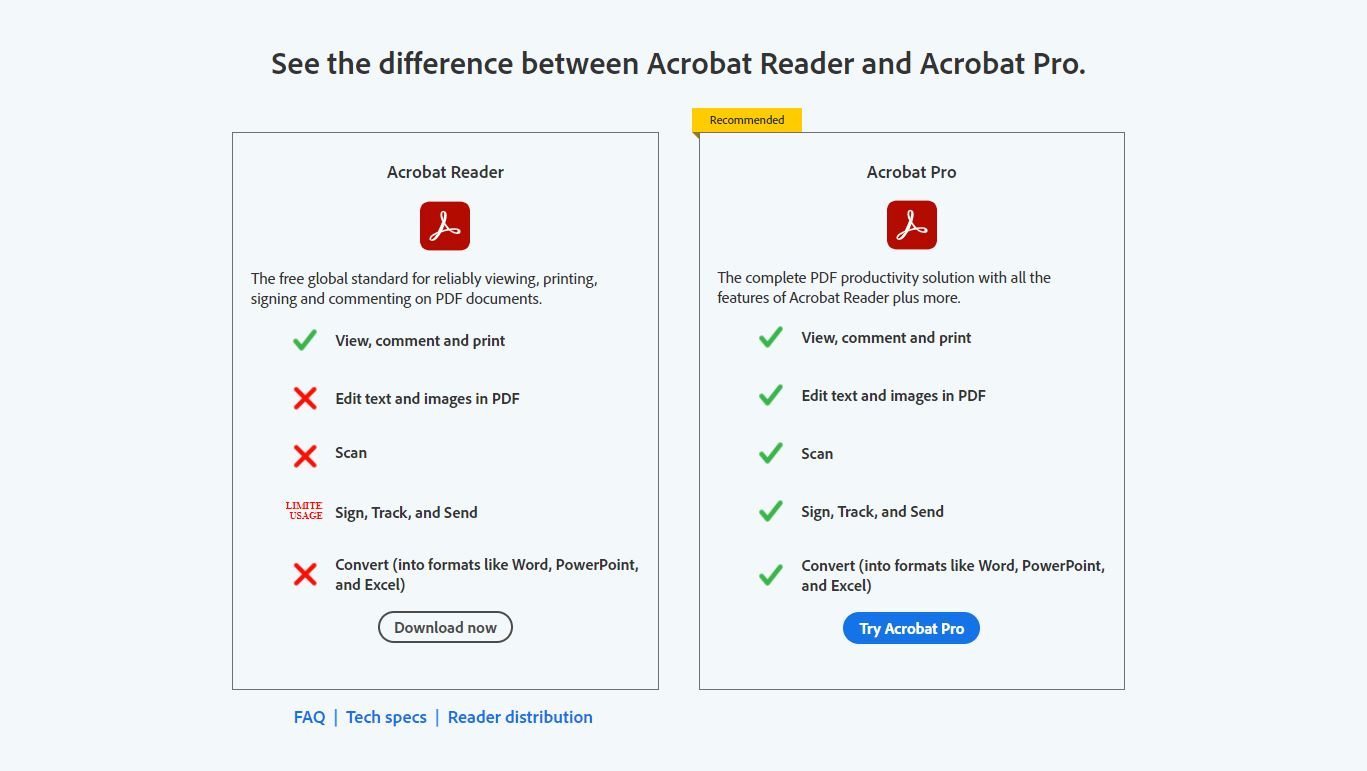
Adobe Acrobat Reader is a free application designed for viewing, printing, and adding basic annotations to PDF documents. Adobe Acrobat Pro is a premium subscription service that provides full document editing, file conversion, advanced security features, and legally binding electronic signature tools. While Reader suffices for basic consumption, Pro is required for professional document creation and modification.
Understanding the Fundamental Divide: Consumption vs. Creation
The distinction between Adobe Acrobat Reader and Adobe Acrobat Pro centers on the user's intent. In 2026, the PDF (Portable Document Format) remains the universal standard for digital documents, but how one interacts with these files determines which software version is necessary. Adobe Acrobat Reader is built for "consumption." It is the most widely distributed PDF viewer globally, intended for individuals who need to open a document, read its contents, and perhaps fill out a simple form or provide basic feedback.
Adobe Acrobat Pro, conversely, is built for "creation and management." It is a sophisticated desktop and cloud-based suite that grants users total control over the structure and content of a PDF. If you need to change a typo in a finalized document, merge five different reports into one, or redact sensitive information before a public filing, Reader will not suffice. Acrobat Pro is the tool of choice for legal professionals, administrative staff, and creative directors who require high-fidelity document manipulation.
Adobe Acrobat Reader: The Standard for Viewing
Adobe Acrobat Reader (often referred to simply as "Reader") remains free to download and use. Despite being the entry-level version, it is not merely a passive viewer. Over the years, Adobe has integrated several "lite" features that allow for minor interactions without requiring a paid license.
Core Capabilities of Reader
The primary function of Reader is to render PDF files accurately across different operating systems and devices. Whether you are on Windows 11, macOS, or a mobile device, Reader ensures that the fonts, images, and layout appear exactly as the creator intended.
- Annotating and Commenting: Users can use "sticky notes," highlighters, and freehand drawing tools to mark up a document. This is particularly useful for students or team members reviewing a draft.
- Form Filling: Reader allows users to type into interactive form fields. This is common for government forms or employment applications.
- Fill & Sign: This tool allows you to add a basic image of your signature or type your name onto a document. Note that this is different from the "Request Signatures" feature found in the Pro version, as it is intended for the user's own signature rather than managing a multi-party signing workflow.
- Acrobat AI Assistant (Basic Access): In 2026, even the free Reader version includes limited access to the AI Assistant, which can summarize long documents or answer questions about the text, though usage limits usually apply unless a subscription is active.
Limitations of the Free Version
The most frequent frustration for Reader users is encountering "locked" features. In the Reader interface, many tools—such as "Edit PDF" or "Export PDF"—are visible but marked with a gold padlock icon. Clicking these will prompt the user to start a free trial or purchase an Acrobat Pro subscription. Reader cannot delete pages, combine files, or change the underlying text and images of a PDF.
Adobe Acrobat Pro: The Professional Powerhouse
Adobe Acrobat Pro is the flagship version of the software, available through the Adobe Document Cloud subscription model. As of 2026, it is integrated deeply into the Adobe Creative Cloud ecosystem but can also be purchased as a standalone subscription.
Advanced Editing and OCR
The "Edit PDF" tool in Acrobat Pro is its most significant differentiator. It allows the PDF to behave much like a word processing document. You can click on a paragraph to change the text, adjust font sizes, or swap out an image.
Furthermore, Acrobat Pro includes powerful Optical Character Recognition (OCR) technology. When you scan a paper document into a PDF, it is originally just a flat image. Acrobat Pro can "read" that image and convert it into searchable, editable text. This is an essential requirement for archiving and modernizing physical records.
Document Assembly and Conversion
Pro users have the ability to manipulate the structure of files. This includes:
- Organizing Pages: Rotating, deleting, reordering, or extracting specific pages from a large document.
- Combining Files: Merging multiple file types (Word, Excel, JPEG, and other PDFs) into a single, cohesive PDF portfolio or document.
- Exporting: Converting PDFs back into fully formatted Microsoft Word, Excel, or PowerPoint files while maintaining the original layout.
Security and Redaction
For users in legal, medical, or government sectors, security is paramount. Acrobat Pro offers tools that go far beyond simple password protection:
- Permanent Redaction: Unlike "covering" text with a black box (which can often be removed), Pro’s redaction tool permanently deletes the underlying metadata and pixel data from the file.
- Sanitization: This feature removes hidden metadata, such as the author's name, revision history, and hidden layers, ensuring that no sensitive "trace" data is shared.
- Certificate-Based Signatures: Pro supports high-assurance digital signatures that comply with strict regulatory standards like eIDAS in Europe or the ESIGN Act in the United States.
Feature Comparison Table
The following table outlines the specific capabilities available in each version as of 2026.
| Feature | Adobe Acrobat Reader | Adobe Acrobat Pro |
|---|---|---|
| Price | Free | Monthly/Annual Subscription |
| View, Print, Comment | Yes | Yes |
| Fill & Sign (Personal) | Yes | Yes |
| Edit Text and Images | No | Yes |
| Convert PDF to Office | No | Yes |
| Combine/Merge Files | No | Yes |
| Optical Character Recognition (OCR) | No | Yes |
| Permanent Redaction | No | Yes |
| Request E-Signatures | No | Yes (Unlimited) |
| Password Protection | No | Yes |
| Bates Numbering (Legal) | No | Yes |
| Mobile App Support | Yes (Basic) | Yes (Premium Features) |
The Role of Adobe Document Cloud and AI
By 2026, the distinction between "software on your computer" and "cloud services" has almost vanished. Adobe Acrobat Pro includes full access to Adobe Document Cloud, which allows users to start a task on a desktop and finish it on a mobile device or a web browser.
The Acrobat AI Assistant has also become a core component of the Pro experience. While Reader users may get limited "credits" to use the AI, Pro subscribers typically enjoy unlimited interactions. This AI can generate summaries of 500-page documents in seconds, suggest citations, and even format insights for use in emails or presentations. This integration significantly reduces the time spent on document synthesis and data extraction.
Pricing and Licensing in 2026
Adobe primarily offers Acrobat Pro through two avenues:
- Acrobat Pro Standalone: This is usually billed as a monthly or annual subscription. In 2026, the annual commitment remains the most cost-effective way for individuals and small businesses to access the software.
- Creative Cloud All Apps: For graphic designers and video editors, Acrobat Pro is included in the full Creative Cloud suite alongside Photoshop and Premiere Pro.
There is also a middle tier known as Adobe Acrobat Standard. It is important to note that Acrobat Standard is Windows-only and lacks several advanced features found in Pro, such as high-end redaction, Bates numbering, and certain pre-flight tools for high-quality printing. For most professional environments, the Pro version is the standard recommendation to ensure cross-platform compatibility and full feature access.
Who Should Choose Which Version?
When Reader is Sufficient
- Students: If you only need to read textbooks, highlight passages, and submit simple PDF forms.
- Casual Home Users: For viewing tax forms, instruction manuals, or reading newsletters.
- Reviewers: If your job is solely to provide feedback using comments and you do not need to alter the actual text of the document.
When Pro is Necessary
- Legal and Financial Professionals: For redaction, document security, and Bates numbering.
- Business Administrators: For merging reports, converting spreadsheets to PDF, and managing signature workflows with clients.
- Marketing and Creative Teams: For making quick text edits to collateral without needing the original design files and for preparing files for professional printing.
- Researchers: For using OCR to turn scanned archives into searchable databases.
Common Mistakes and Troubleshooting
One of the most common issues users face is "Version Confusion." Often, a user will have both Reader and a trial of Pro installed. This can lead to the computer defaulting to Reader even when the user has paid for Pro. To fix this, ensure your "Default PDF Handler" is set to Acrobat Pro in your system settings.
Another common mistake involves Electronic Signatures. Many users assume they need Pro just to sign a document they received. This is incorrect; you can sign documents for free in Reader. You only need Pro if you are the one sending the document to others and need to track who has signed it and where they have signed.
If you encounter performance issues in 2026, check your hardware acceleration settings within the Adobe Preferences menu. With the addition of AI and 3D rendering capabilities in PDF, Acrobat Pro requires more system memory (RAM) than it did a decade ago. Ensure you have at least 8GB of RAM for a smooth experience with large, multi-layered files.
Frequently Asked Questions
Can I edit a PDF for free in Adobe Acrobat Reader?
No, Adobe Acrobat Reader does not support editing the existing text or images within a PDF. To make changes to the document's content, you must subscribe to Adobe Acrobat Pro or use a different PDF editing tool. Reader only allows you to add new elements, like comments, highlights, or signature stamps, on top of the existing content.
Is there a one-time purchase option for Adobe Acrobat Pro in 2026?
Adobe has almost entirely transitioned to a subscription-based model. While "Classic" versions (perpetual licenses) were available in the past, they are no longer the primary offering and often lack the cloud connectivity and AI features that define the modern Acrobat experience. For most users, the only path to the Pro features is through a monthly or annual subscription.
Does Adobe Acrobat Pro work on Mac and Windows?
Yes, Adobe Acrobat Pro is fully compatible with both macOS and Windows. Furthermore, your subscription allows you to sign in to the Acrobat mobile app on iOS and Android, as well as the Acrobat web interface, giving you access to your tools on almost any device with an internet connection.
What is the difference between a "Digital Signature" and "Fill & Sign"?
"Fill & Sign" is a basic feature in Reader that allows you to place an image of your signature on a document; it is essentially a visual representation. A "Digital Signature" (available and manageable in Pro) is a cryptographically secure mark that verifies the signer's identity and ensures the document has not been altered since it was signed. Pro is required for managing these high-security signature workflows.
Can I convert a PDF to a Word document with the free Reader?
No, the "Export PDF" feature, which converts PDFs into editable Word, Excel, or PowerPoint files, is a premium feature reserved for Acrobat Pro subscribers. While some third-party websites offer free conversion, Adobe's native conversion in Pro is generally considered the most accurate for maintaining complex layouts and tables.
Practical Recommendation
If your daily routine involves simply reading documents or filling out occasional forms, Adobe Acrobat Reader is the correct, cost-effective choice. There is no need to pay for a subscription if you are not actively creating or modifying the structure of PDF files.
However, if you are a professional who manages contracts, handles sensitive data that requires redaction, or needs to convert various file types into a single cohesive document, Adobe Acrobat Pro is an essential investment. For most businesses, the time saved by using Pro’s editing and OCR tools quickly offsets the monthly subscription cost. Before committing, consider starting a 7-day free trial to ensure the Pro features align with your specific workflow requirements.