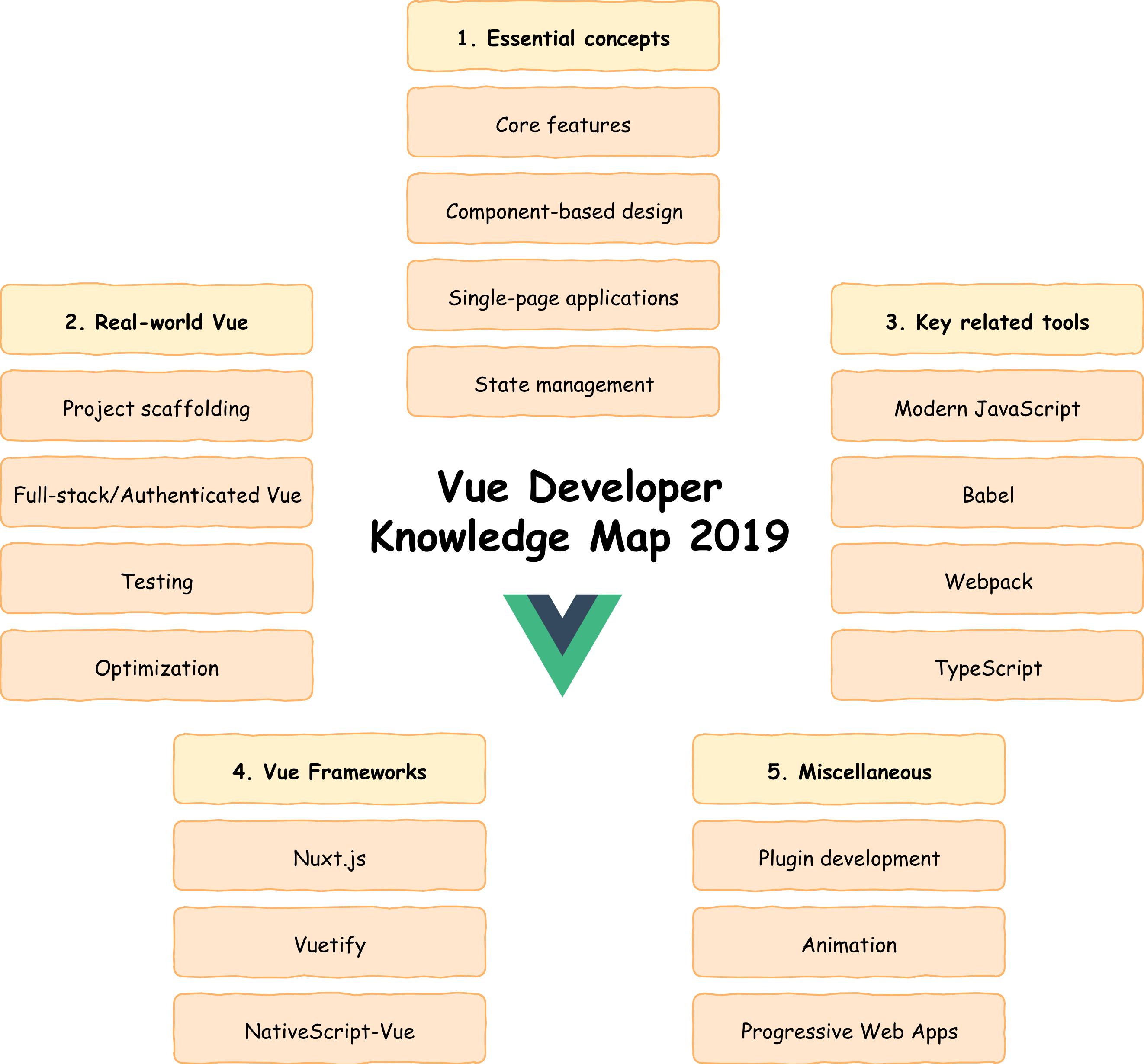
Navigating a Vue developer's path in modern web development requires mastering reactive data structures, component-driven architecture, robust state management, and modern build tooling while adapting to server-side rendering paradigms and performance optimization standards.
The journey of a Vue developer has transformed significantly over the years. What started as a progressive, approachable JavaScript library for building simple user interfaces has evolved into a powerhouse framework capable of powering enterprise-scale web applications. Modern web development demands much more than writing clean single-file components. Today’s engineers must navigate a complex landscape of server-side rendering, meta-frameworks, static site generation, strict type safety, and sophisticated build tooling. Understanding this evolutionary trajectory and knowing where to focus your energy is essential for career longevity and technical excellence.
Understanding the Evolution of the Vue Ecosystem
To chart an effective path as a Vue developer, you must first understand how the ecosystem arrived at its current state. Vue.js was created by Evan You as a lightweight alternative to heavier frameworks, combining the best parts of Angular and React. Early adoption was driven by its gentle learning curve and the flexibility of the Options API. However, as applications grew, the community required better code organization, leading to the introduction of Vue 3 and the Composition API.
The release of Vue 3 brought native TypeScript support, a rewritten reactivity system powered by JavaScript Proxies, and significantly improved performance metrics. Alongside the core library, the official tooling ecosystem expanded. Vite replaced older bundlers like Webpack for local development, offering instantaneous hot module replacement (HMR). Meanwhile, Pinia emerged as the official state management solution, replacing the aging Vuex. Recognizing the shift toward server-rendered applications, Nuxt established itself as the premier meta-framework for Vue, bringing file-system routing, server-side rendering (SSR), and hybrid rendering capabilities out of the box.
Core Milestones on the Vue Developer Path
Advancing through the Vue ecosystem involves moving from basic template rendering to architecting large-scale, performant applications. The path can be broken down into distinct progressive stages.
- Junior Stage
- Options API
- Basic Router
- Simple SFCs
- Intermediate Stage
- Composition API
- Pinia State Management
- TypeScript Integration
- Advanced Stage
- SSR & Nuxt
- Advanced Optimization
- Automated Testing
- Architectural Stage
- Custom Renderers
- Monorepo Scaling
- Enterprise Design Systems
1. Foundations and the Modern Composition API
Every Vue developer starts by mastering Single File Components (SFCs). While the Options API is still supported and useful for simple components, the Composition API is the undisputed standard for modern applications.
- Reactivity Fundamentals: Deeply understand
ref,reactive,computed, andwatch. Knowing when to userefversusreactiveprevents subtle state bugs. - Custom Composables: Learn how to extract and reuse stateful logic into clean, testable functions, mirroring the custom hook pattern in React.
- Lifecycle Hooks: Master the component lifecycle, understanding how setup execution differs from traditional mounted and unmounted hooks.
2. State Management and Routing
As applications scale beyond a few interconnected components, passing props and emitting events becomes unmanageable.
- Vue Router: Go beyond basic path mapping. Learn nested routes, route guards for authentication, scroll behavior management, and lazy loading for performance.
- Pinia: Move away from Vuex. Understand Pinia stores, action composition, plugin integration, and server-side state hydration.
3. TypeScript Integration
Modern enterprise web development requires type safety. Vue 3 was built with TypeScript in mind, and writing untyped Vue code is increasingly rare in professional environments.
- Generic typing for props and emits.
- Typing template refs and complex composable return values.
- Leveraging Volar (Vue official language service) for advanced template diagnostics.
Meta-Frameworks and Server-Side Rendering with Nuxt
Client-side rendering (CSR) is no longer sufficient for production-grade applications that require robust SEO, lightning-fast initial page loads, and edge computing capabilities. This is where Nuxt enters the picture. A modern Vue developer must be fluent in Nuxt architecture.
Nuxt provides an opinionated structure that eliminates boilerplate configuration. Key areas to master include:
- Universal Rendering: Understanding how code executes on both the server and the client, managing cookies, headers, and avoiding hydration mismatches.
- Auto-imports: Leveraging Nuxt's auto-import system for components, composables, and utility functions while maintaining clean code readability.
- Data Fetching: Utilizing
useFetchanduseAsyncDatawith proper deduplication, payload caching, and error handling. - Nitro Engine: Exploring Nuxt's server engine, which allows you to deploy your application to serverless environments, edge nodes, or traditional Node.js servers effortlessly.
Tooling, Testing, and Performance Optimization
Writing the code is only half the battle. A professional Vue developer must ensure code quality, maintainability, and optimal runtime performance.
Modern Build Tooling with Vite
Vite has fundamentally changed frontend development. Understanding how Vite leverages native ES modules during development and rolls up code with Rollup for production is crucial. Developers should know how to configure Vite plugins, handle environment variables securely, and optimize asset loading.
Comprehensive Testing Strategies
A resilient Vue application requires a balanced testing pyramid:
- Unit Testing: Using Vitest alongside Vue Test Utils to test individual composables, utility functions, and isolated components.
- Component Testing: Testing component rendering, user interactions, and event emissions in a simulated browser environment.
- End-to-End (E2E) Testing: Using Playwright or Cypress to verify critical user journeys across the entire application stack.
Performance Optimization Techniques
Users expect instant feedback. Vue developers must actively optimize their applications by implementing:
- Route-level and component-level code splitting.
- Image optimization using modern formats and responsive attributes.
- Virtual scrolling for rendering massive lists without DOM bloat.
- Careful management of computed properties to avoid unnecessary recalculations.
| Skill Level | Core Technologies | Key Responsibilities |
|---|---|---|
| Junior | Vue 3, Options/Composition API, Vue Router, Tailwind CSS | Building isolated components, consuming REST APIs, fixing UI bugs |
| Intermediate | Composition API, Pinia, TypeScript, Vitest, Vite | Architecting feature modules, implementing state management, writing unit tests |
| Advanced | Nuxt, SSR, Playwright, Monorepos, Performance Profiling | Managing server-side rendering, optimizing Core Web Vitals, leading code reviews |
| Architect | Micro-frontends, Custom Renderers, CI/CD Pipelines | Defining technical direction, scaling infrastructure, mentoring engineering teams |
Frequently Asked Questions
Is Vue.js still relevant compared to React?
Yes, Vue remains one of the most popular and actively maintained frontend frameworks in the industry. Its vibrant ecosystem, led by the core team and backed by major open-source contributors, ensures continuous innovation. While React maintains a larger market share in certain regions, Vue is widely praised for its cohesive official tooling, superior documentation, and ergonomic developer experience.
Should I learn the Options API or the Composition API?
You should focus primarily on the Composition API. While the Options API is still supported for backward compatibility and is encountered in legacy codebases, the Composition API is the standard for modern Vue 3 development. It provides superior logic reuse, better TypeScript integration, and cleaner code organization for complex components.
Do I need to learn Nuxt if I already know Vue?
Learning Nuxt is not strictly required if you only build single-page applications (SPAs) or dashboards hidden behind authentication walls. However, if you build public-facing websites where SEO, fast initial load times, and server-side rendering are critical, mastering Nuxt is an essential career step for a Vue developer.
How important is TypeScript for Vue developers today?
TypeScript is practically mandatory for mid-to-senior level roles in modern web development. While you can still write standard JavaScript in Vue 3, TypeScript catches runtime errors early, improves refactoring confidence, and unlocks advanced autocompletion features in modern code editors.
What is the best way to manage state in a modern Vue application?
For most applications, Pinia is the official and recommended state management library. It is lightweight, type-safe, has an intuitive API that discards mutations, and integrates seamlessly with Vue's devtools. For localized component state, native Vue composables are often sufficient without introducing a global store.
Conclusion and Next Actions
Becoming an accomplished Vue developer requires continuous learning and practical application. To advance your career, start by auditing your current skill set against the milestones outlined above. If you spend most of your time in the Options API, refactor a personal project using the Composition API and TypeScript. If you have only built client-side single-page applications, build a dynamic blog or e-commerce storefront using Nuxt to understand server-side rendering mechanics. Engage with the community, contribute to open-source packages, and focus on delivering performant, accessible web experiences.