For organizations navigating the complexities of modern project management, the Asana home page serves as a centralized hub designed to bridge the gap between fragmented tasks and strategic clarity. By providing a unified interface that consolidates team goals, active assignments, and status updates, Asana functions as an operational foundation intended to reduce administrative overhead and improve collaborative visibility across complex workstreams.
Defining the Core Value Proposition
The phrase "where work meets clarity" is more than a marketing slogan; it defines the structural intent of the Asana platform. In an era where information silos frequently impede progress, the platform is engineered to organize work into a hierarchical structure of portfolios, projects, and tasks. By grounding every individual action in the context of organizational goals, Asana aims to solve the problem of "work about work"—the phenomenon where employees spend more time discussing tasks than executing them.
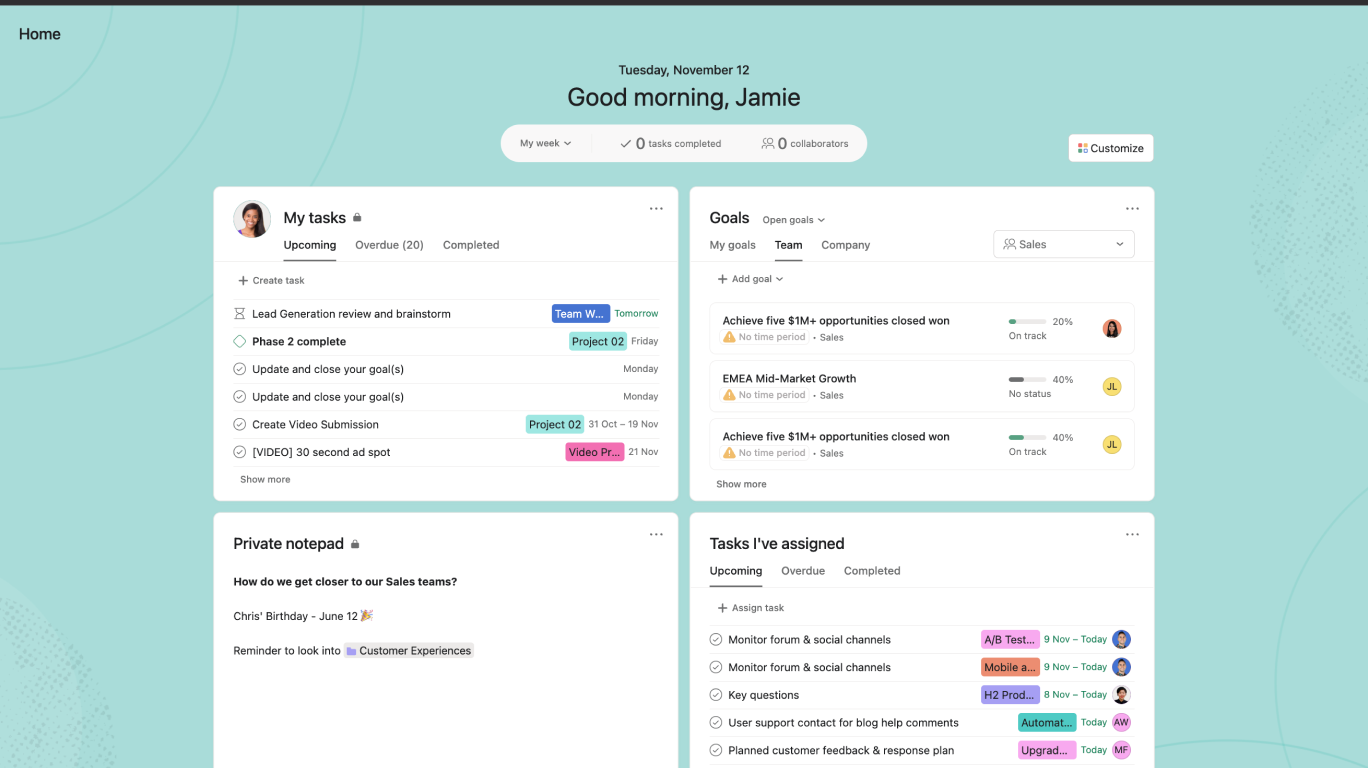
The home page acts as the personalized command center for every user. Upon logging in, an individual is presented with a curated view of their immediate priorities, upcoming deadlines, and relevant project updates. This immediate visual synthesis allows team members to align their daily activities with broader company objectives, ensuring that time and resources are directed toward high-impact results rather than reactive maintenance.
Navigating the Asana Environment
To effectively leverage the platform, users must understand the primary components that populate the home page dashboard. These elements are designed to facilitate rapid information retrieval and decision-making.
The Personalized Dashboard
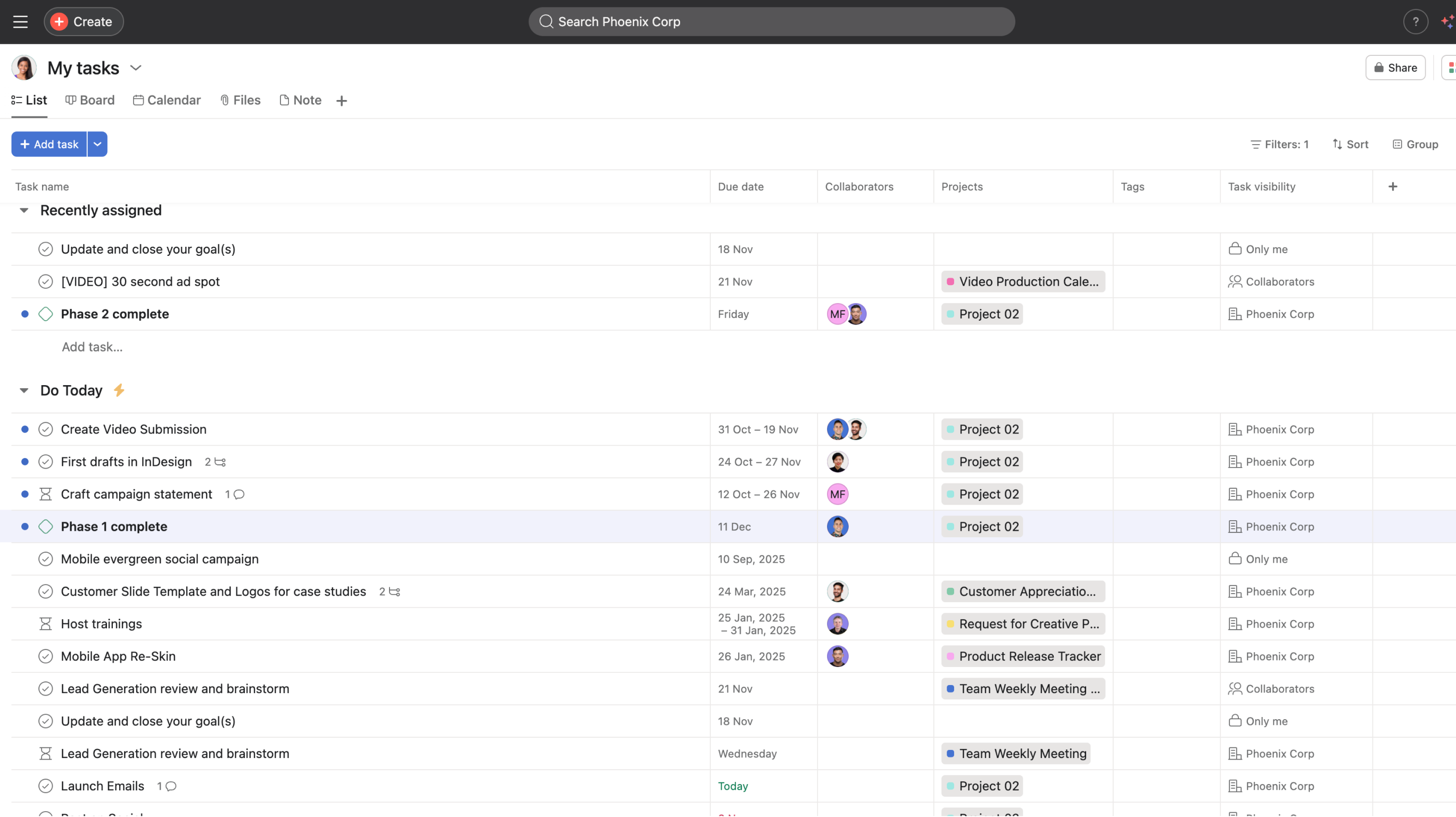
The "My Tasks" section is perhaps the most critical component of the Asana home page. It serves as a personal to-do list that aggregates tasks assigned to a specific user across all projects. As of 2026, the interface allows for custom sorting—by due date, project, or custom priority fields. Users can toggle between list, board, and calendar views to better suit their personal working style, providing the "clarity" required to manage heavy workloads without feeling overwhelmed.
Project Overviews and Portfolios
For managers and leads, the home page provides access to Portfolios and Project Overviews. Portfolios allow users to group related projects together, providing a high-level monitoring tool that indicates project health, budget utilization, and schedule status. This is where strategic oversight meets tactical execution. When a project begins to deviate from its timeline, the visual cues provided on these dashboards enable immediate intervention, preventing small delays from compounding into major failures.
Functional Requirements for Effective Implementation
Achieving the promise of clarity requires more than simply creating an account. Organizations must adopt a standardized approach to how work is entered, tracked, and reported within the system.
- Standardized Naming Conventions: Projects and tasks should follow a clear, consistent structure. Ambiguity in task naming leads to search friction and lost productivity.
- Custom Field Utilization: By using custom fields, teams can track specific metadata such as priority levels, budget codes, or department ownership. This transforms static task lists into dynamic, data-driven reports.
- Regular Maintenance Protocols: An untended workspace becomes cluttered and unreliable. Teams should establish weekly rhythms where project leads review the home page dashboards for accuracy, archiving completed work and updating project statuses.
Comparative Landscape of Project Management Tools
Choosing the right project management platform involves understanding the trade-offs between different philosophies of work. While Asana emphasizes visual clarity and workflow automation, other platforms may prioritize different aspects of team management.
| Feature | Asana | Jira | Trello |
|---|---|---|---|
| Primary Focus | General Task & Project Management | Software Development/Agile | Visual Kanban/Small Teams |
| User Interface | Intuitive, visual-centric | Technical, configuration-heavy | Highly visual, card-based |
| Automation | Robust, rule-based workflows | Deep integration for coding | Simple automation (Butler) |
| Best For | Cross-functional team alignment | Engineering/Scrum teams | Individual or small project workflows |
The primary difference lies in the user experience. Asana’s architecture is built to be accessible to non-technical departments (like marketing, HR, or operations) while maintaining enough power for technical project management. This accessibility is essential for organizations that require cross-departmental alignment, as it reduces the learning curve for new team members.
Overcoming Common Adoption Challenges
The transition to a digital work management platform is often hindered by cultural resistance rather than technical difficulty. "Where work meets clarity" can only be realized if the organization is committed to the platform as the single source of truth.
A common mistake is maintaining "shadow systems"—spreadsheets or email threads that track tasks outside of Asana. When this happens, the home page loses its status as a reliable source of information. If a user cannot trust that the dashboard is up-to-date, they will stop using it. Leadership must mandate that all project-related communication and documentation occur within the tool to ensure the data remains accurate and the "clarity" promised is actually delivered.
Troubleshooting and Optimization
When the home page feels cluttered or ineffective, users should evaluate their current configuration. Common issues include:
- Task Overload: If the "My Tasks" view contains hundreds of items, the user is likely missing important deadlines. Use automation rules to move tasks to "Upcoming" or "Later" to keep the "Today" view focused on high-priority items.
- Missing Context: If tasks lack clear descriptions, owners, or due dates, they create "noise." Implementing mandatory fields for new tasks ensures that every item in the system is actionable from the moment it is created.
- Notification Fatigue: Excessive email notifications can drive users away from the platform. Review notification settings within the profile menu to ensure that you are only alerted to updates that require immediate attention or direct action.
The Role of Automation in Sustaining Clarity
As of 2026, automation within Asana has become a fundamental requirement for maintaining an organized home page. Automation rules can be set to perform mundane tasks, such as moving a task to a different project when a status changes, assigning tasks based on custom field values, or notifying stakeholders when a project timeline is adjusted. By delegating these repetitive actions to the platform, human attention is preserved for higher-value creative and strategic work.
Frequently Asked Questions
How can I make the Asana home page more useful for my daily routine? Start by setting up your "My Tasks" to filter by "Due Today." Use the "Customize" button on the top right of the screen to arrange your view by priority, project, or custom fields. Consistently using these tools transforms the home page from a generic landing screen into a high-performance daily planner.
Is it possible to integrate my calendar with the Asana home page? Yes, Asana supports synchronization with Google Calendar, Outlook, and other calendar platforms. This allows you to view your Asana tasks alongside your scheduled meetings, providing a comprehensive view of your time commitments in one place.
What should I do if my team is not using the platform effectively? Start with an audit of your project structure. If the projects are too broad, tasks get lost. Encourage "micro-projects" where tasks are clearly defined and have assigned owners. Leadership must also model the behavior by providing updates and feedback directly within Asana rather than through external email or chat applications.
How does Asana ensure security for our project data? Asana provides robust administrative controls, including SAML/SSO integration, audit logs, and granular permission settings. These features ensure that sensitive project data remains accessible only to authorized team members, regardless of the size or complexity of the organization.
Can I use the home page to track goals across the entire company? Yes, by using the Goals feature, leaders can connect high-level company objectives to the specific projects and tasks that contribute to them. This ensures every individual can see how their work supports the organization's overarching vision.
Recommendations for Immediate Action
To maximize the efficacy of your Asana experience, begin by decluttering your "My Tasks" view today. Archive or complete any tasks that are outdated, and categorize your current tasks by their strategic importance. Once your personal view is clean, host a 15-minute sync with your team to ensure everyone understands the naming and project-structure conventions currently in place. By standardizing the input of work, you will see an immediate improvement in the clarity and utility of your shared dashboards.