Phishing scams remain one of the most pervasive cyber threats, utilizing deceptive emails, messages, and websites to trick individuals into revealing sensitive information such as login credentials, financial details, or personal data. Understanding how these social engineering attacks operate is essential for recognizing red flags and protecting yourself or your organization from digital fraud.
Understanding the Anatomy of a Phishing Attack
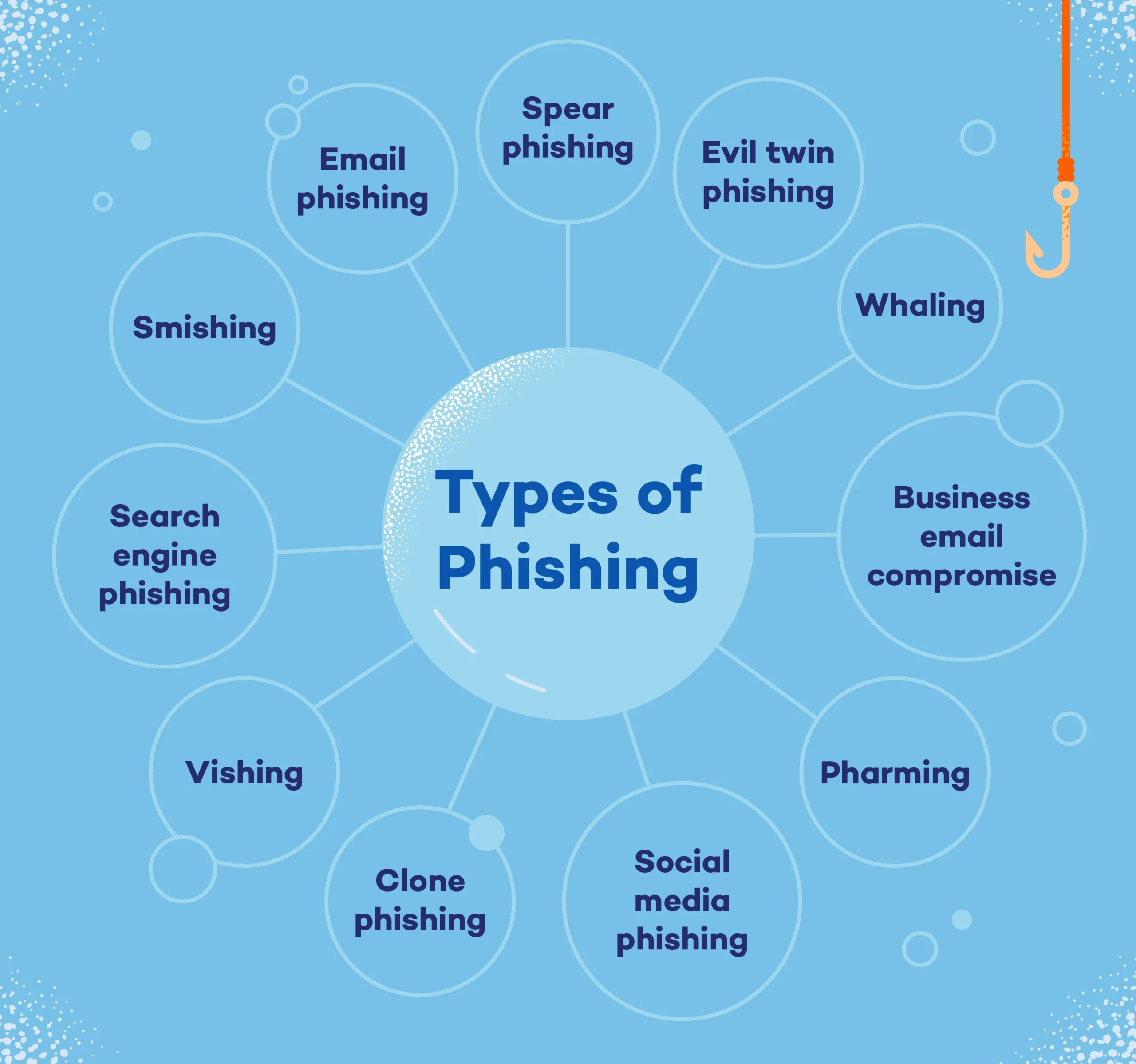
Before examining specific attacks, it helps to understand the underlying mechanics of phishing. At its core, phishing relies on human psychology rather than technical exploits. Attackers leverage fear, urgency, curiosity, or greed to bypass a victim's critical thinking. Whether delivered via email (phishing), SMS (smishing), voice calls (vishing), or targeted corporate spear-phishing, these campaigns typically share common phases:
- Reconnaissance: Attackers research targets, often gathering names, email addresses, job titles, and organizational charts from public sources, social media, or data breaches.
- Pretexting: The attacker establishes a plausible scenario, impersonating a trusted entity such as a bank, government agency, IT department, or known vendor.
- Delivery: The fraudulent message is transmitted, often featuring urgent language or enticing offers.
- Exploitation: The victim takes the requested action, such as clicking a malicious link, downloading an infected attachment, or transferring funds.
- Monetization: Attackers exploit the compromised credentials or financial access for illicit gain.
10 Notable Phishing Scam Examples
The following ten notable phishing scam examples illustrate the diverse tactics, vectors, and targets utilized by cybercriminals over the years.
1. The CEO Fraud (Business Email Compromise)
Business Email Compromise (BEC), commonly known as CEO fraud, targets organizations rather than individuals. In these attacks, scammers spoof or compromise the email account of a high-ranking executive—such as the Chief Executive Officer or Chief Financial Officer. They then send an urgent message to an employee in finance or human resources, directing them to execute an immediate wire transfer or share sensitive employee tax documents (W-2s).
- Why it works: It exploits organizational hierarchy, creating a sense of urgency and discouraging the subordinate from questioning a direct order from leadership.
- Defense strategy: Implement strict dual-authorization protocols for wire transfers and out-of-band verification (such as a phone call or in-person confirmation) for any financial requests sent via email.
2. The IRS Tax Season Impersonation Scam
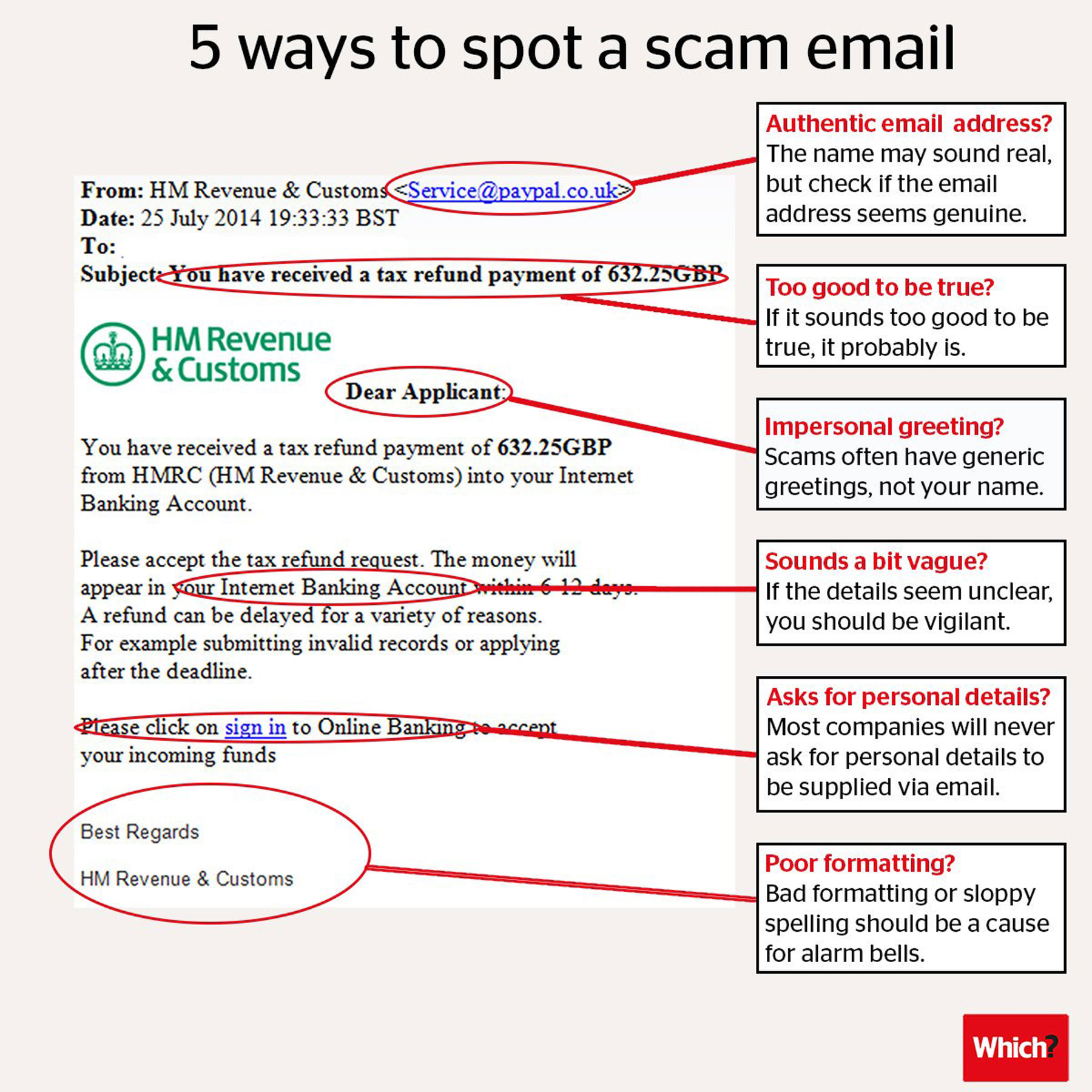
Tax-related phishing scams surge annually during tax filing season. Cybercriminals impersonate government tax agencies—such as the Internal Revenue Service (IRS)—notifying victims that they owe back taxes or are eligible for an immediate refund. The messages typically contain links to fraudulent web portals designed to harvest Social Security numbers, banking details, and login credentials.
- Why it works: Official-sounding legal threats and the prospect of unexpected financial refunds trigger anxiety and excitement, prompting quick compliance.
- Defense strategy: Remember that government agencies typically initiate contact via postal mail rather than email, text, or unsolicited phone calls, and they never demand immediate payment via prepaid debit cards or cryptocurrency.
3. The Fake IT Password Reset Notification
Internal employees are frequently targeted by simulated IT support emails claiming that their corporate password has expired or that their account has been compromised. The email directs users to click a link and log into a fake portal that mirrors the company's single sign-on (SSO) page. Once the user enters their credentials, the attackers capture them in real-time.
- Why it works: Employees are conditioned to follow instructions from their internal IT departments regarding password hygiene and security updates.
- Defense strategy: Verify URLs carefully, use password managers that only auto-fill credentials on legitimate domains, and deploy hardware-based multi-factor authentication (MFA) that resists credential harvesting.
4. COVID-19 Relief and Stimulus Scams
Global crises frequently provide fertile ground for opportunistic phishers. During the COVID-19 pandemic, bad actors launched widespread campaigns offering fake stimulus checks, vaccine appointments, contact tracing notifications, and personal protective equipment (PPE) grants. These messages directed users to malicious landing pages designed to steal personal identifiable information (PII).
- Why it works: High public anxiety and the continuous stream of breaking news lower user skepticism regarding official health and financial guidance.
- Defense strategy: Navigate directly to official public health websites (such as CDC or local government portals) rather than clicking links embedded in unsolicited messages.
5. Fake Delivery and Shipping Notifications
With the exponential growth of e-commerce and logistics services, consumers regularly track packages. Scammers exploit this habit by sending mass SMS or email notifications claiming that a package could not be delivered due to an incorrect address or unpaid customs fees. The attached link leads to a phishing site requesting a small delivery fee, thereby capturing credit card details.
- Why it works: The widespread expectation of online orders makes the notification feel routine and expected.
- Defense strategy: Track packages directly on the official carrier website (e.g., USPS, UPS, FedEx, DHL) using the official tracking number provided by the merchant, rather than clicking links in texts.
6. Streaming Service and Utility Account Suspension
Phishing attacks frequently target subscription services such as Netflix, Spotify, Amazon Prime, or major utility providers. The message warns the victim that their subscription is about to be canceled or their power disconnected due to a billing error or expired credit card. A link is provided to "update billing information," leading straight to a credential-harvesting site.
- Why it works: The threat of losing access to essential entertainment or utilities prompts an emotional, hurried reaction.
- Defense strategy: Log into your account by typing the official web address directly into your browser to check your billing status rather than using links from notification emails.
7. Cryptocurrency Giveaways and Impersonation
Cryptocurrency scams leverage the popularity of digital assets. Attackers frequently hack verified social media accounts or create lookalike profiles of prominent tech entrepreneurs, cryptocurrency exchanges, or influencers. They host fake "giveaway" events, claiming that if users send a certain amount of cryptocurrency to a specific wallet address, they will receive double the amount back.
- Why it works: The allure of quick financial returns combined with the perceived endorsement of trusted public figures creates a powerful hook.
- Defense strategy: Understand the adage "if it sounds too good to be true, it probably is." Legitimate public figures and corporations never require cryptocurrency deposits to distribute rewards.
8. Spear-Phishing Targeting HR and Payroll Portals
Spear-phishing is a highly targeted form of phishing directed at specific individuals. In corporate environments, attackers frequently target human resources personnel with emails disguised as employee requests to change direct deposit information. By capturing HR portal credentials, attackers redirect payroll funds to fraudulent bank accounts.
- Why it works: HR professionals handle numerous routine employee administrative requests daily, making slight anomalies harder to spot.
- Defense strategy: Establish secondary verification channels, such as calling the employee directly via a known internal extension before making changes to direct deposit details.
9. High-Profile Social Media Brand Impersonation
Content creators, influencers, and business page administrators on platforms like Meta, YouTube, and TikTok are frequent targets of brand impersonation phishing. Attackers send messages claiming that the user's account has violated copyright policies or community guidelines and will be permanently deleted unless an appeal is submitted via a provided link.
- Why it works: The fear of losing a monetized channel, business presence, or years of personal content drives panic and compliance.
- Defense strategy: Review platform safety centers directly within the official mobile app or desktop interface. Legitimate platforms communicate account infractions through secure in-app notification centers rather than external login links.
10. Fake Banking Fraud Alerts
Financial phishing often involves simulated security alerts from major retail banks. The text message or email warns of suspicious activity or unauthorized transactions on the victim's account, urging them to click a link to "verify identity" or "cancel the transaction." The link directs victims to a remarkably convincing replica of their bank's login portal.
- Why it works: Financial anxiety triggers an immediate urge to secure one's assets, blinding the victim to technical anomalies.
- Defense strategy: Call the phone number printed on the back of your debit or credit card to verify any supposed fraud alerts with your financial institution directly.
Comparison of Common Phishing Vectors
| Phishing Type | Primary Vector | Target Audience | Common Objective |
|---|---|---|---|
| CEO Fraud (BEC) | Corporate Finance / HR | Unauthorized wire transfers / W-2 theft | |
| Smishing | SMS / Text | General Public | Credential harvesting / Delivery fees |
| Spear-Phishing | Targeted Email | Specific Employees | Corporate network intrusion / Data theft |
| Vishing | Phone Call | Consumers / Employees | Social engineering / Sensitive data extraction |
| Watering Hole | Compromised Websites | Niche Industry Workers | Malware installation via browser exploits |
Frequently Asked Questions
What is the difference between phishing, spear-phishing, and whaling?
Phishing refers to broad, mass-blast campaigns sent to thousands of potential victims indiscriminately. Spear-phishing is a targeted attack customized for a specific individual or organization using gathered background information. Whaling is a specialized form of spear-phishing aimed explicitly at high-profile executives, such as C-level officers, politicians, or celebrities.
How can I spot a phishing email if it looks legitimate?
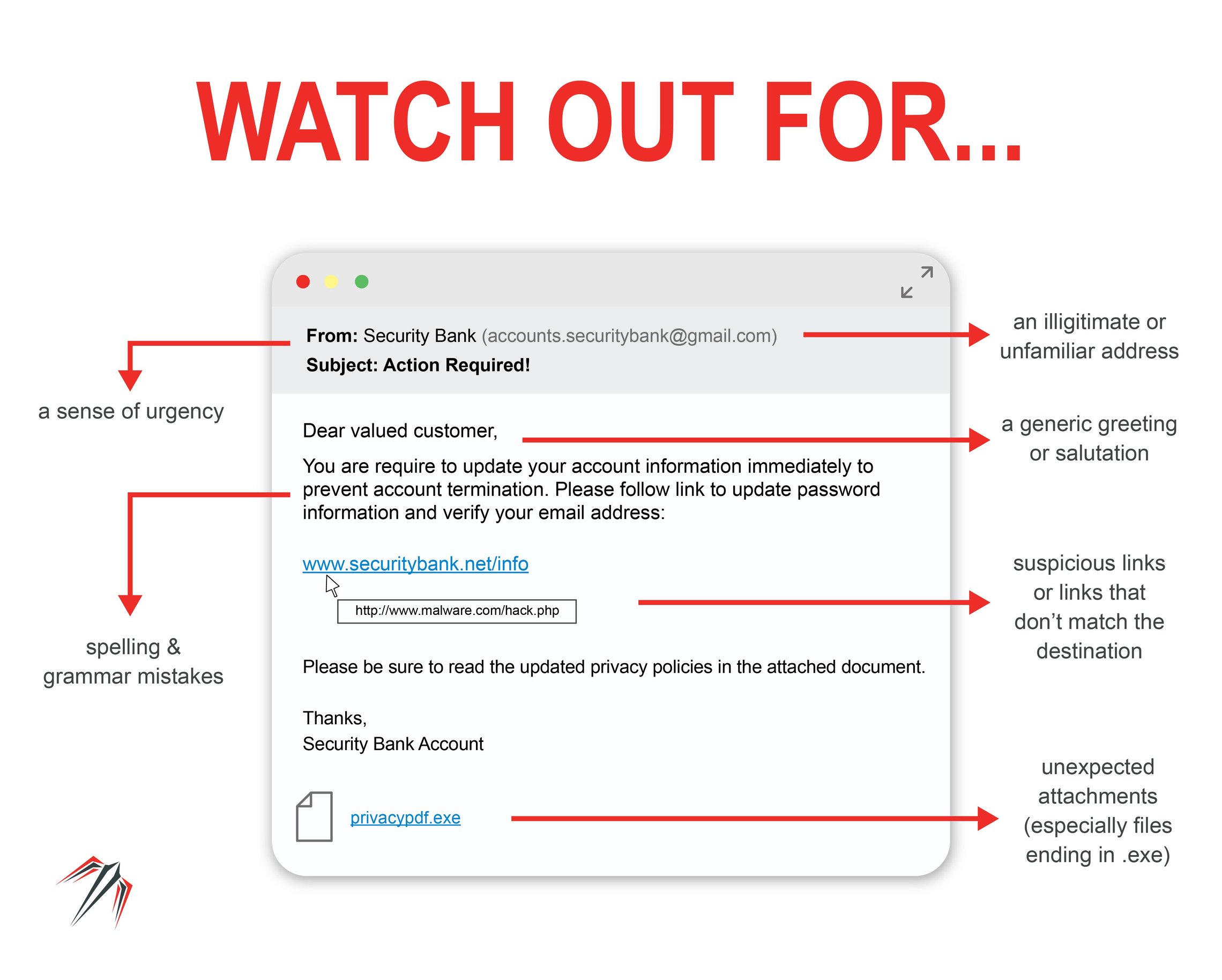
Inspect the sender's email address closely for subtle misspellings (typosquatting). Look for generic greetings instead of your name, urgent or threatening language demanding immediate action, unexpected attachments, and suspicious hyperlinks that reveal a different destination URL when hovered over.
What should I do if I clicked a phishing link and entered my password?
Immediately disconnect your device from the internet to limit potential malware spread. Change your password immediately on a secure, uncompromised device. If the compromised password was reused elsewhere, update those accounts as well. Notify your organization's IT security team if corporate credentials were exposed, and monitor your financial accounts for unauthorized activity.
Does multi-factor authentication (MFA) stop all phishing attacks?
While standard MFA significantly reduces unauthorized access, traditional SMS-based or push-notification MFA can sometimes be bypassed via advanced adversary-in-the-middle (AitM) phishing proxies that capture session tokens in real-time. Upgrading to phishing-resistant MFA, such as FIDO2/WebAuthn hardware security keys, provides robust protection against these advanced techniques.
Are mobile devices as vulnerable to phishing as desktop computers?
Yes, mobile devices are frequently targeted, often via SMS (smishing) or malicious messaging apps. Mobile interfaces often obscure full URL bars and email headers, making it harder for users to spot deceptive domains and technical discrepancies compared to desktop browsers.
Practical Next Steps for Digital Defense
Protecting yourself against sophisticated phishing scams requires a combination of technical safeguards and constant vigilance. Always verify unexpected communications through independent, trusted channels rather than relying on the contact methods provided within the suspicious message. Deploy modern multi-factor authentication, maintain updated software patches across all devices, and cultivate a healthy skepticism toward urgent requests for personal or financial information.